44
Recordings
My Recordings
This feature is only accessible if your Set Top Box is equipped with a recording
device (USB stick / hard disk drive) either internally or externally attached.
*
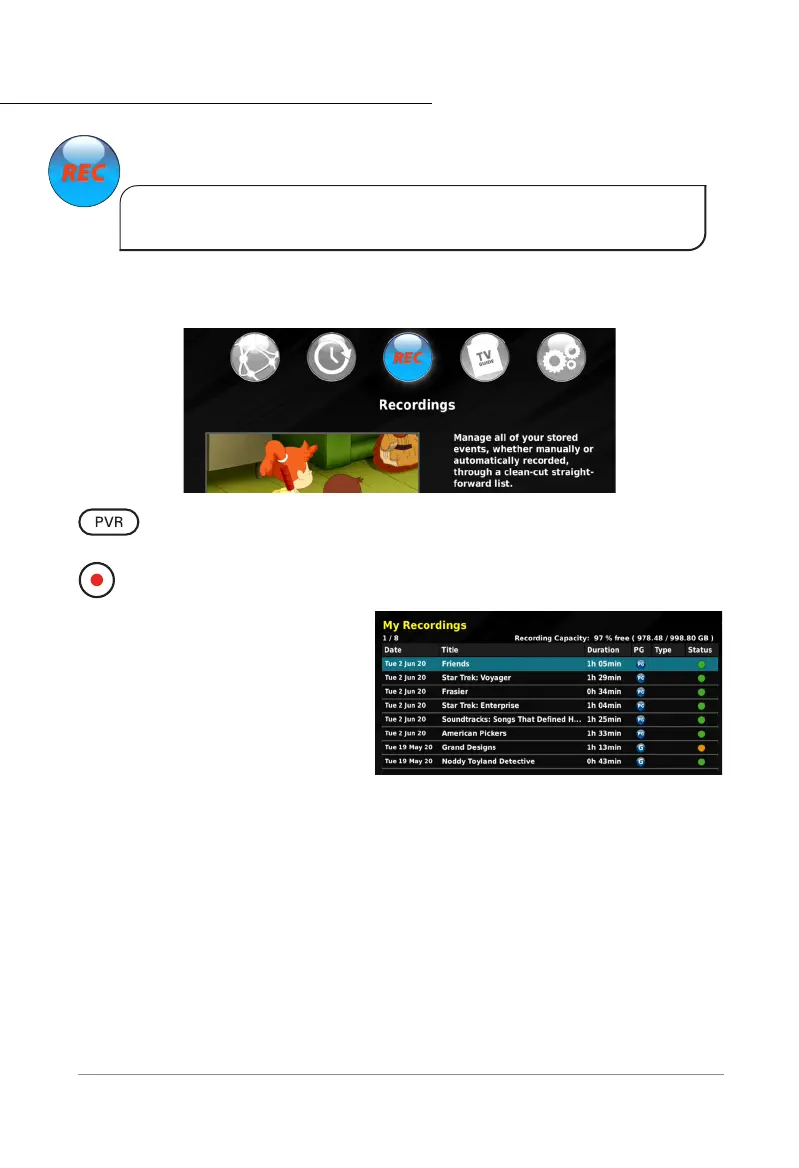
The MY RECORDINGS menu allows you to watch and manage the recordings stored on
your hard drive. Information about each program is also stored with the recordings.
QUICKLY ACCESS RECORDINGS: Press the PVR button on the remote control to
directly access the RECORDINGS menu.
INITIATION RECORDING: While watching live TV, pressing the Record button will
initiate the recording function immediately.
You can record two programs from
different channels, and you can
watch live satellite TV simultaneously.
This ‘multiple watch/record’ feature
depends on the broadcaster’s allocation
of channels on the satellite. This
functionality will vary by region.
All recordings, past and current are listed in the RECORDINGS menu. The data displayed in
this menu are the Date, Title, Duration, PG, Type and Status of your recordings:
• Date: the day and date of the recording.
• Title: the default or custom title set for that recording.
• PG (Parental Guidance): This column displays the recommended age rating of
the recorded broadcast. If Parental Control is active, recordings that are higher
than the selected range will be blocked.
• Type: This column displays whether a recording is locked.
• Status: This column displays the status of the recording, and if it has been
watched.
*Recording with the DSD 5000 is only available if you have connected and formatted a compatible
external hard drive.



 To Next Page