29
Installation Settings
Dish Alignment Help
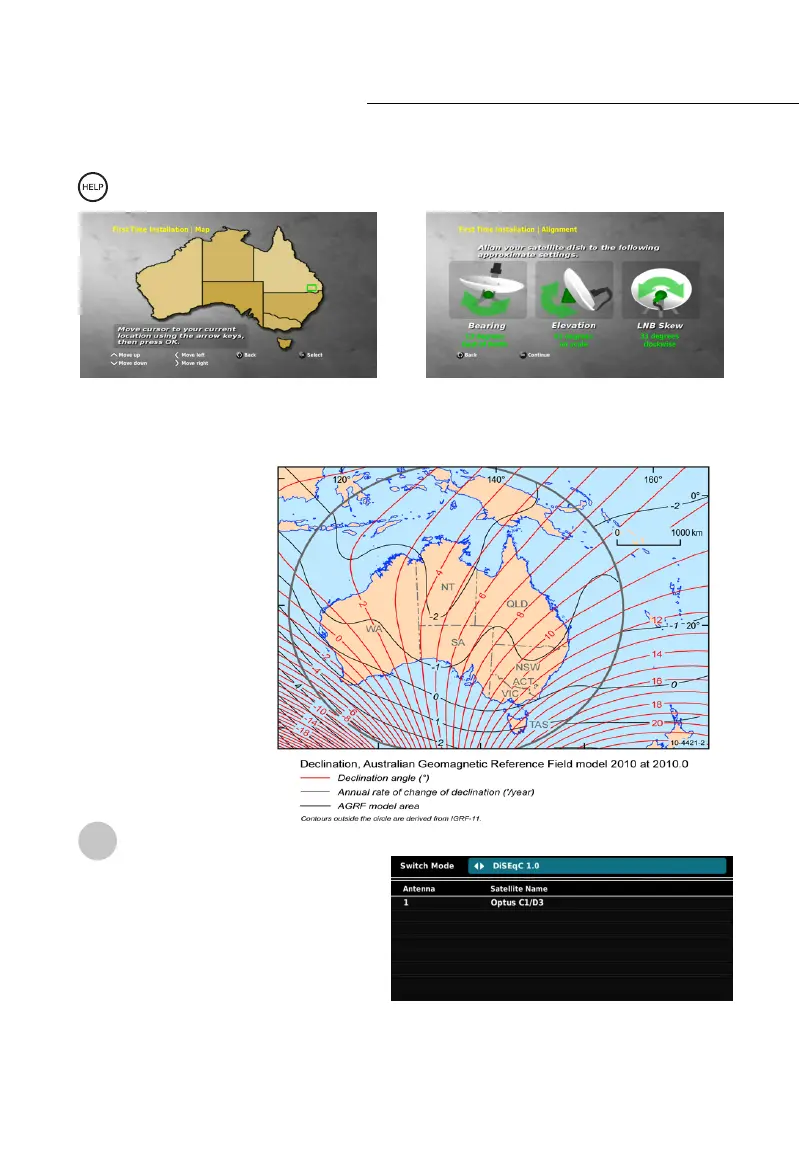
While in the SATELLITE CHANNEL SEARCH press the HELP button on your RCU to
open the DISH INSTALLATION MAP.
This function presents you with a map of Australia. Use the NAV buttons to move the cursor
to your current location, then press the OK button. The STB will calculate the required
Satellite Dish alignment, and provide the angles required to align the dish for your location.
The Bearing in degrees is
calculated in relation to
‘True North’. If you use
a magnetic compass,
you may need to correct
‘Magnetic Declination’.
See http://www.ga.gov.au/
webtemp/image_cache/
GA17167.gif
Dish Installation
To connect a satellite dish, enter the
INSTALLATION menu, and select DISH
INSTALLATION. First, select your switch
mode, either DiSEqC 1.0 or DiSEqC 1.2 by
using the left and right NAV buttons. To
select the satellite options, press down
on the NAV buttons, and then press the OK
button while the satellite is highlighted.
The advanced satellite settings will now be shown where you can select the satellite, LNB
Type, and DiSEqC port. While DiSEqC is highlighted, press the Green (2
nd
of left) button to
access ADVANCED DiSEqC OPTIONS.
!



 To Next Page