46
UEC Streaming Portal
UEC Streaming Portal
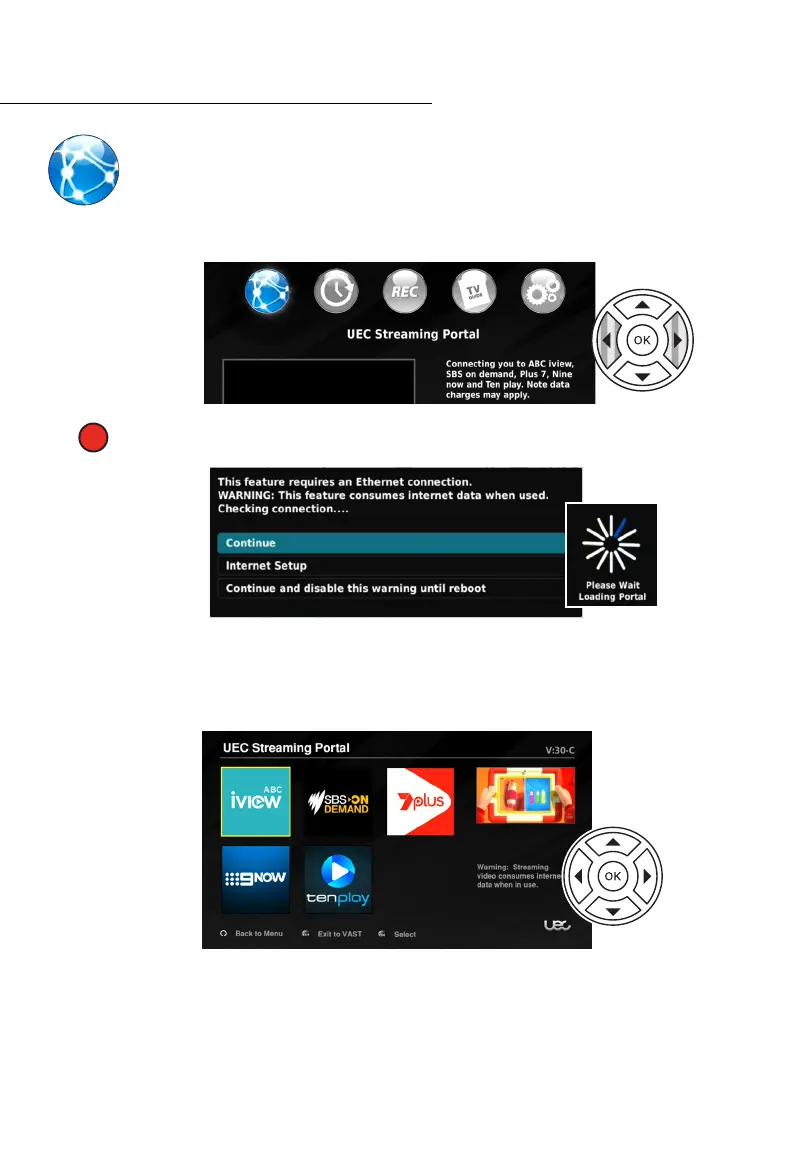
The UEC Streaming Portal is a newly added feature of the DSD 5000. It requires an
internet connection through a router, via an ethernet cable. While in the MAIN
MENU use the NAV buttons to select the UEC STREAMING PORTAL, then press
the OK button.
QUICKLY ACCESS UEC STREAMING PORTAL: Press the RED (1
st
from left) button
while watching live TV to quickly access the UEC STREAMING PORTAL.
Five services are available, one for each Australian national network. The catch-up services
for channel 9 may require a free independent account to be set up prior to ‘logging in’
through the portal. This can be achieved through an internet browser on a computer or
smart phone. After creating an account, use the name and password to ‘login’ through the
portal.
The ABC, SBS, 7 and 10 services are available to use immediately without a login.
Please consider the substantial data usage before using the Streaming Portal Function. Please
check with your internet Service Provider for more information about data charges.
Formats and layouts differ between portals as does the content. Use the NAV buttons to
move through each portal, using the direction arrows, OK and BACK buttons. Press EXIT to
leave the portal entirely.



 To Next Page