28
Installation Settings
Some settings require you to input a PIN-code with your remote control to enter or make
changes. The PIN-code for the Set Top Box is: 1234
Installation
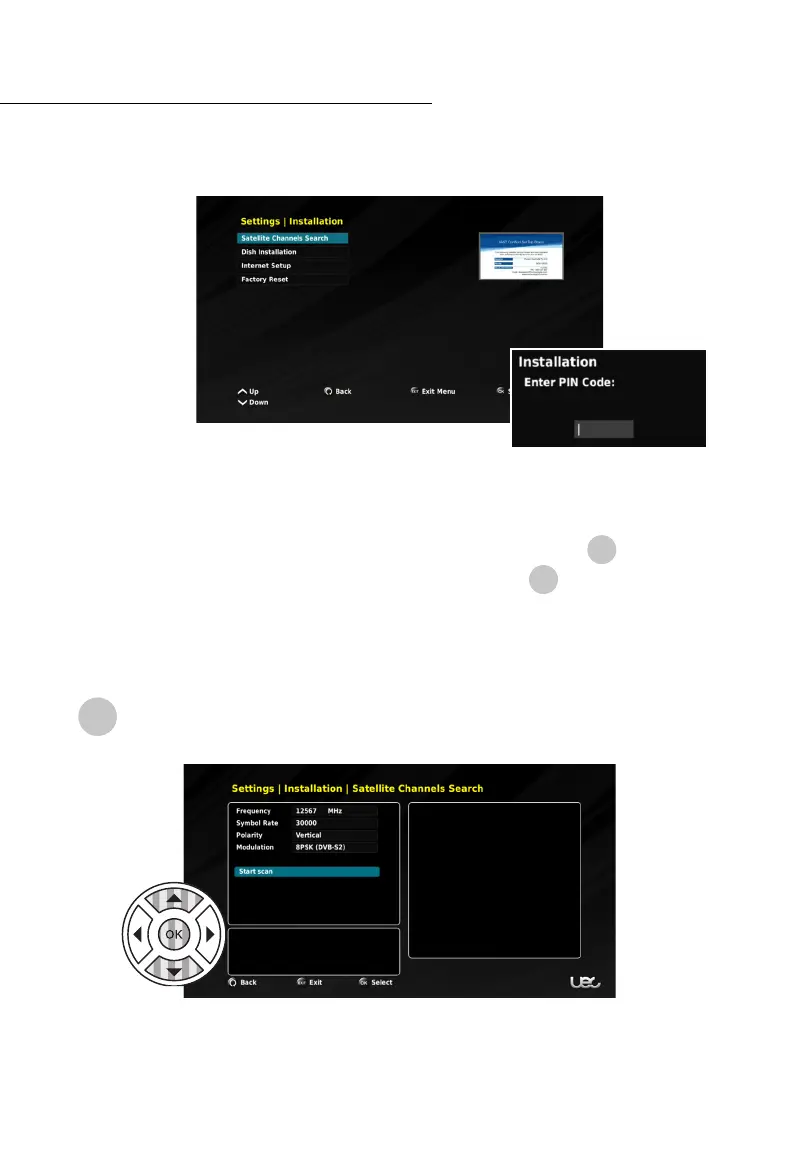
To access the INSTALLATION menu, you will be required to enter the PIN-Code: 1234
Within this menu you have access to:
• Satellite Channel Search, (configured during FIRST TIME SETUP)
• Dish Installation, (configured during FIRST TIME SETUP)
• Internet Setup, and
• Factory Reset.
Satellite Channel Search
To conduct a Satellite Channel Search, enter the INSTALLATION menu, and select
SATELLITE CHANNELS SEARCH.
By default, the Tuning Parameters are set to access Optus VAST™ services, however you are
able to select the Frequency, Symbol Rate, Polarity and Modulation, if required. To edit
the tuning parameters, use the NAV buttons to select the setting. Select START SCAN to
search for satellite channels.
!
!
!



 To Next Page