Sharing the
Emergency Stop
with other
machines
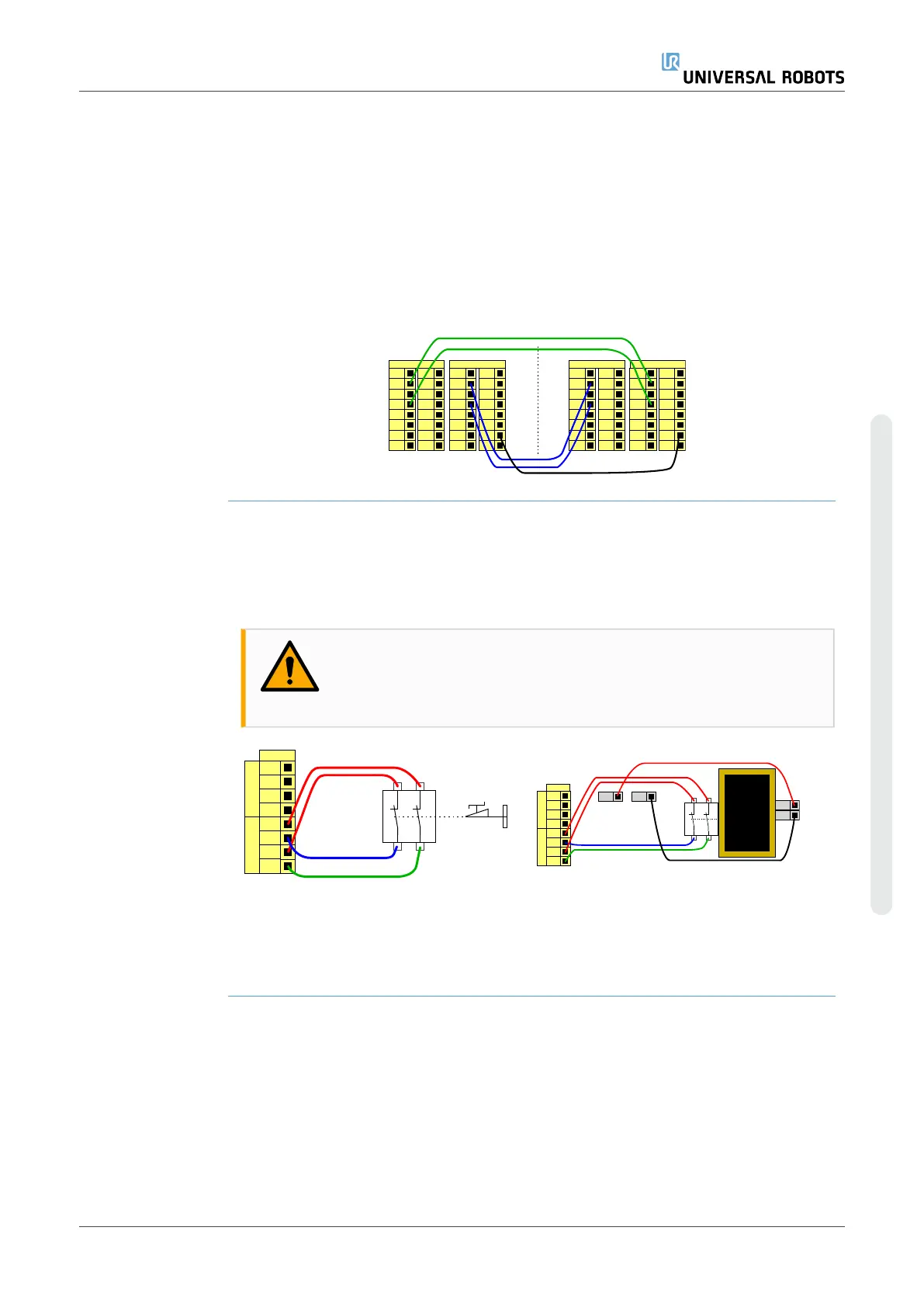
You can set up a shared emergency stop function between the robot and other
machines by configuring the following I/O functions via the GUI. The Robot Emergency
Stop Input cannot be used for sharing purposes. If more than two UR robots or other
machines need to be connected, a safety PLC must be used to control the emergency
stop signals.
•
Configurable input pair: External emergency stop.
•
Configurable output pair: System emergency stop.
The illustration below shows how two UR robots share their emergency stop functions.
In this example the configured I/Os used are CI0-CI1 and CO0-CO1.
24V
CI1
24V
CI2
24V
CI3
24V
CI0
Configurable Inputs
24V
CI5
24V
CI6
24V
CI7
24V
CI4
0V
CO1
0V
CO2
0V
CO3
0V
CO0
Configurable Outputs
0V
CO5
0V
CO6
0V
CO7
0V
CO4
24V
CI1
24V
CI2
24V
CI3
24V
CI0
Configurable Inputs
24V
CI5
24V
CI6
24V
CI7
24V
CI4
0V
CO1
0V
CO2
0V
CO3
0V
CO0
Configurable Outputs
0V
CO5
0V
CO6
0V
CO7
0V
CO4
A
B
Safeguard stop
with automatic
resume
This configuration is only intended for applications where the operator cannot go
through the door and close it behind him. The configurable I/O is used to setup a reset
button outside the door to reactivate robot motion. The robot resumes movement
automatically when the signal is re-established.
WARNING
Do not use this configuration if signal can be re-established from the
inside of the safety perimeter.
24V
EI1
24V
SI0
24V
SI1
24V
EI0
Safety
Safeguard Stop
Emergency Stop
24V
EI1
24V
SI0
24V
SI1
24V
EI0
Safety
Safeguard Stop
Emergency Stop
24V 0V
24V
0V
In this example a door switch is a
basic safeguard device where the
robot is stopped when the door is
opened.
In this example a safety mat is a safety device
where automatic resume is appropriate. This
example is also valid for a safety laser scanner.
User Manual 57 UR10e PolyScope X
4. Electrical Interface
Copyright © 2009–2024 by UniversalRobotsA/S. All rights reserved.










 To Next Page