Compact Keypad User Manual
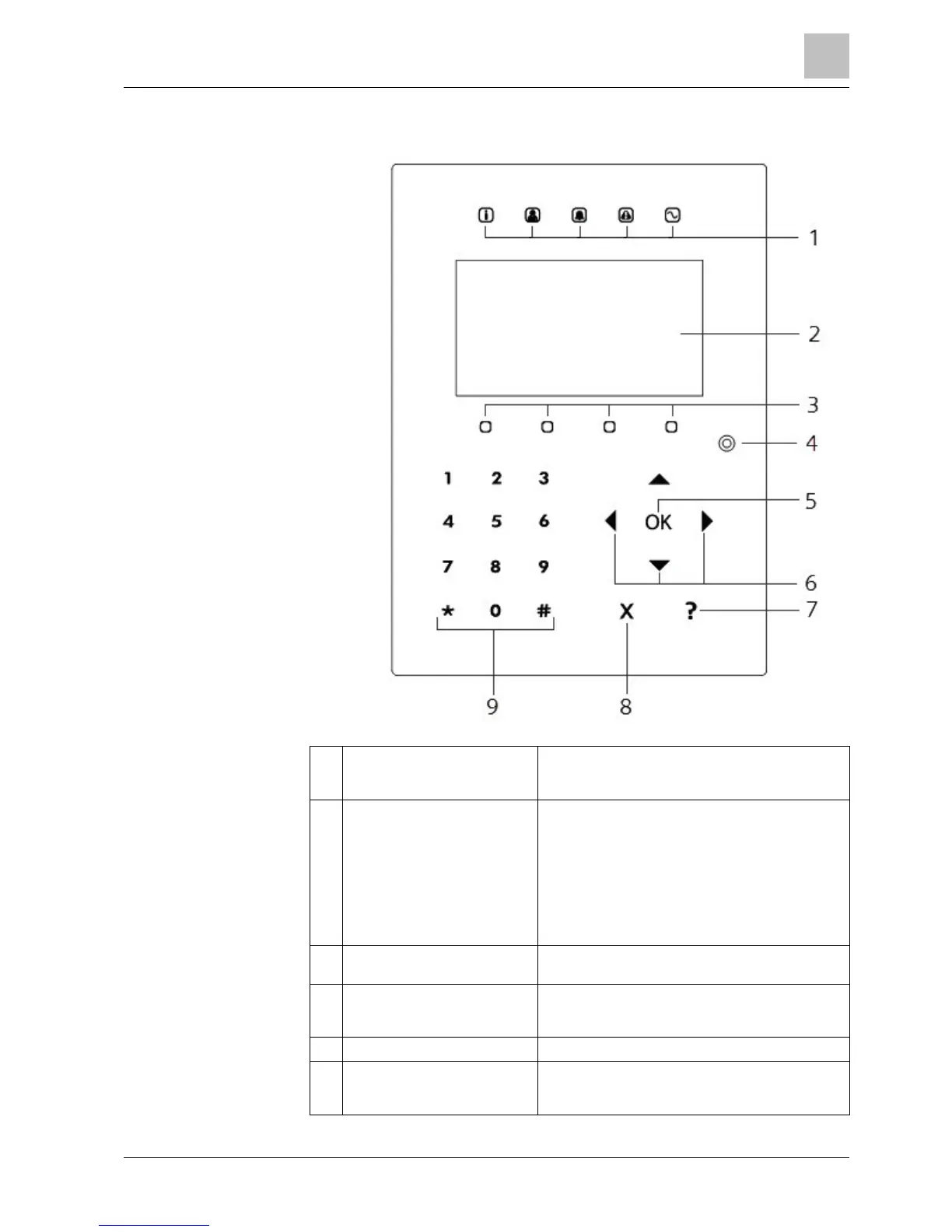
The LED status indicators provide information on
the current status of the system as detailed in the
table below.
The keypad display shows all alert and warning
messages and provides a visual interface for
programming the system (engineer programming
only). (See section on Display Message
Prioritization) The display can be configured under
which conditions the backlight comes on.
Only SPCK 521: If the keypad has been fitted with
a Mifare receiver, users should present their card to
the LCD display area.
Context sensitive keys to navigate through
menus/programming.
Proximity device receiver area
Only SPCK 521: If the keypad has been fitted with
a proximity device receiver, users should present
the Portable ACE Fob to within 1 cm of this area.
Multi-functional navigation keys
Navigation through menus and to scroll through
alert messages. (See Display Message
Prioritization below)


 To Next Page