© by N&W GLOBAL VENDING S.p.A. 53 02-2014 4535 00
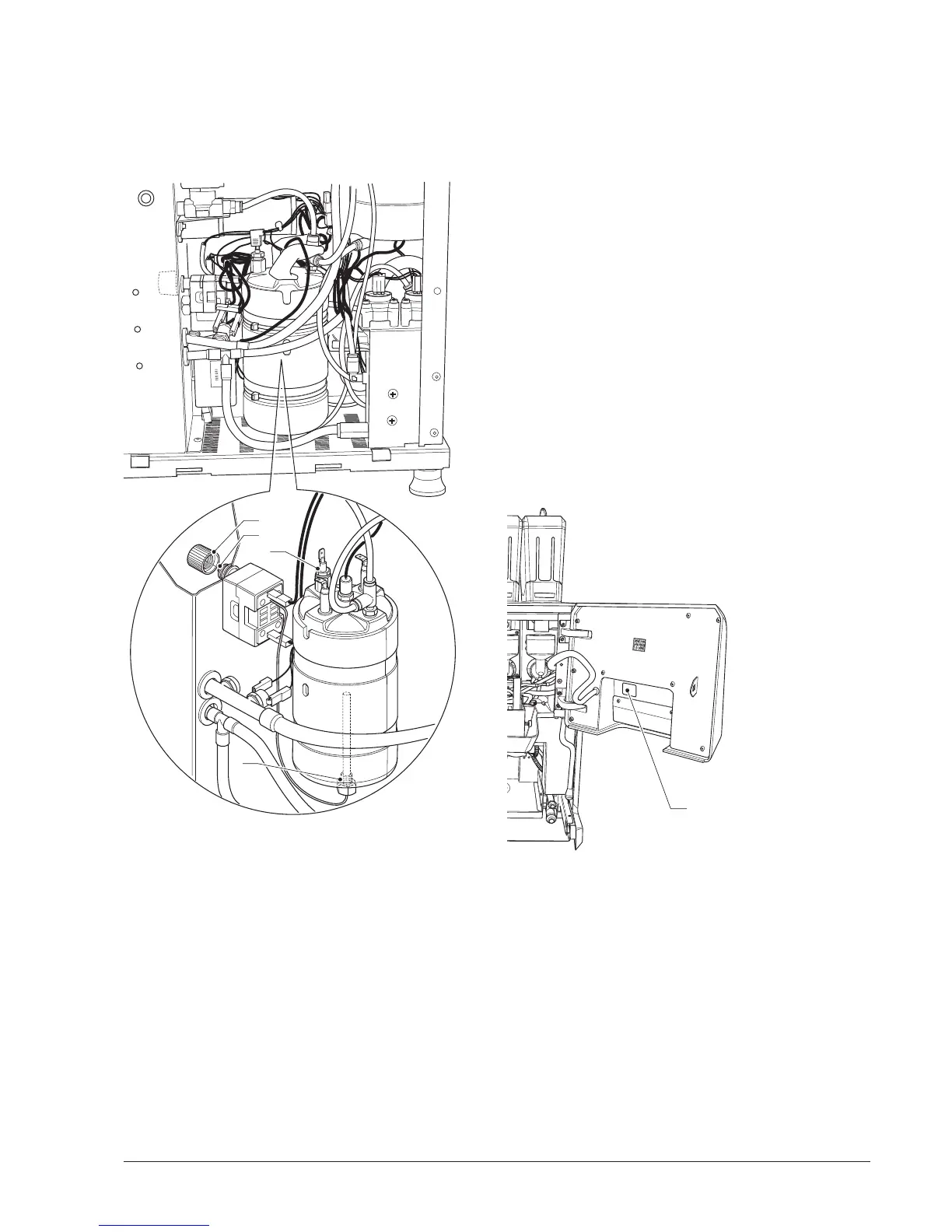
The steam boiler has a capillary safety thermostat, which
intervenes in case the temperature in the boiler exceeds
the safety temperature (155°C) in absence of water.
To reset the thermostat with capillary unscrew the cover
and press the reset button.
4
3
2
1
Fig. 44
1- Connection for capillary thermostat
2- Probe
3- Thermostat with capillary reset button
4- Thermostat with capillary reset button cover
SOFTWARE UPDATE
- with the machine turned off, insert the USB drive of the
touchscreen operating system
- turn on the machine and wait for the operation com-
pleted message.
- remove the USB drive
- turn off the machine
- Insert the USB drive of the software in the machine.
- turn on the machine and wait for the "Update complete
Remove USB" message.
The operation takes a few minutes and during this time
messages on ongoing operations appear
- remove the USB drive
- turn off the machine and back on.
After the software update proceed to initialize the
machine.
1
Fig. 45
1- USB jack


 To Next Page