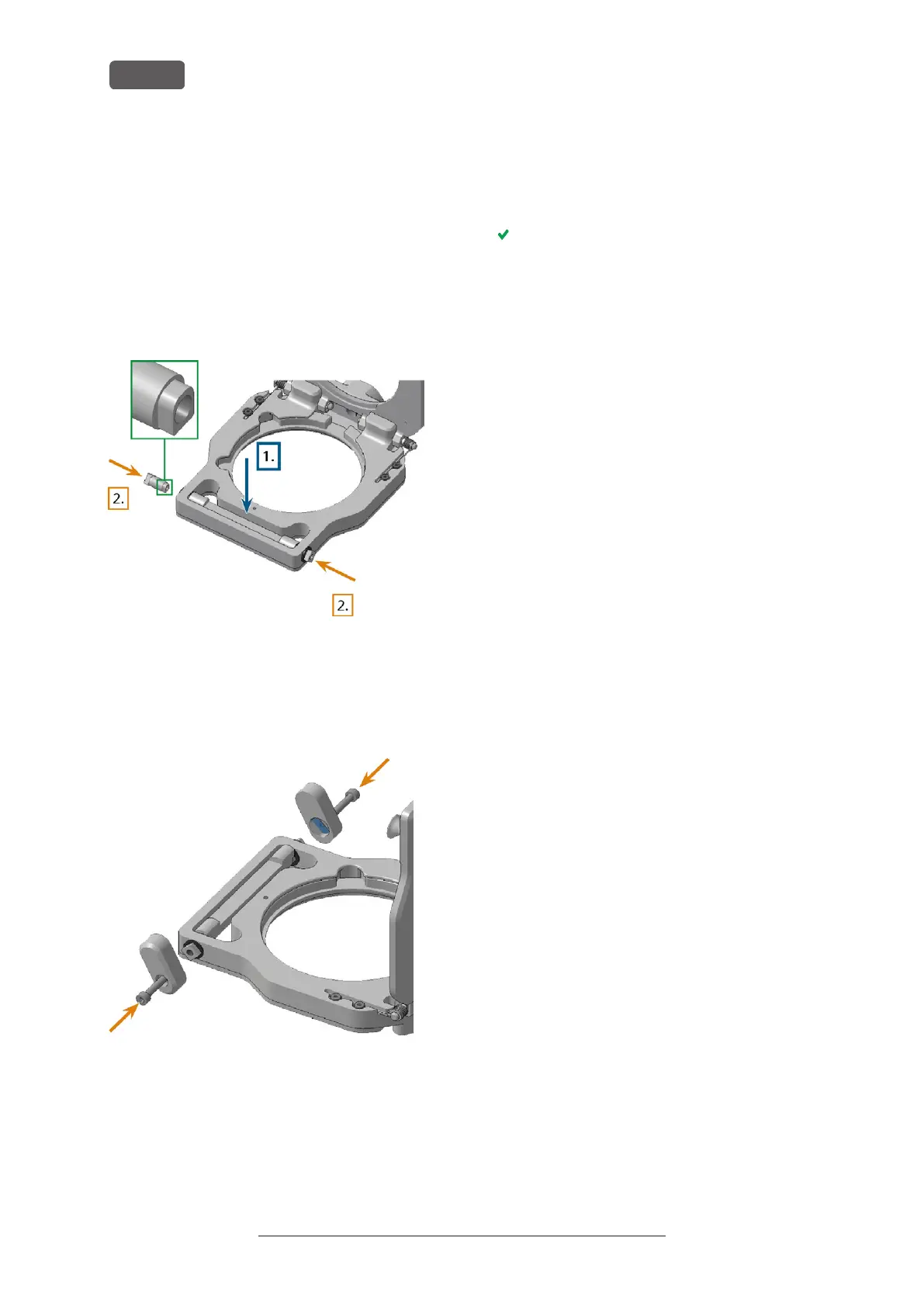
9. Place the spare shaft of the clamping system:
a. Position the shaft in the blank holder, with the
rounded surface to the front and the rect-
angular recess to the top. Hold the shaft in
place.
b. Insert the partly rounded connection geo-
metry of the positioning aids into the shaft,
with the rounded part to the top.
c. Ensure that all parts fit exactly into each other.
FIG. 72
10. Place the spare blank holder levers in the “open”
position on the positioning aids and screw them
down with the 3 mm hex key. Mind the form of the
recess (marked blue) in the blank holder levers.
FIG. 73
11. Check if the blank holder opens /closes properly
and if the blank holder cover is fixated as required.
If not, revise the installation of the clamping sys-
tem.
12. Close the blank holder.
13. Close the working chamber door.
14. Switch on the machine at the main power switch.
15. Restart DENTALCNC.
The machine references.
Original Operating Instructions:K5+
Version: 12/16/2021
K5+ – Maintenance and do-it-yourself
EN 50



 To Next Page