D
D
D
L
L
L
P
P
P
P
P
P
r
r
r
o
o
o
j
j
j
e
e
e
c
c
c
t
t
t
o
o
o
r
r
r
–
–
–
U
U
U
s
s
s
e
e
e
r
r
r
’
’
’
s
s
s
M
M
M
a
a
a
n
n
n
u
u
u
a
a
a
l
l
l
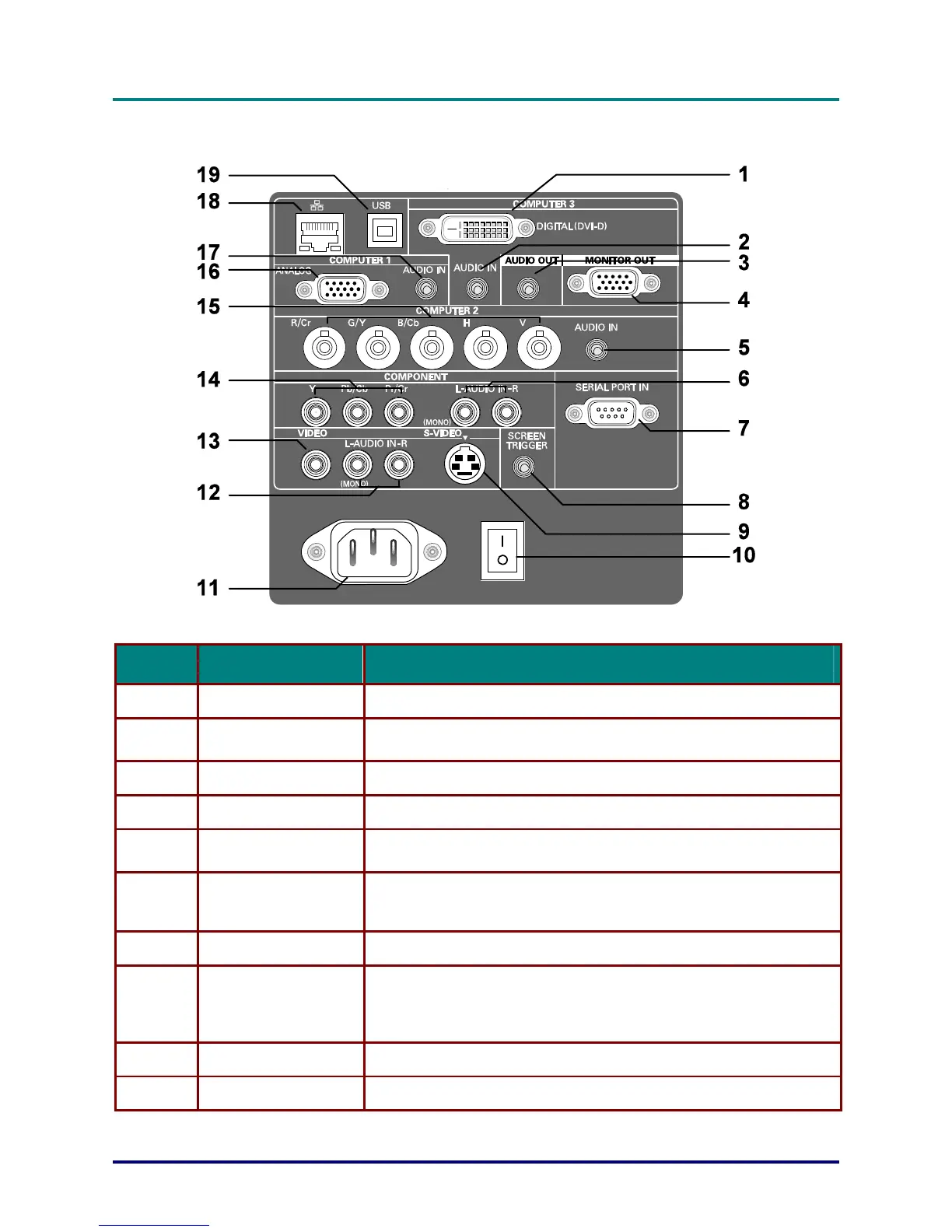
Terminal Panel Features
– 5 –
ITEM LABEL DESCRIPTION
1.
COMPUTER 3 IN Connect the DVI-D cable (not supplied) from a computer
2.
AUDIO IN
(COMPUTER 3)
Connect the audio cable (not supplied) from the input device
3.
AUDIO OUT Audio loop-thru
4.
MONITOR OUT Connect to a monitor
5.
AUDIO IN
(COMPUTER 2)
Connect the audio cable (not supplied) from the input device
6.
AUDIO IN [L
(MONO)/R]
(COMPONENT)
Connect an RCA audio cables (not supplied) from the input device
right and left channels
7.
SERIAL PORT IN Installation control
8.
SCREEN TRIGGER
When connected to the screen through a commercially available ca-
ble, the screen deploys automatically on start up of the projector. The
screen retracts when the projector is powered off
(see notes below)
9.
S-VIDEO Connect a commercially available S-video cable from a video device
10.
POWER SWITCH Turn on/off the projector



 To Next Page