EasyManua.ls Logo

Vivitek D6510 - Installing the Optional Color Wheel

Vivitek D6510
111 pages
Print Icon
To Next Page IconTo Next Page
To Previous Page IconTo Previous Page
Loading...
D
D
D
L
L
L
P
P
P
P
P
P
r
r
r
o
o
o
j
j
j
e
e
e
c
c
c
t
t
t
o
o
o
r
r
r
U
U
U
s
s
s
e
e
e
r
r
r
s
s
s
M
M
M
a
a
a
n
n
n
u
u
u
a
a
a
l
l
l
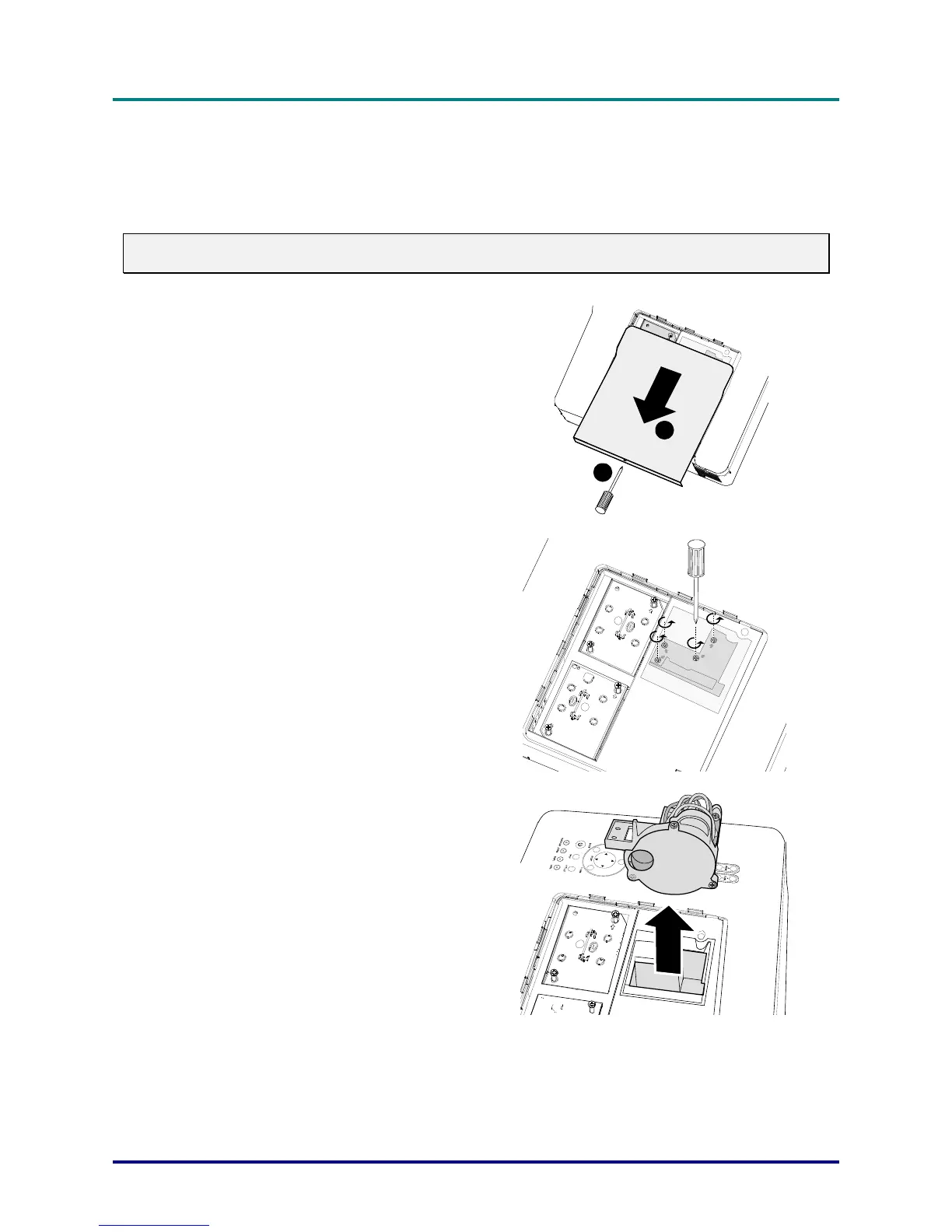
Installing the Optional Color Wheel
The projector comes with a four-segment color wheel installed. An additional six-segment color wheel
is optional. To replace the color wheel (located under the lamp cover adjacent to lamp 1) refer to the
following guide.
Note:
Wait until the lamp house and the color wheel cool off.
1.
Remove the four screws (A) on the
lamp cover.
2.
Lift the lamp cover in the direction of
the arrow (B).
A
B
3.
Unscrew the retaining screws (x 4) on
the four-segment color wheel.
4.
Lift the color wheel in the direction
shown.
15

Table of Contents

Related product manuals