D
D
D
L
L
L
P
P
P
P
P
P
r
r
r
o
o
o
j
j
j
e
e
e
c
c
c
t
t
t
o
o
o
r
r
r
—
—
—
U
U
U
s
s
s
e
e
e
r
r
r
’
’
’
s
s
s
M
M
M
a
a
a
n
n
n
u
u
u
a
a
a
l
l
l
Preventing the Unauthorized Use of the Projector
The projector has a built-in security feature to lock the OSD control panels and deny remote control
operation. The security feature has no default keyword; in the first instance of enabling the security
feature, the user must define a keyword.
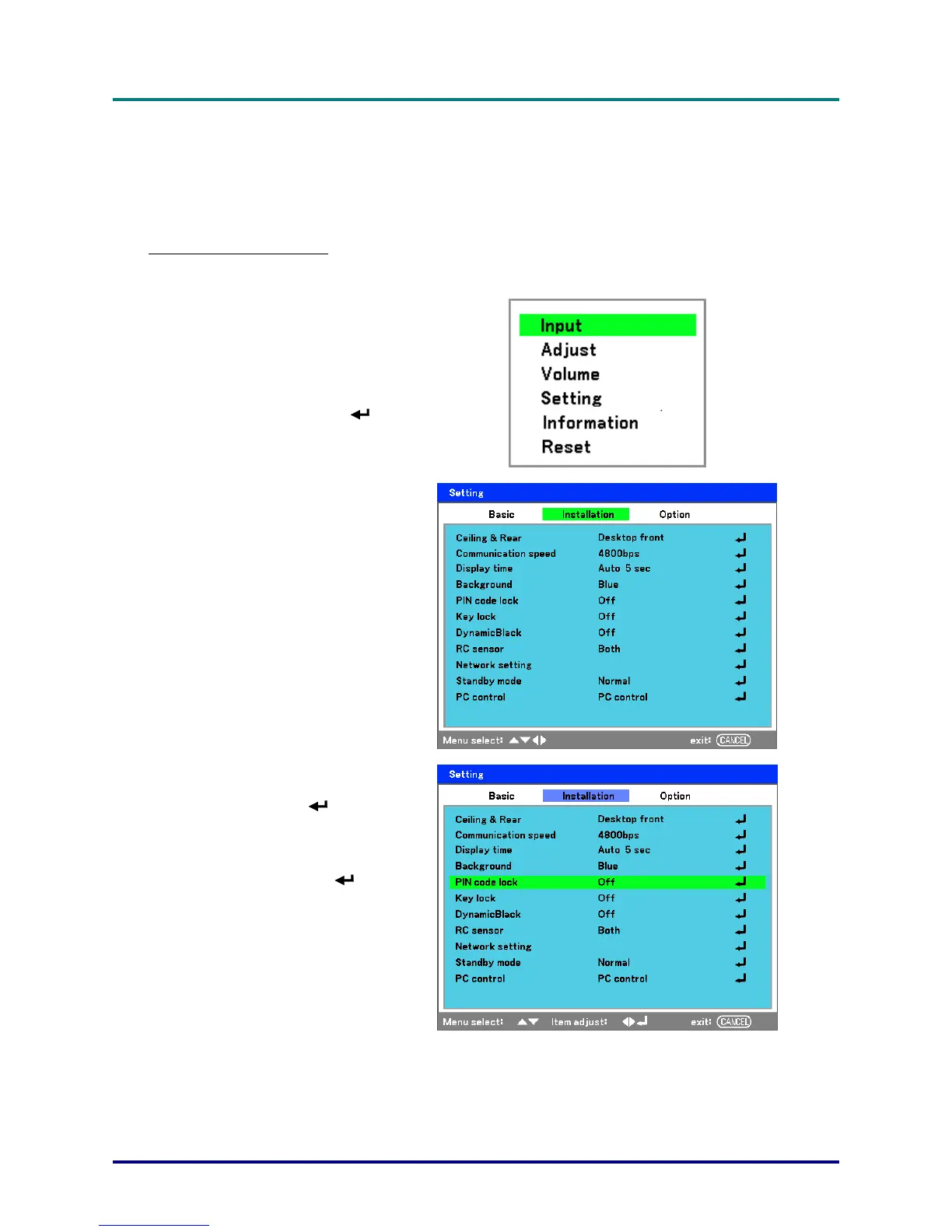
Locking the Projector
To setup the security keyword, refer to the following guide.
1.
Press Menu on the OSD
control panel on the projec-
tor or remote control to
display the Main menu.
Scroll to the Setting menu
using ▲or▼ and press
.
2.
The Setting menu is dis-
played. Select the
Installation tab using
◄or►.
3.
Select PIN code lock us-
ing ▲or▼. Press
. You
are prompted to enable the
PIN code lock function. Se-
lect On using ▲or▼.
Select OK and press
.
– 40 –



 To Next Page