VIVOTEK - Built with Reliability
User's Manual - 29
Camera list
Layout
Layout
contents
Logo & Menu
Viewcell panel
Alarm
panel
PTZ
panel
1
2
3
4
5
6
7
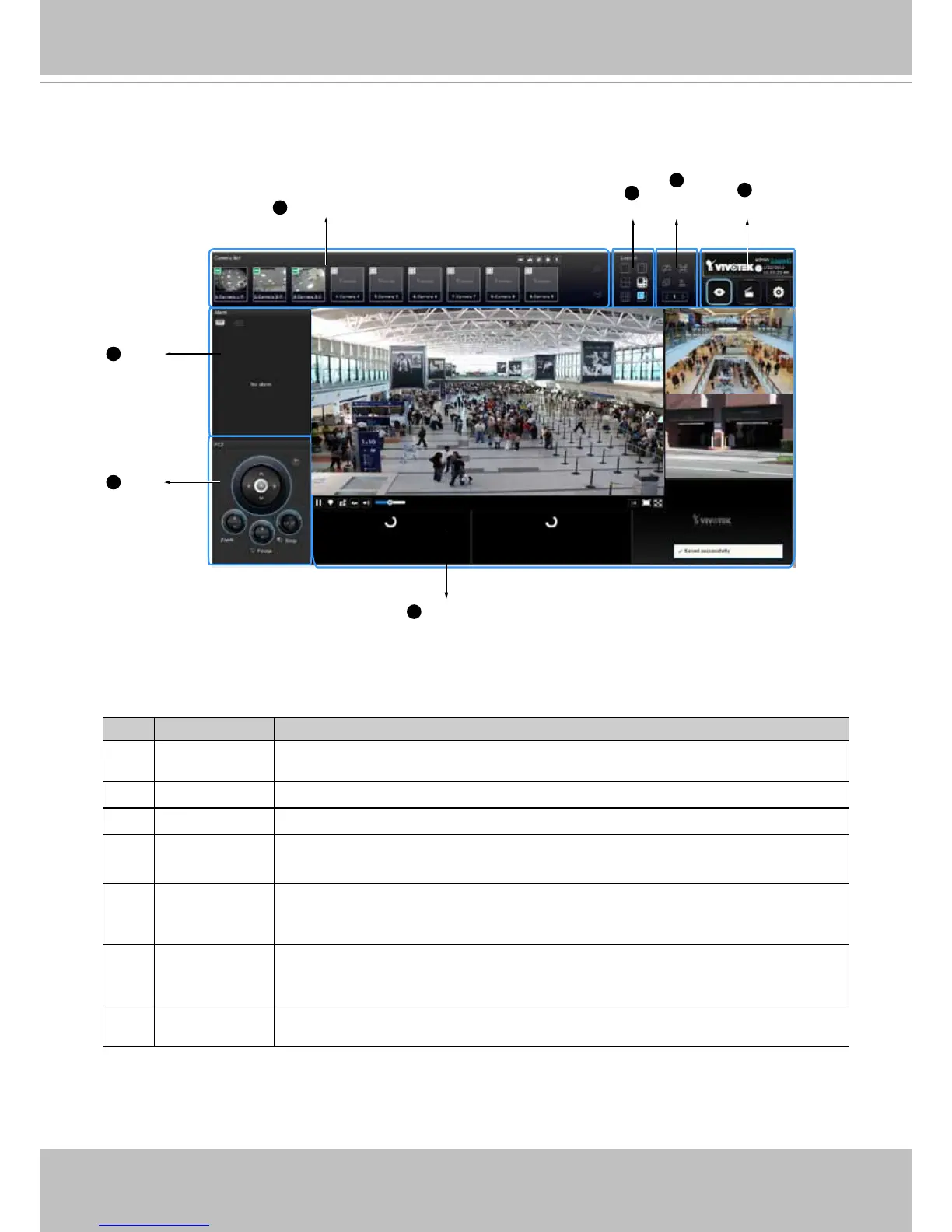
2-2. Graphical Layout and Screen Elements - Liveview
Once you log in, the system defaults to the Liveview page, which provides access to other
conguration utilities, live view screen, and other functional panels. The screen elements are
described as follows:
Item Name Description
1 Camera List Provides a glimpse of all cameras inserted into your conguration. Basic
information is also provided along with a screenshot.
2 Layout Provides access to various layouts
3 Layout contents Provides functions to extend, rotate, redo the layout, and control a DI/DO panel.
4 Logo & Menu Provides access to the Playback and System Settings utilities, as well as
system time and logout function.
5 View cell panel Displays video streams from one or multiple cameras. Snapshot, streaming,
bookmark, and audio control functions are also available on individual view
cells.
6 PTZ panel Exerts Pan/Tilt control on a selected view cell if the camera comes with
mechanical PTZ mechanism. Note that the use of joystick is currently not
available.
7 Alarm panel Reports alarms transmitted via cameras' DI connections or those by the Motion
Detection, etc.
Each panel will be described in further discussions.



 To Next Page