44
6. Tap Axles. A message box is displayed saying ‘Settings have changed - Send to Jbox (Yes) -
Dicard changes (No)’.
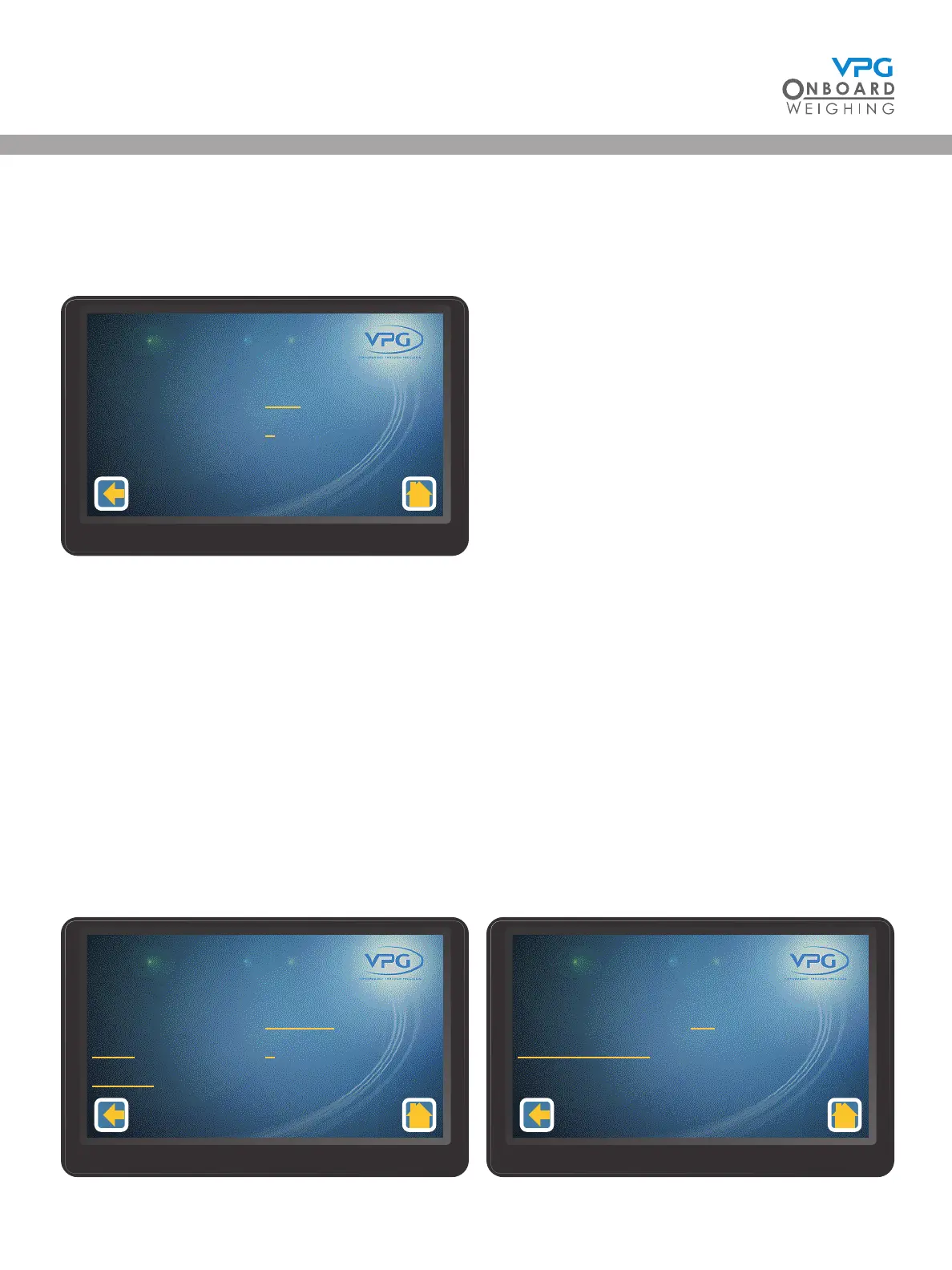
7. Tap Yes to update. The axle set up menu is displayed:
8. Swipe left or right to select an axle to congure. 1-2 is the Front Axle and 2-2 is the rear axle.
9. Tap to set the type of axle conguration and the sensor count that is appropriate for that axle.
Select Axle. This is used to indicate that axle transducers are located on a single leaf spring
axle. This type of conguration will usually have 2 sensors on each axle, one for each side of
the vehicle.
10. Repeat steps 8 and 9 to congure each axle for the junction box.
11. Tap the back icon. A message box appears saying ‘Send Axle Map to Jbox?’
12. Tap yes to update.
13. Tap the back icon to return to junction box setup page:
Axle Number
Type
Sensor Count
1 - 2
Axle
4
Axle Set Up
1/1
Juncon Box
Orientaon
Axles
Sensors
1 - 1
Disabled
2
3
Juncon Box Set Up
1/2
Juncon Box
Jier Filter
Restore Defaults
1 - 1
O
Juncon Box Set Up
2/2
VanWeigh
®


 To Next Page