14
PICKLING
PAD
0 28V 30V
10
13
9
8
3
1
11
2
4
12 6 5 7
1415
PICKLING
PAD
28V
PWR: HIGH PUMP: 1
SURFOX 306
USER MANUAL
If no button is pressed for 30 seconds during the language selection procedure, the unit automatically goes
back to the main screen without saving any changes that were made.
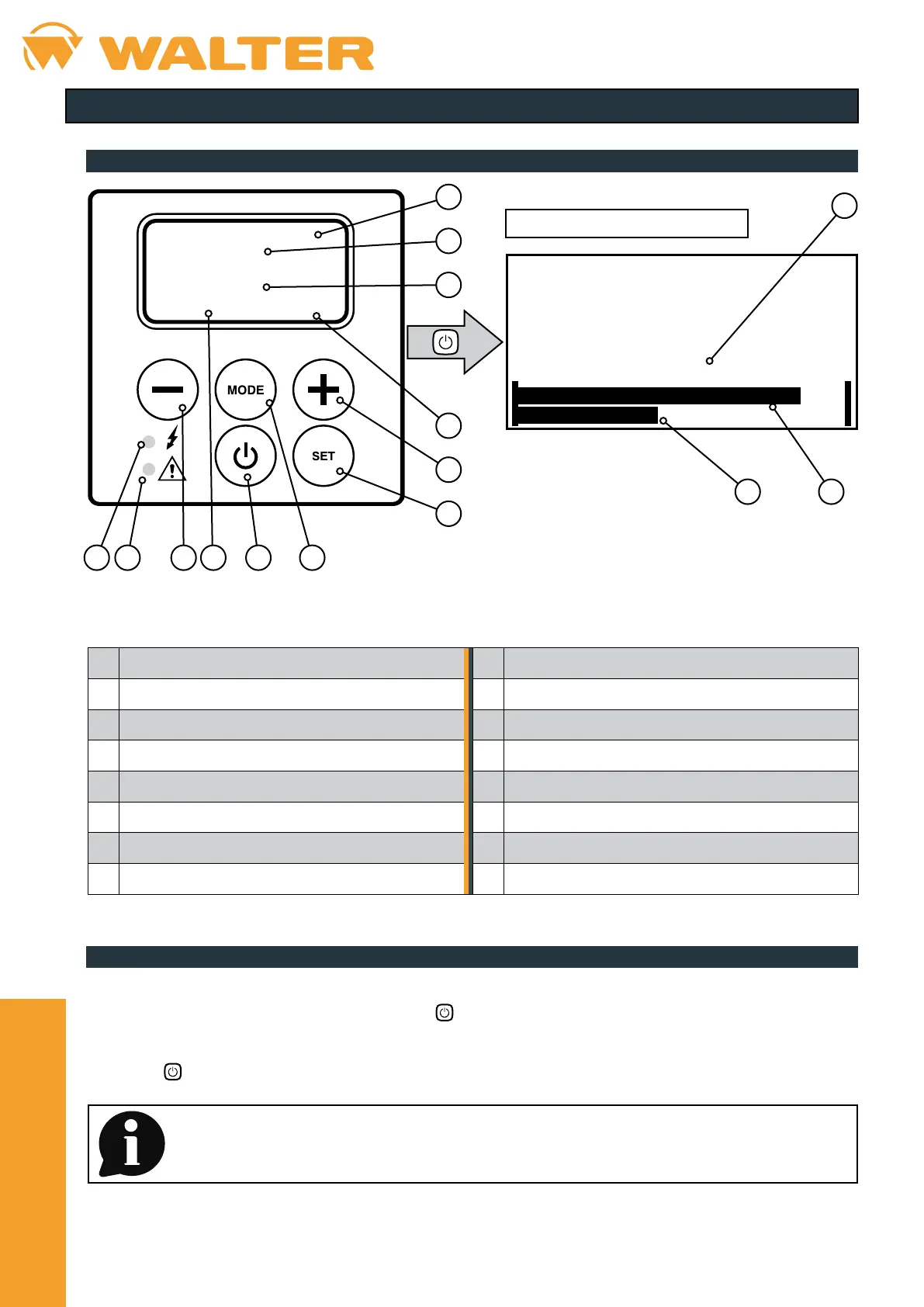
3. CONTROL PANEL
3.1. General description
1 Display 9 Power button
2 Operating mode indicator 10 SET button
3 Set voltage (V) 11 Power LED (green)
4 Pump program indicator 12 Alarm LED (red)
5 Device power indicator 13 Set voltage (V)
6 Voltage decrease button 14 Output voltage indicator
7 MODE button 15 Current output indicator
8 Voltage increase button
screen during processing
3.2. Changing the language
• With the device switched on, keep the – and + buttons pressed at the same time for a few seconds.
• The code 0 0 0 0 will appear on the display; press the
button.
• Select the required language from those available (EN - ES - FR - PT) using the – and + buttons.
• Press the
button again to conrm and go back to the main screen.


 To Next Page