MAINTENANCE INSTRUCTIONS
TR05A140.B1107
44
6.3 Accessing the boiler
All maintenance operations require one or more of the boiler casing panels to be removed.
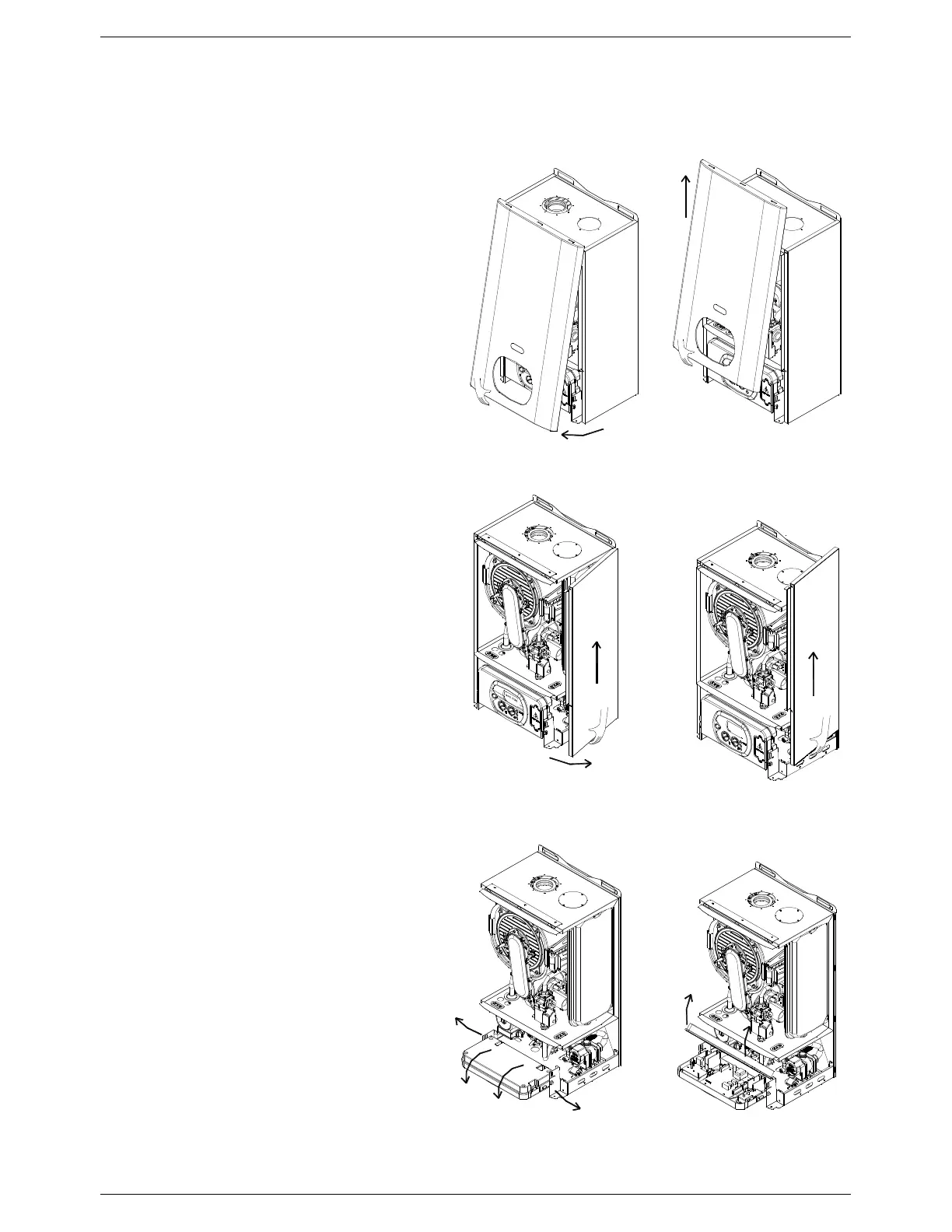
6.3.1 Front panel removal
• Remove the fixing screws at the lower edge of
the front panel;
• Grasp the lower part of the panel and pull it
outwards and then upwards (see Figure 33).
6.3.2 Side panel removal
• The side panels can only be removed after the
front panel has been removed;
• Remove the fixing screws at the front and lower
edge of the side panel;
• Grasp the bottom of the panel, move it
sideways and then upwards (see Figure 34).
6.3.3 Control panel access
• Remove the front panel (refer to 6.3.1 above);
• Grasp the left and right control panel support
brackets and pull them outwards, at the same
time rotating the panel downwards (see Figure
35);
• Unscrew the four cover securing screws and
remove the control panel rear cover.
Figure 33: Front panel removal
Figure 34: Side panel removal



 To Next Page