3.3.3 TVM control panel
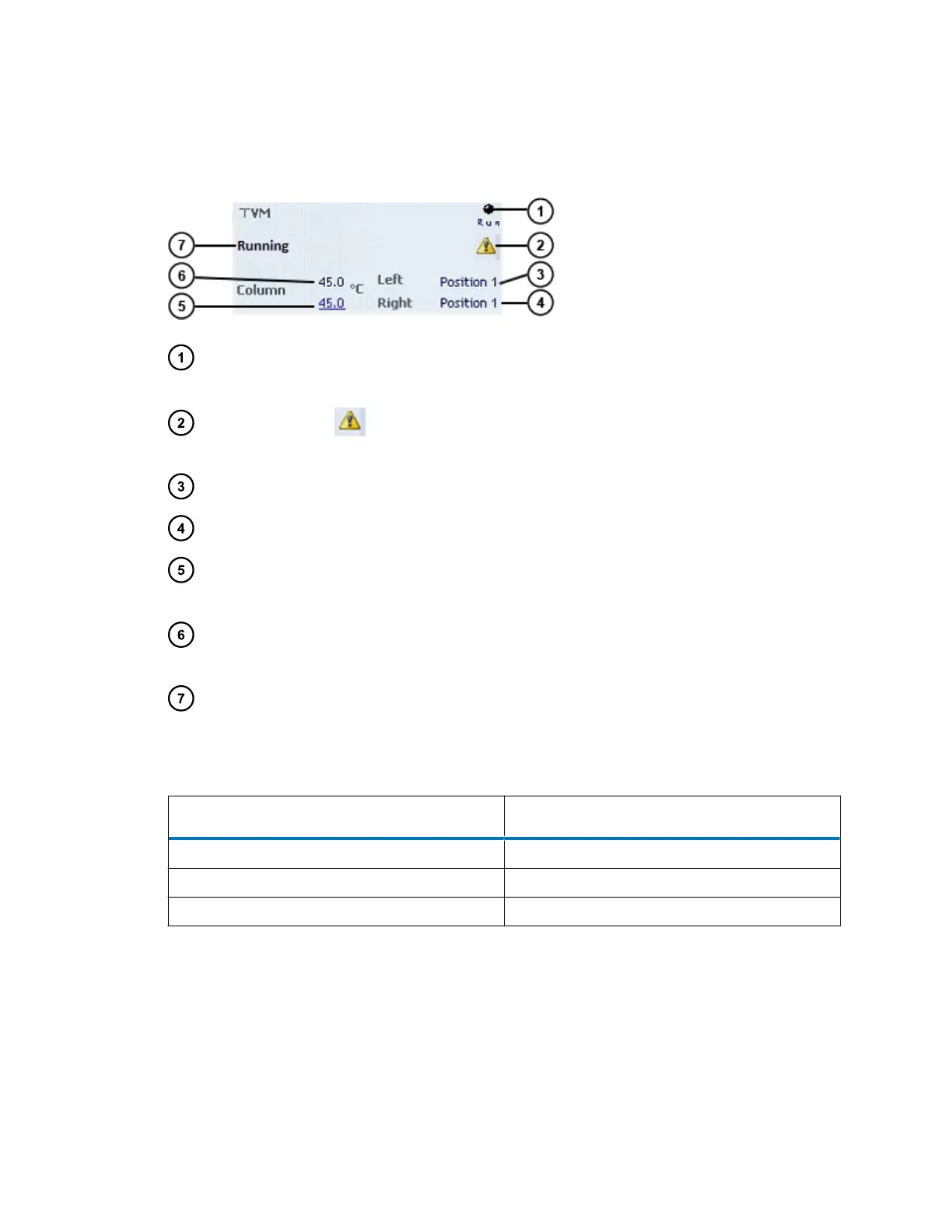
Figure 3–4: TVM control panel
Run LED Depicts the actual run LED, on the front panel, unless
communications to the TVM are interrupted.
Warning indicator Displays warning indicator icon when you exceed valve cycle
counters.
Left valve position Displays the current position (position 1 or position 2).
Right valve position Displays the current position (position 1 or position 2).
Column-temperature set
point
Displays the current column set point to 0.1°C resolution. When
active temperature control is disabled, this field reads Off.
Column temperature Displays the current column temperature to 0.1°C resolution,
even when active temperature control is disabled.
Status Displays the status of the current operation.
You can access these additional functions by right-clicking anywhere in the TVM control panel.
Table 3–7: Additional functions in the TVM control panel
Control panel item Description
Launch Instrument Console Launches the instrument console.
Reset TVM Resets the TVM after an error condition.
Help Displays the instrument console’s online Help.
November 26, 2019, 715003588 Revision C
Page 56












 To Next Page