Table 3–4: Additional functions in the column manager's control panel
Control panel function Description
Reset module Resets the column manager after an error condition.
Help Displays the console online Help.
3.5.2 Sample manager control panel
The control panel of the sample manager-flow through needle (SM-FTN) displays the current
temperatures of the sample compartment and column heater, their set points, and the selected
column.
You can edit these values when the system is idle by clicking the underlined value. You cannot
edit sample manager set points while the system is running samples.
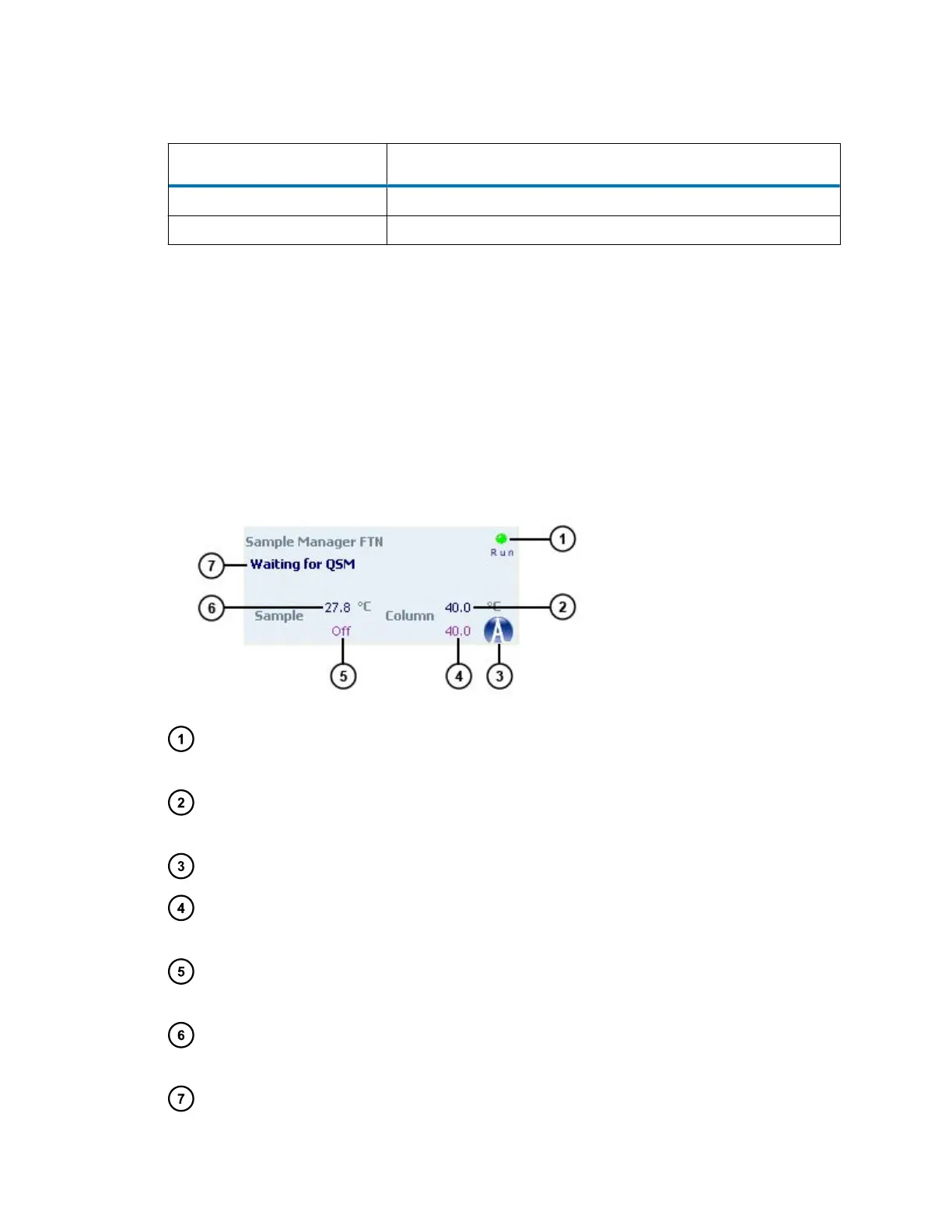
Figure 3–2: SM-FTN control panel
Run LED – Mirrors the run status LED on the sample manager's front panel, unless
communications are interrupted.
Current sample compartment temperature – Displays the current temperature of the sample
compartment.
Display console icon – When clicked, launches the console software.
Column compartment temperature set point – Displays the temperature set point for the
column compartment.
Sample compartment temperature set point – Displays the temperature set point for the
sample compartment.
Current column compartment temperature – Displays the current temperature in the column
compartment.
Status – Displays the status of the current operation.
August 8, 2016, 715005049 Rev. C
Page 52











 To Next Page