Lamp icon – When clicked, ignites or extinguishes the lamp. If the icon is green, the lamp is
ignited. If the icon is red, the lamp is extinguished.
Current nebulizer temperature – Displays the current nebulizer temperature.
Current nebulizer gas pressure – Displays the current nebulizer gas pressure.
Photomultiplier tube gain factor – Displays the current photomultiplier-tube gain factor.
Current sample energy – Displays the sample signal, in light scattering units.
You can access these additional functions by right-clicking anywhere in the detector control
panel.
Table 3–7: Additional functions in the ELS detector control panel
Control panel function Description
Autozero Resets the detector offsets.
Reset module Resets the detector after an error condition.
Help Displays the console online Help.
3.5.5 FLR control panel
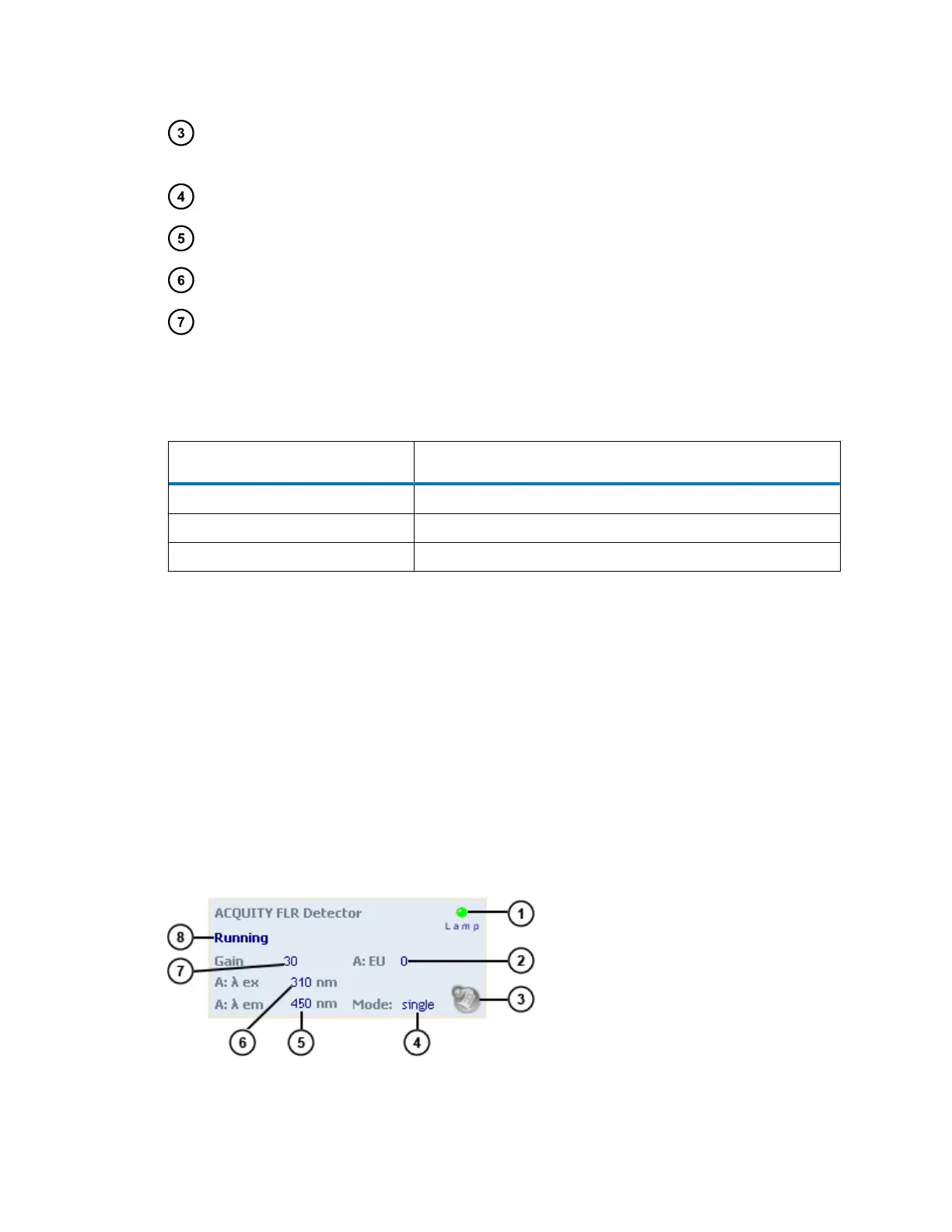
The fluorescence (FLR) detector's control panel displays emission or energy units, the excitation
and emission wavelengths, and the photomultiplier tube gain factor.
If Empower software controls the system, the detector's control panel appears at the bottom of
the Run Samples window. If MassLynx software controls the system, the detector's control panel
appears at the bottom of the Inlet Editor window.
You can edit detector parameters when the system is idle by clicking the underlined value. You
cannot edit these values while the system is running samples.
Figure 3–5: FLR detector control panel
August 8, 2016, 715005049 Rev. C
Page 55











 To Next Page