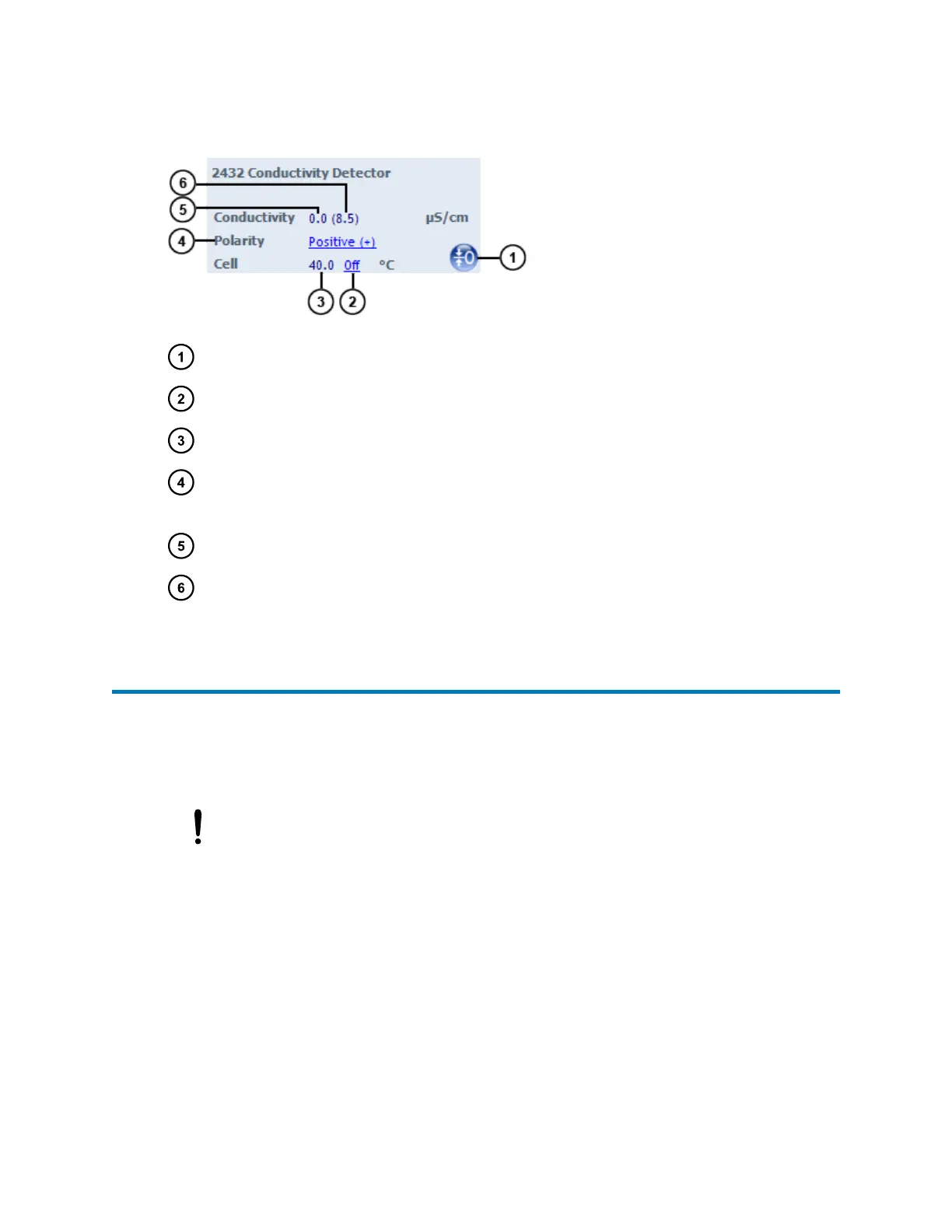
Figure 3–9: 2432 conductivity detector control panel
Autozero button – Eliminates the eluent's contribution to conductivity.
Cell temperature set point – Displays the set point for the flow cell temperature.
Current cell temperature – Displays the current flow cell temperature.
Peak polarity – Displays the polarity of the output signal. If the polarity is negative, the
chromatogram is inverted.
Relative conductivity – The autozeroed conductivity.
Absolute conductivity – The conductivity reading including the eluent's contribution.
3.6 Starting up the system
Use the Start up system function to prime the solvent manager after changing the mobile phase,
after changing the sample needle, or after the system has been idle a long period of time (for
example, overnight). Before you begin this procedure, ensure that the system is correctly
configured for use.
Notice:
• Do not leave buffers stored in the system.
• Flush all flow paths, including the needle wash, with plenty of non-buffered solvent
before shutting down the system.
• For extended shutdown periods (longer than 24 hours), use 10% to 20% methanol
in water.
• When using a buffered wash solvent, prime it for a minimum of 30 sec.
• Use of buffers can cause salt build-up on the needle and wash port, which can
require periodic cleaning.
August 8, 2016, 715005049 Rev. C
Page 60











 To Next Page