138
Western Digital Hard Disk Drive OEM Specification
11.10 Format Unit (F7h)
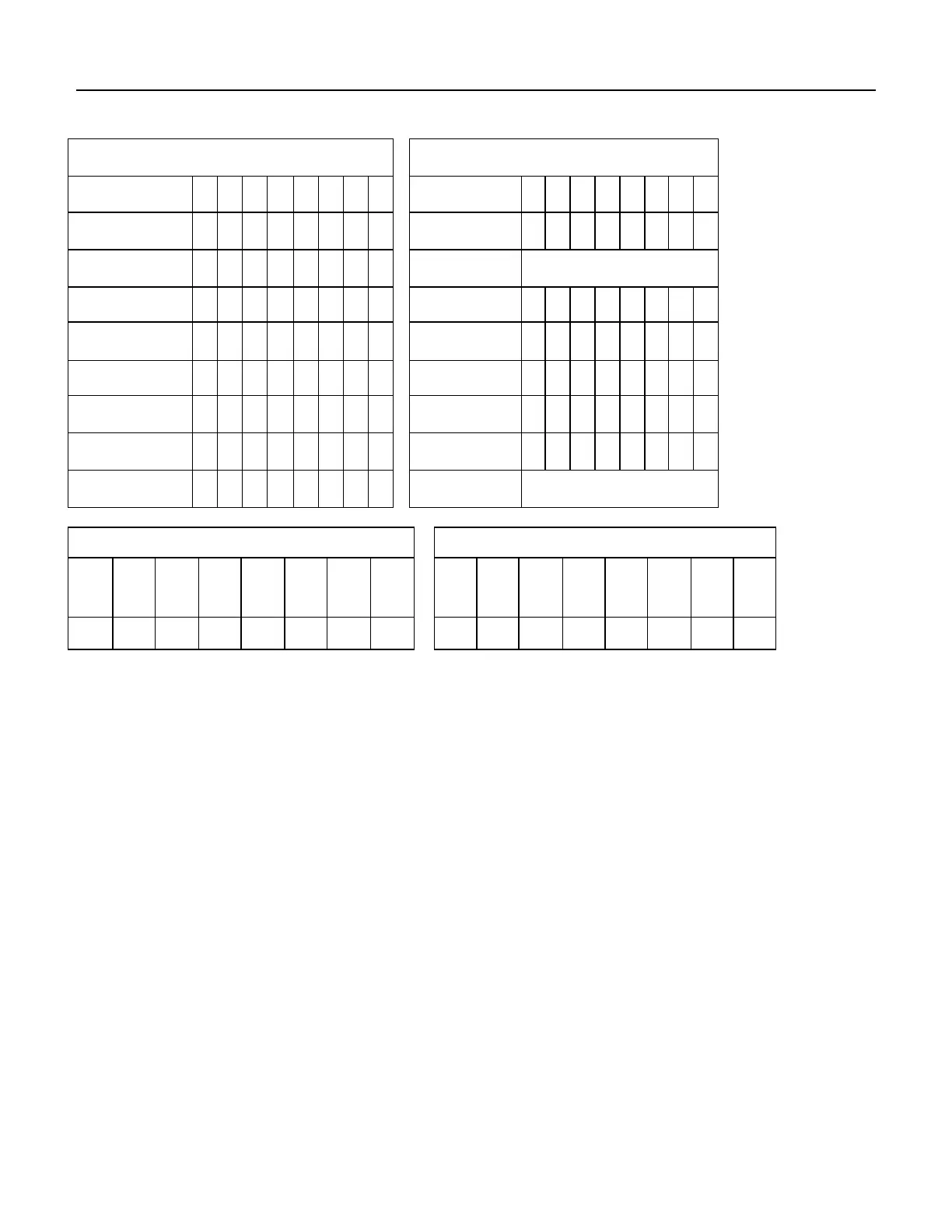
Command Block Output Registers
Command Block Input Registers
Table 111 Format Unit Command (F7h)
The Format Unit command initializes all user data sectors after merging reassigned sector location into the defect
information of the device and clearing the reassign information. Both new reassign information and new defect
information are available right after command completion of this command. Previous information of reassign and
defect are erased from the device by executing this command.
Note that the Format Unit command initializes from LBA 0 to Native MAX LBA regardless of setting by Initialize
Device Parameter (91h) command, Device Configuration Overlay, or Set Max Address (F9h) command, so the
protected area defined by these commands is also initialized.
Security Erase Prepare (F3h) commands should be completed just prior to the Format Unit command. If the device
receives a Format Unit command without a prior Security Erase Prepare command, the device aborts the Format
Unit command.
All values in Feature register are reserved, and any values other than 11h should not be put into Feature register.
This command does not request to data transfer.
Command execution time depends on drive capacity. To determine command timeout value, Word 89 of Identify
Device data should be referred.













 To Next Page