232
Western Digital Hard Disk Drive OEM Specification
11.38 Security Disable Password (F6h)
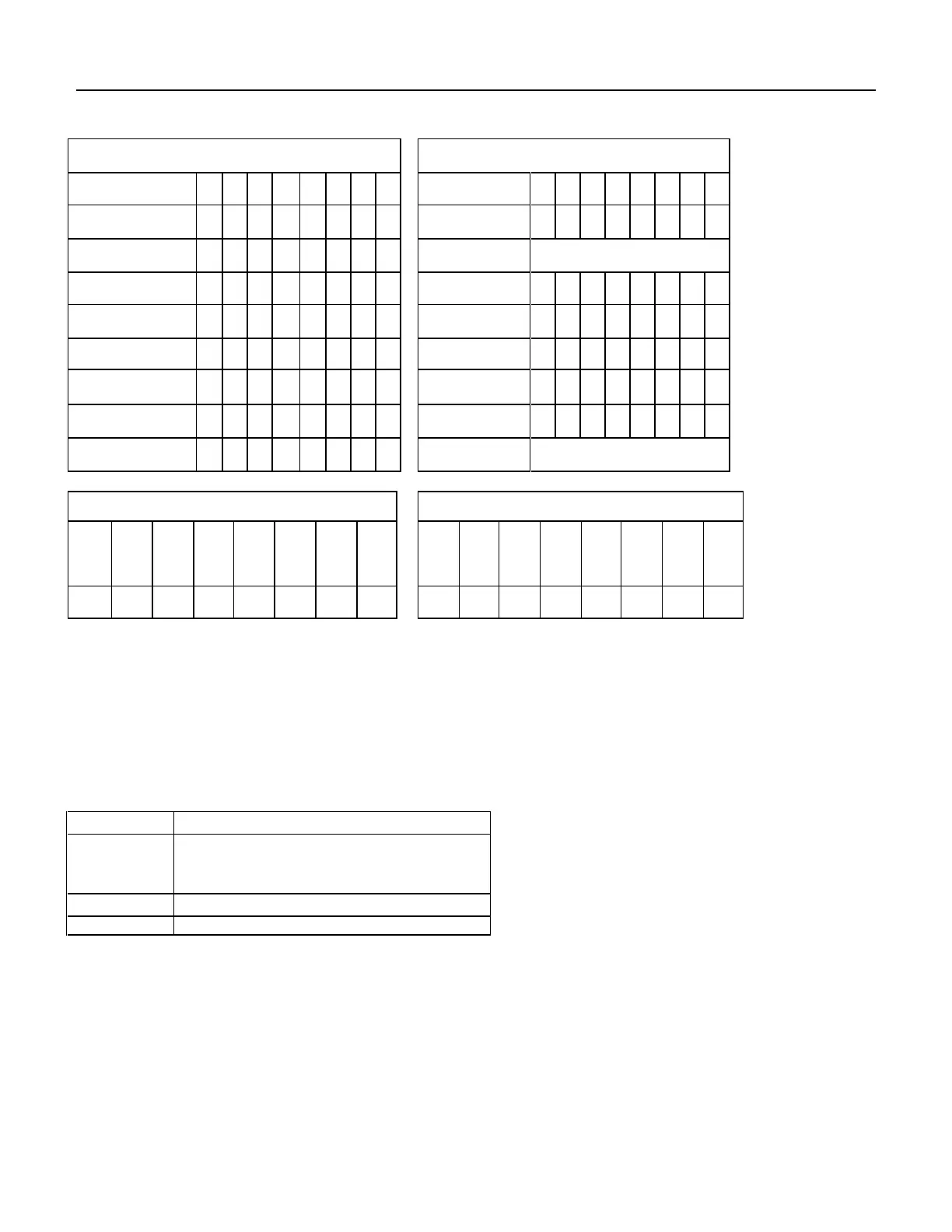
Command Block Output Registers
Command Block Input Registers
Table 200 Security Disable Password Command (F6h)
The Security Disable Password command disables the security mode feature (device lock function).
The Security Disable Password command requests a transfer of a single sector of data from the host including
information specified in Table 193 on the page 221. Then the device checks the transferred password. If the User
Password or Master Password matches the given password, the device disables the security mode feature (device
lock function). This command does not change the Master Password which may be re-activated later by setting User
Password. This command should be executed in device unlock mode.
When security is disabled and the Identifier bit is set to User, then the device shall return command aborted.
: Identifier (1-Mater, 0-User)
Table 201 Password Information for Security Disable Password command
The device will compare the password sent from this host with that specified in the control word.
Zero indicates that the device should check the supplied password against the user password stored
internally. One indicates that the device should check the given password against the master password
stored internally.













 To Next Page