EasyManua.ls Logo

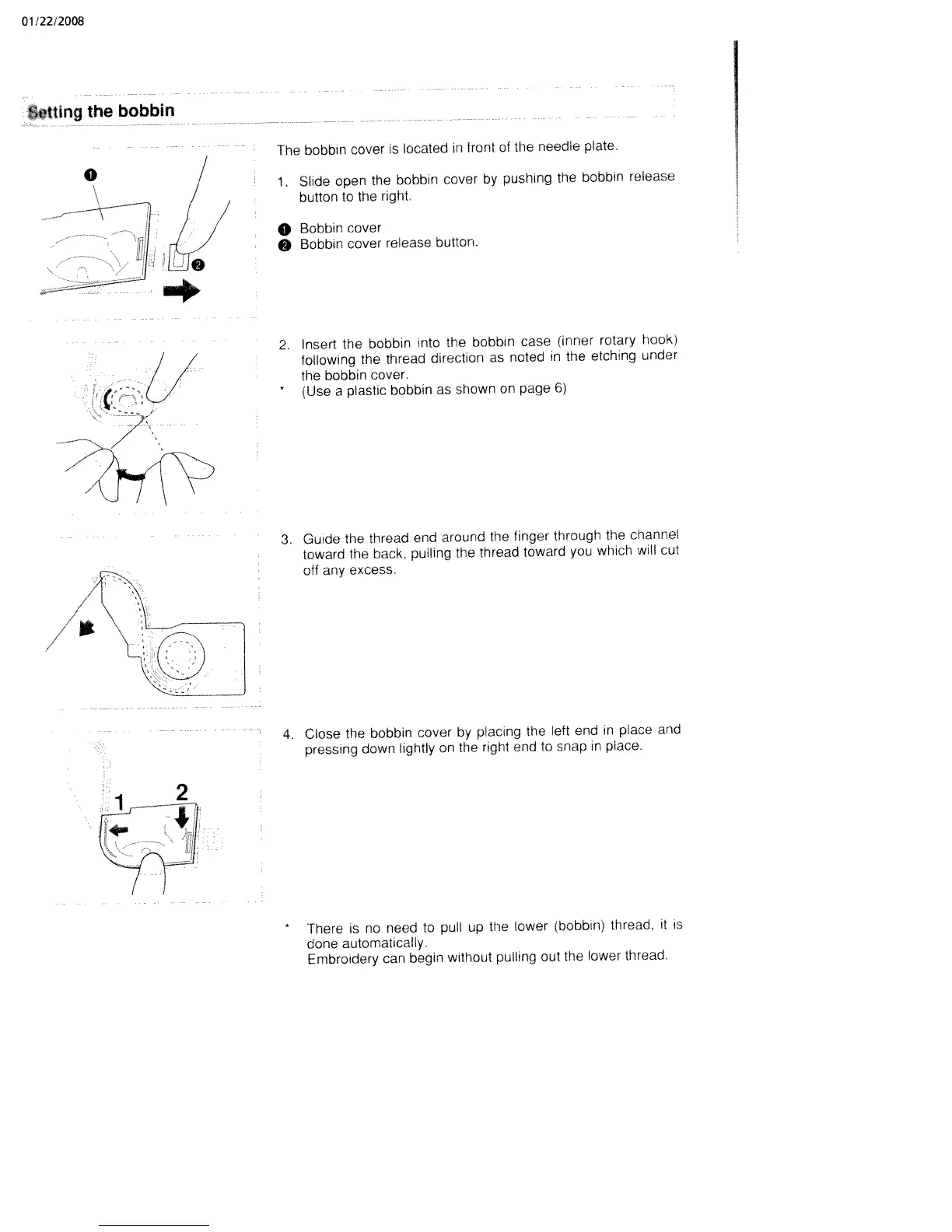
White W3300 - Setting the Bobbin; Insert Bobbin into Bobbin Case; Guide Thread Through Channel

Default Icon
73 pages
Print Icon
To Next Page IconTo Next Page
To Previous Page IconTo Previous Page
Loading...
01/22/2008
Setting
the
bobbin
The
bobbin
cover
is
located
in
front
of
the
needle
plate.
1
Slide
open
the
bobbin
cover
by
pushing
the
bobbin
release
button
to
the
right.
o
Bobbin
cover
O
Bobbin
cover
release
button.
2.
Insert
the
bobbin
into
the
bobbin
case
(inner
rotary
hook)
following
the
thread
direction
as
noted
in
the
etching
under
the
bobbin
cover.
*
(Use
a
plastic
bobbin
as
shown
on
page
6>
/
3.
Guide
the
thread
end
around
the
finger
through
the
channel
toward
the
back
pulling
the
thread
toward
you
which
will
cut
off
any
excess.
4.
Close
the
bobbin
cover
by
placing
the
left
end
in
place
and
pressing
down
lightly
on
the
right
end
to
snap
in
piace.
*
There
is
no
need
to
pull
up
the
lower
(bobbin)
thread,
it
is
done
automatically.
Embroidery
can
begin
without
pulling
out
the
lowei
thread.
0
/
/
/

Table of Contents

Related product manuals