EasyManua.ls Logo

White W3300 - Combining Two or More Patterns (90° Rotation); Move Needle to Start Position; Clamp Frame at Next Position; Embroider Next Pattern

Default Icon
73 pages
Print Icon
To Next Page IconTo Next Page
To Previous Page IconTo Previous Page
Loading...
01
i2212008
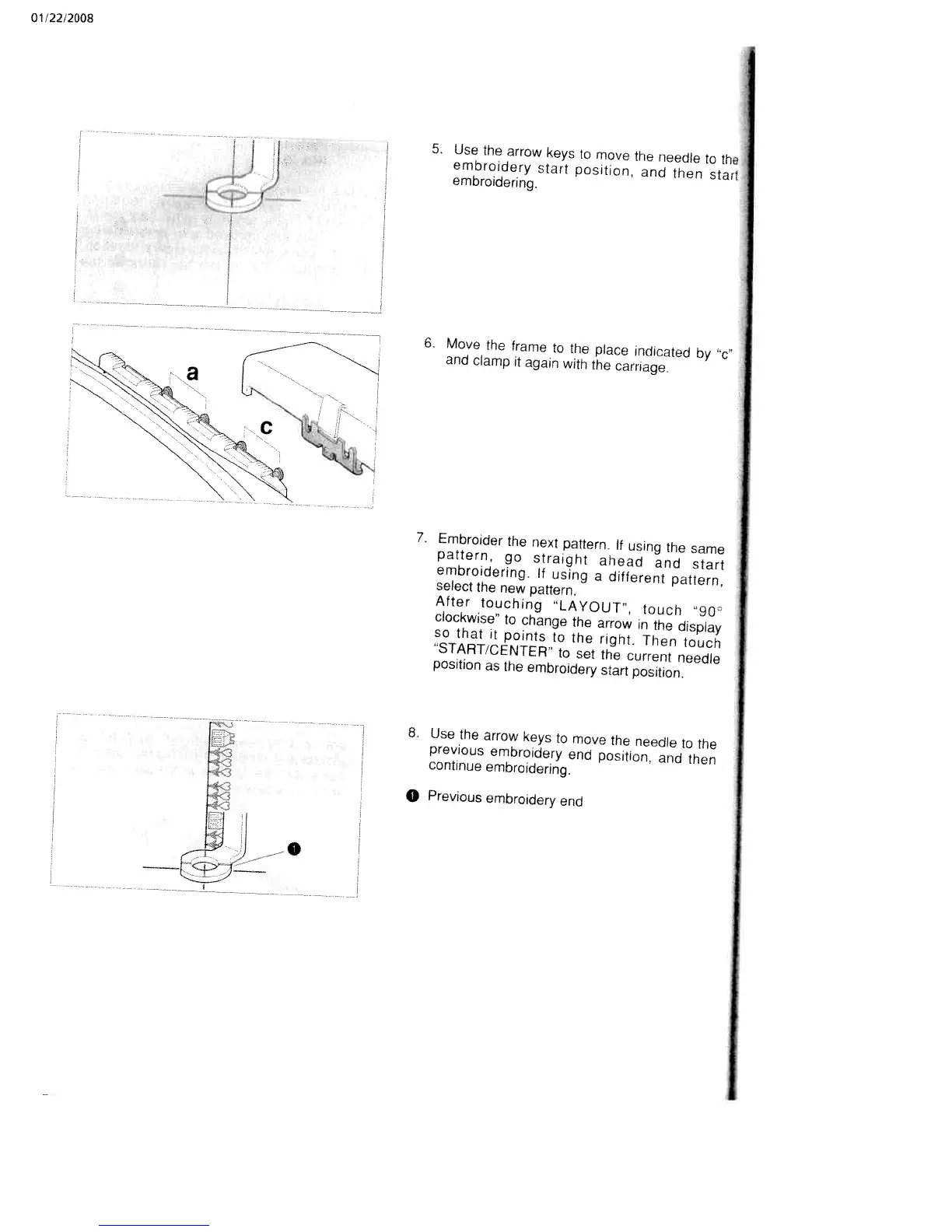
5.
Use
the
arrow
keys
to
move
the
needle
to
the
embroidery
start
position, and
then
start
embroidering.
6.
Move
the
frame
to
the
place
indicated
by
‘c
and
clamp
it
again
with
the
carriage.
7.
Embroider
the
next
pattern.
If
using
the
same
pattern,
go
straight
ahead
and
start
embroidering.
If
using
a
different
pattern,
select
the
new
pattern.
After
touching
LAYOUT,
touch
“90
clockwise”
to
change
the
arrow
in
the
display
so
that
it
points
to
the
right.
Then
touch
“START/CENTER’
to
set
the
current
needle
position
as
the
embroidery
start
position.
8.
Use
the
arrow
keys
to
move
the
needle
to
the
previous
embroidery
end
position.
and
then
continue
embroidering.
0
Previous
embroidery
end

Table of Contents

Related product manuals