Rugged Windows Tablet M101B/ M101BL User Guide
5.8.2 Set up the Barcode Scanner for Bluetooth Pairing
Now the Barcode Scanner is ready for pairing process to start.
5.8.3 Perform Bluetooth Pairing
After you finish setting up both the Computer and Barcode Scanner you are ready to start
pairing.
1. Open a program that is used for paring.
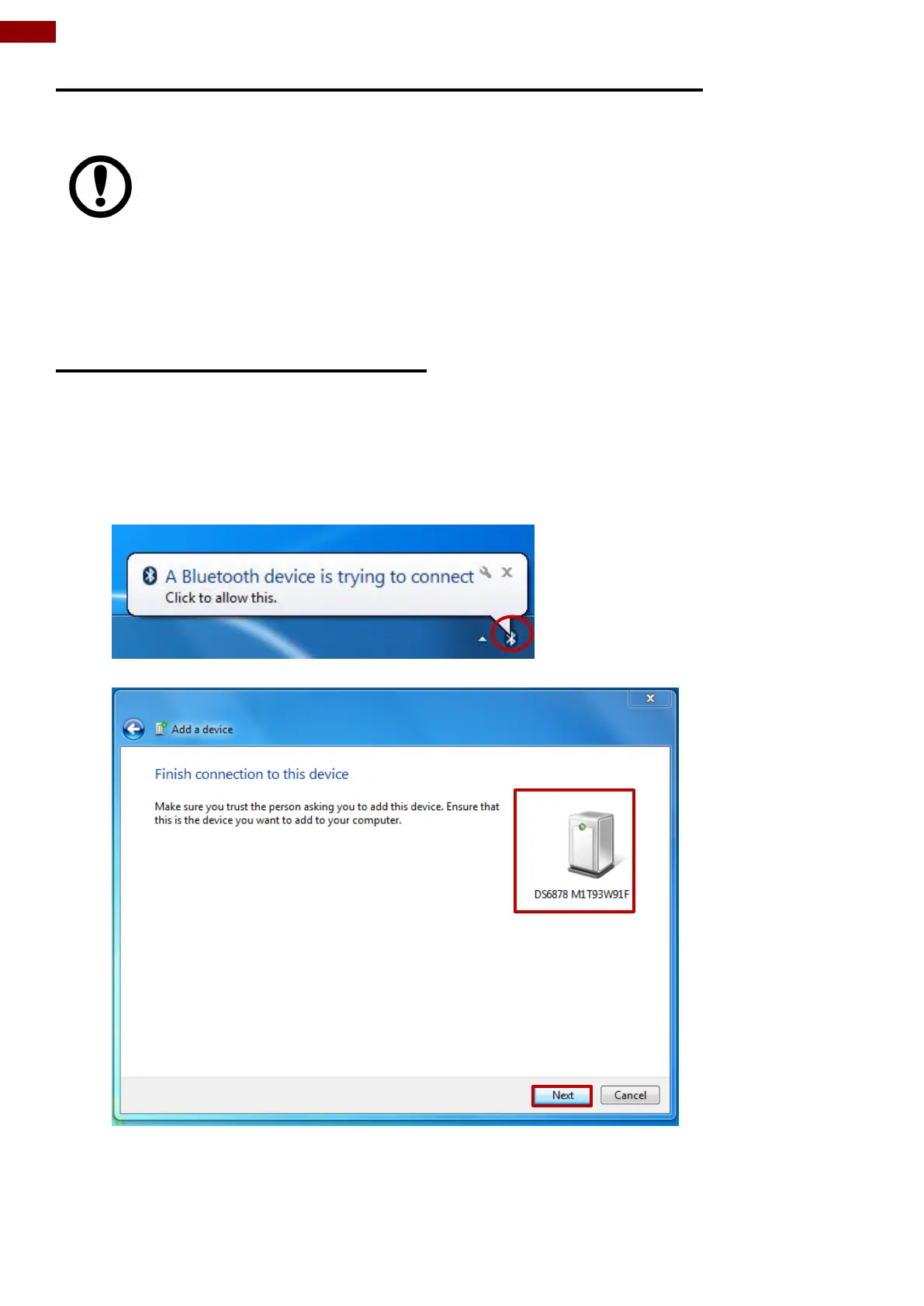
2. Perform scanning procedures. A Bluetooth notification window pop-up on the right hand
side of the desktop. Left click on the mouse to enter Add a device menu.
3. In Add a device window, click Next to connect the Barcode Scanner to the Computer.
IMPORTANT:
The wireless Bluetooth Barcode Scanner has to be configured as Bluetooth Serial
Port Profile Master device to establish connection via Bluetooth MAC address
barcode label. For a more detailed instruction, please refer to the User Guide for
the wireless Bluetooth Barcode Scanner you are using for paring.



 To Next Page