Tempro basic C 90 & Tempro primus C 90
Page 56
BASIC & PRIMUS C90 V 3.0 english / 10.04.2012
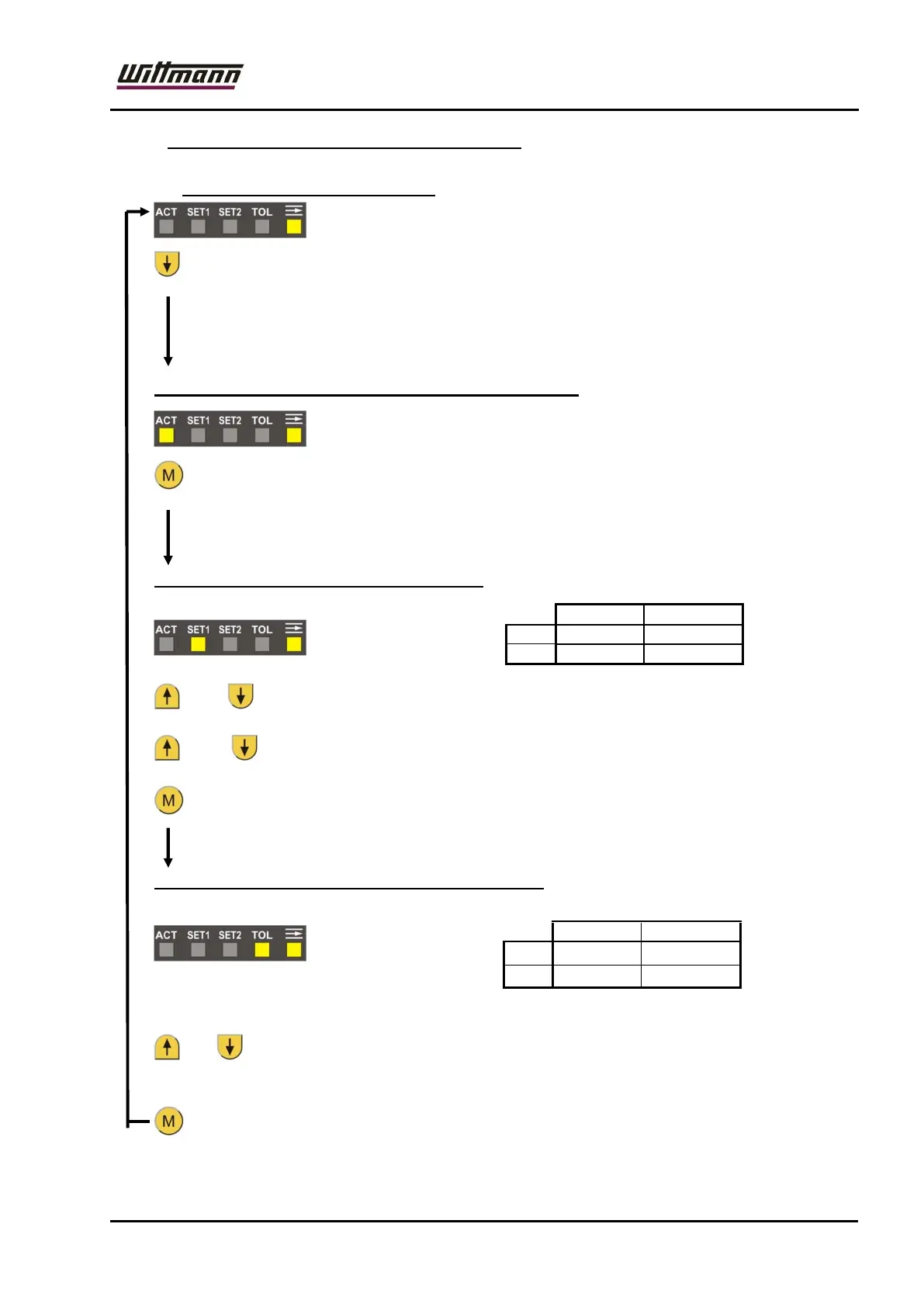
11.6.3 Description – Menus for flow indication:
11.6.3.1 Display – current flow value:
(2 sec.): From this menu – by pressing this button (for longer than 2
seconds), it is possible to reach the menus for settings for flow –
tolerance monitoring (LED “ACT“ lights up in addition).
Input options of values for the tolerance monitoring:
: From this menu – by pressing this button, it is possible to reach the
menu for setting the setpoint for flow tolerance monitoring.
Setpoint for flow – tolerance monitoring:
or : Change of setpoint for flow – tolerance monitoring
and : Accepting of the current flowrate value for setpoint.
: Go to menu „flow – tolerance“
Tolerance value for flow – tolerance monitoring:
* 0 = no tolerance monitoring!
or : Change of tolerance value for flow – tolerance monitoring.
By tolerance value = 0: tolerance monitoring is disabled!
: Back to menu “Display of actual flow value“.
°C °F
Min 1 l/min 0,5 GPM
Max 40 l/min 10 GPM
°C °F
Min
0 GPM
Max 40 l/min 10 GPM



 To Next Page