5-3
Troubleshooting CT Hoods and DD Ventilation
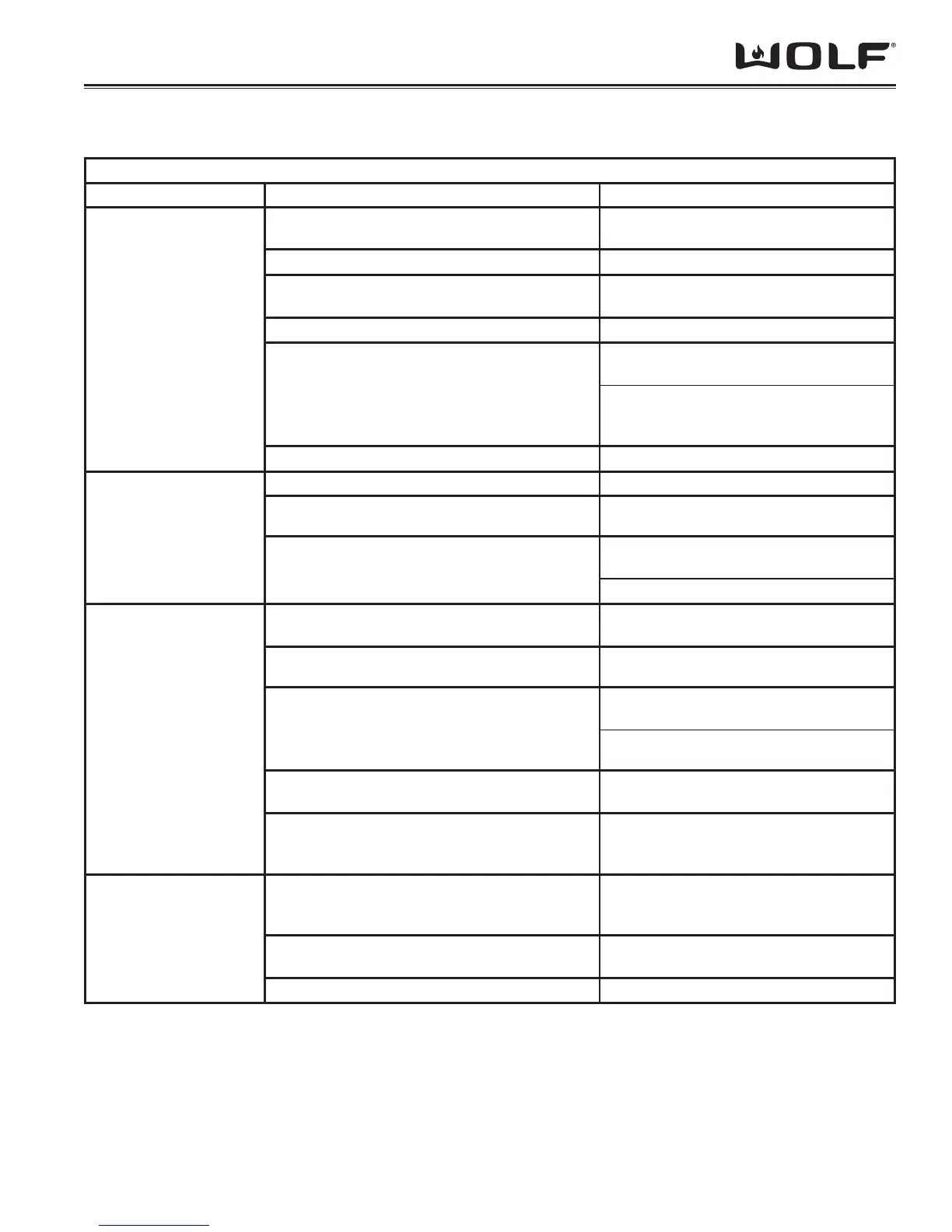
VENTILATION TROUBLESHOOTING
CTWH & IH
Symptom Diagnostic Test Resolution
Lights do not light
Check for incoming power to hood at CN2
(Black & White)
If no voltage reset power supply breaker
Check Bulbs for continuity Replace if defective
“Light” LED illuminated on touch control with
light selected.
If not illuminated replace Touch Control
Check Lighting Fuse for continuity Replace if defective
Check for 120 VAC at CN3 (plugged in) with
lights turned on
If no voltage replace Control Board
If voltage present - check for 120 VAC
at Lighting Transformer - if no voltage
change harness
Check for 12 VAC at Lighting Transformer If no 12 VAC replace transformer
Blower does not shut off Unit is above 174°F (79°C) Allow unit to cool down.
Remote blower wired improperly See Wiring Section for proper connection
Check continuity of Heat Sentry w/CN5
disconnected from Control Board.
If there is continuity replace Heat Sentry
If no continuity Replace Control Board
Blower does not run
If internal blower - make sure blower is plugged
in.
Plug blower in.
Remote blower wired improperly See Wiring Section for proper connection.
Disconnect CN4 and check for motor continuity
and ground
If no continuity verify wiring correct and no
broken wires
Replace motor if it is open or grounded
LED is not illuminated on touch control of
selected speed
Change touch control
Check for appropriate voltage at CN4 for
selected speed w/CN4 plugged in. (see Tech
Data Section)
Improper or no voltage: replace Control
Board
Hood does not move
enough air
Correct Ducting installation
See Ventilation Specs for proper duct size
- verify entire run is correct including wall/
roof cap
Make-up air may be required for adequate
operation
Open a window and if unit draws more
then make-up air is inadequate
Incorrect blower installed See Ventilation Specifi cations


 To Next Page