STEERING
STW34, STW37, STW40, WSM
7-S7
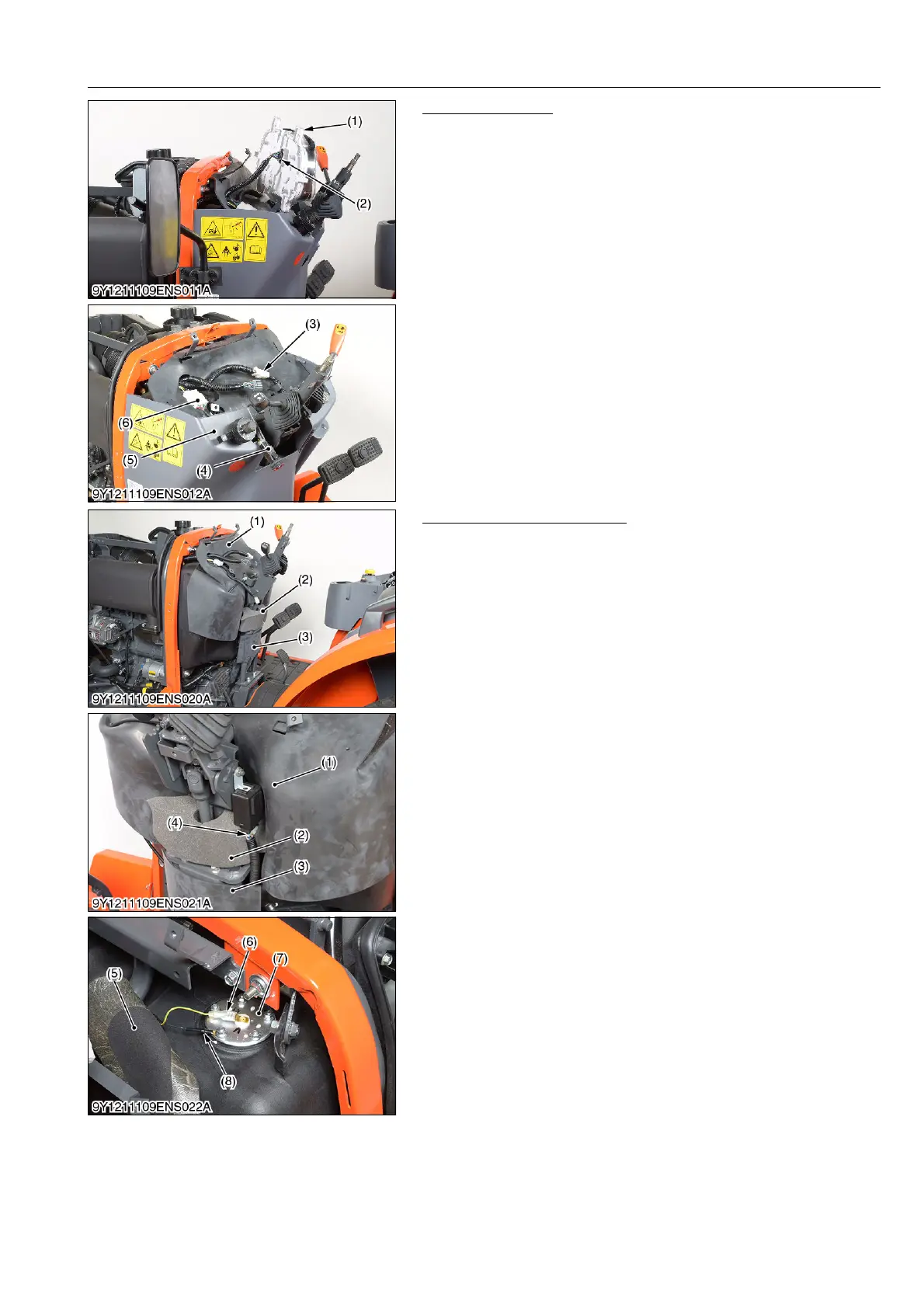
Instrument Panel
1. Remove the instrument panel mounting screws and disconnect
the instrument panel connector (2). Then remove the instrument
panel (1).
2. Disconnect the combination switch connector (6), main switch
connector (3) and hazard switch connector (4).
3. Remove the under cover (5).
9Y1211109ENS0023US0
Rubber and Wiring Harness
1. Remove the fuel tank cover (1)
2. Disconnect the OPC controller connector (4).
3. Remove the steering controller cover (3).
4. Remove the sponge (2).
5. Turn over the fuel sensor cover (5), and disconnect the
grounding wire (8) and 1P connector (6) from the fuel level
sensor (7).
9Y1211109ENS0024US0
(1) Instrument Panel
(2) Instrument Panel Connector
(3) Main Switch Connector
(4) Hazard Switch Connector
(5) Under Cover
(6) Combination Switch Connector
(1) Fuel Tank Cover
(2) Sponge
(3) Steering Controller Cover
(4) OPC Controller Connector
(5) Fuel Sensor Cover
(6) 1P Connector
(7) Fuel Sensor
(8) Grounding Wire



 To Next Page