Chapter Three - Installation
21
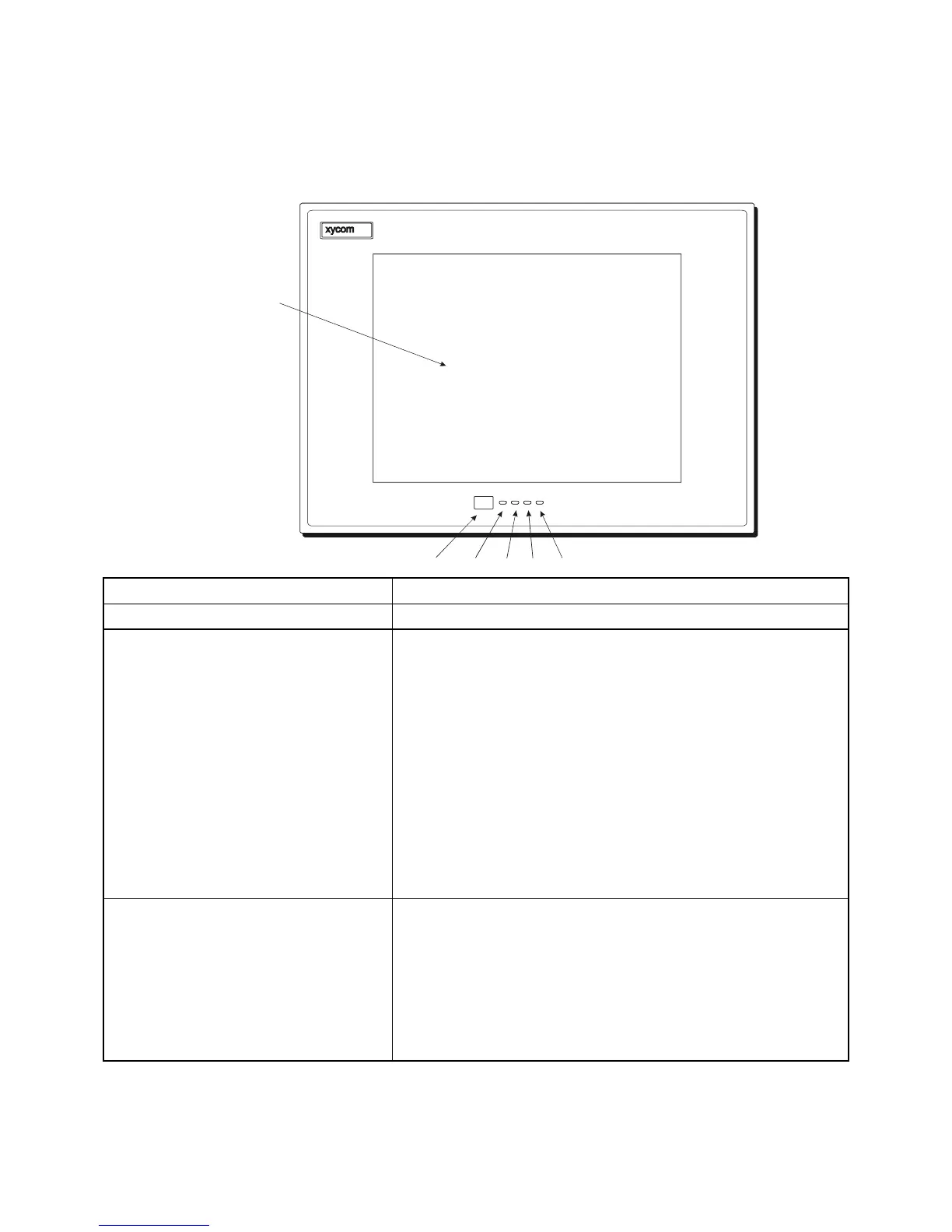
3535T Front Panel
IR PORT
POWER DISK COM INPUT
TOUCH
SCREEN
(OPT IONAL)
IR PORT POWER DISK
COM
INPUT
Feature Description
Display The 3535T has a 15-inch (1024 x 768) XGA flat panel display.
Diagnostics LED The 3535T features four status LEDs on the front panel, which
you can use to monitor system operation.
Power There is power to the 3535.
Disk The computer module is accessing the disk drive.
COM There is communication activity on one of the
computer module’s serial ports, including
communication between the computer module and the
touchscreen (if on COM2) or a serial device.
Input The unit has a touchscreen and the LED gets brighter
when touch input is detected.
During power-up, firmware on the processor board checks the
hardware configuration against the configuration stored in the
CMOS memory.
IR (Infrared) The IR port transceiver is located behind this window. The
3535 IR port is IrDA, and ASK-IR compliant. You can connect
the 3535 to any IrDA compatible device, if you load special
software (not included). The infrared (IR) link operates at a
distance of 0 to 1 meter and is capable of 115 Kbaud transfer
rates. Enable the interface through the BIOS setup menus.
Note: When the IR port is chosen, COM2 is not available.
Correspondingly, if COM2 is in use by the touchscreen the IR is not
operational.



 To Next Page