R
e
f
e
r
e
n
c
e
80 PSR-E413 Owner’s Manual
Memorize Your Favorite Panel Settings
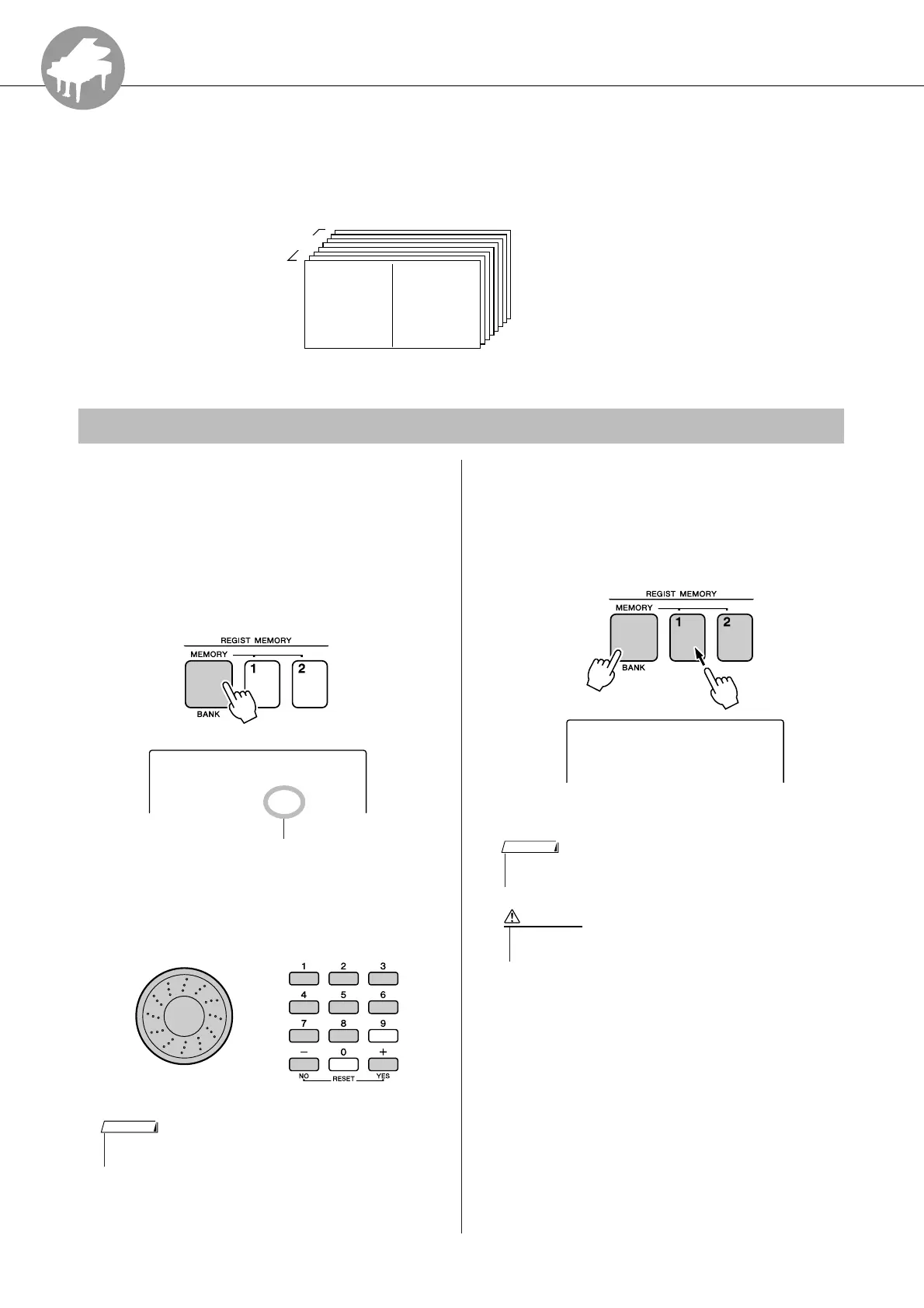
This instrument has a Registration Memory feature that lets you save your favorite set-
tings for easy recall whenever they’re needed. Up to 16 complete setups can be saved
(8 banks of two setups each).
1
Set the panel controls as required—
select a voice, accompaniment style,
etc.
2
Press the [MEMORY/BANK] button. A
bank number will appear in the display
when you release the button.
3
Use the dial or the [1]–[8] number but-
tons to select a bank number from 1 to
8.
4
Press the REGIST MEMORY [1] or [2]
button while holding the [MEMORY/
BANK] button to store the current panel
settings to the specified registration
memory.
8 Banks
Memory 1
Up to 16 presets (eight
banks of two each) can be
memorized.
Memory 2
Saving to the Registration Memory
1
Bank
Bank number
• Data cannot be saved to the registration memory during song play-
back.
NOTE
• If you select a Registration Memory number that already contains
data, the previous data is deleted and overwritten by the new data.
NOTE
• Do not turn off the power while saving settings to the registra-
tion memory, otherwise the data may be damaged or lost.
CAUTION















 To Next Page