RX-A4A
34
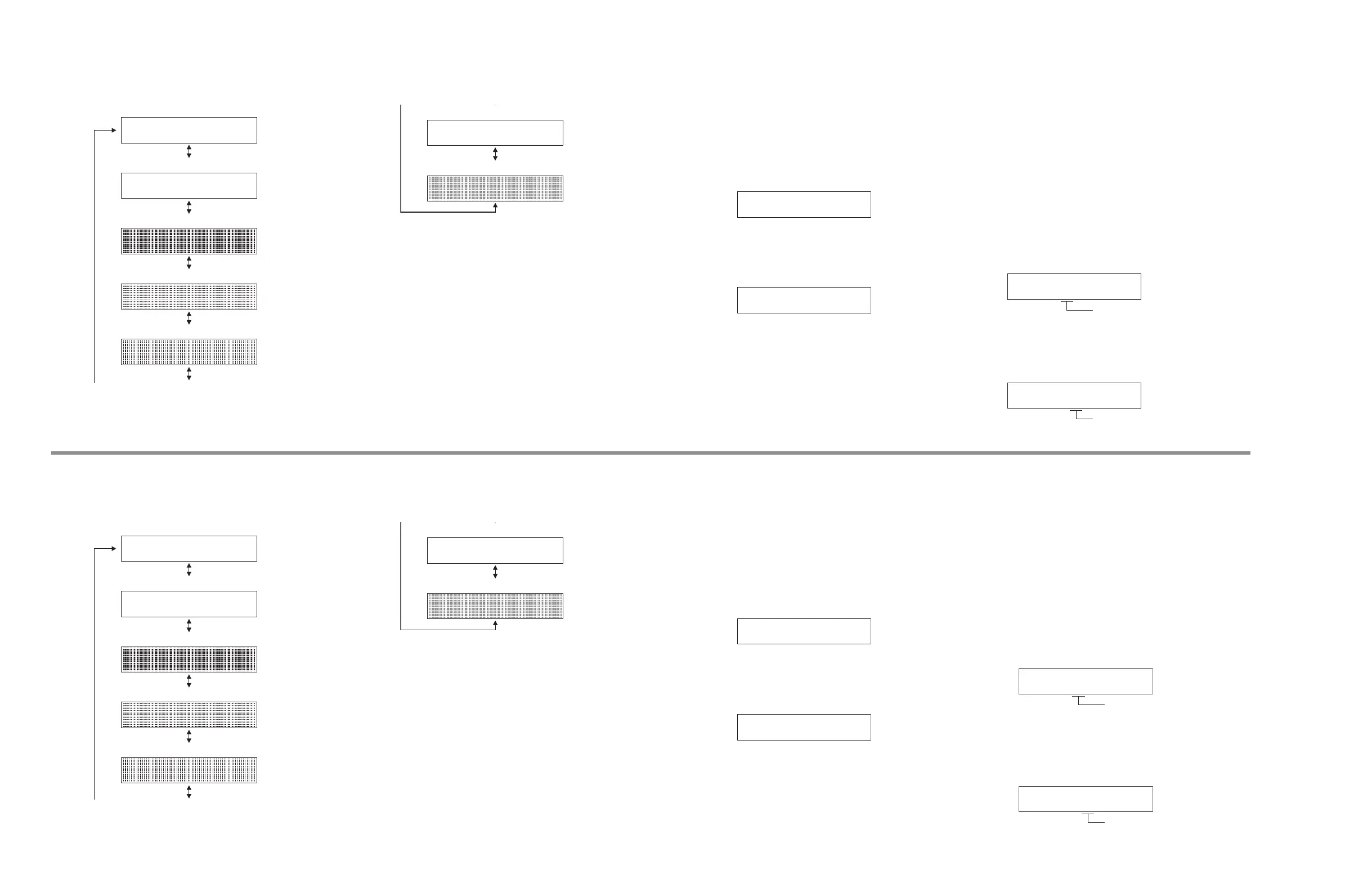
D1. LCD CHECK
LCD 表示の動作をチェックします。
####################
####################
D1-1
LCD CHECK
D1-1. 初期表示
D1-2. LCD 全セグメント点灯
D1-3. LCD 全セグメント消灯
D1-4. LCD パターン 1
D1-5. LCD パターン 2
####################
####################
D1-6. LCD クロストーク
D1-7. LCD ディマー
LCD 全セグメント消灯・全セグメント点灯により LCD の
セグメントの不良を確認します。
全セグメント点灯時には、スタンバイ、SURROUND AI、
PURE DIRECT、ZONE インジケーターも点灯します。
U1. USB
USB フラッシュメモリーからの音声信号の経路をチェッ
クします。
U1-1. USB FRONT 1 TRACK
USB 端子に接続された USB フラッシュメモリーに
保存された音楽ファイルの 1 曲目が再生されます。
※ あらかじめ PC から USB フラッシュメモリー
のルートフォルダに音楽ファイルを 2 曲以上コ
ピーしてください。
U1-1
USB_F 1 TRACK
U1-2. USB FRONT 2 TRACK
USB 端子に接続された USB フラッシュメモリーに
保存された音楽ファイルの 2 曲目が再生されます。
U1-2
USB_F 2 TRACK
N1. NETWORK
ネットワークに関連する機能をチェックします。
ブロードバンドルーターの LAN ポートと本機の
NETWORK 端子をネットワークケーブルで接続します。
※ サブメニュー表示中にネットワークの状態が変わると
(たとえばネットワークが一時切れるなど)正しい結果
が表示されません。
その場合、一度本機の電源を切り、ダイアグを再起動
して本メニューを選択します。
N1-1. IP ADDRESS CHECK
IP アドレスが取得されていることをチェックしま
す。
N1-1
IP AD CHK:OK
OK: 接続(IP アドレス取得完了)
NG: 通信不能/接続が切れている
N1-2. MAC ADDRESS CHECK
MAC アドレスが書き込まれていることをチェック
します。
N1-2
MAC AD CHK:OK
OK: 正常
NG: 書き込まれていない
D1. LCD CHECK
This menu is used to check operation of the LCD display.
####################
####################
D1-1
LCD CHECK
D1-1. INITIAL DISPLAY
D1-2. ALL LCD SEGMENT ON
D1-3. ALL LCD SEGMENT OFF
D1-4. LCD PATTERN 1
D1-5. LCD PATTERN 2
####################
####################
D1-6. LCD CROSSTALK
D1-7. LCD DIMMER
Segment conditions of the LCD is checked by turning ON
and OFF all segments.
When all segments turned ON, standby, SURROUND AI,
PURE DIRECT and ZONE indicators also turn ON.
U1. USB
This menu is used to check the audio signal route from
USB storage device.
U1-1. USB FRONT 1 TRACK
The 1st music file stored in the USB storage device
connected to the USB jack is reproduced.
* Copy 2 or more music files from PC to the root
folder of the USB storage device in advance.
U1-1
USB_F 1 TRACK
U1-2. USB FRONT 2 TRACK
The 2nd music file stored in the USB storage
device connected to the USB jack is reproduced.
U1-2
USB_F 2 TRACK
N1. NETWORK
This menu is used to check functions related to
NETWORK.
Connect between LAN port of broadband router and
NETWORK jack of this unit with a network cable.
* When the network condition varies while sub-menu is
displayed (e.g., the network is deactivated once), the
correct result will not be displayed.
In that case, once turn off the power to this unit, then
start up the self-diagnostic function again and select
this menu.
N1-1. IP ADDRESS CHECK
This menu is used to check that IP address can be
obtained.
N1-1
IP AD CHK:OK
OK: Connected (IP address obtained)
NG: No traffic / Disconnected
N1-2. MAC ADDRESS CHECK
This menu is used to check that MAC address is
written.
N1-2
MAC AD CHK:OK
OK: Normal
NG: Unwritten



 To Next Page