EasyManua.ls Logo

Yamaha RX5 - Page 45

Yamaha RX5
81 pages
Print Icon
To Next Page IconTo Next Page
To Previous Page IconTo Previous Page
Loading...
Voice
Assign
КеуА
:Crt-BD
3
New
voice
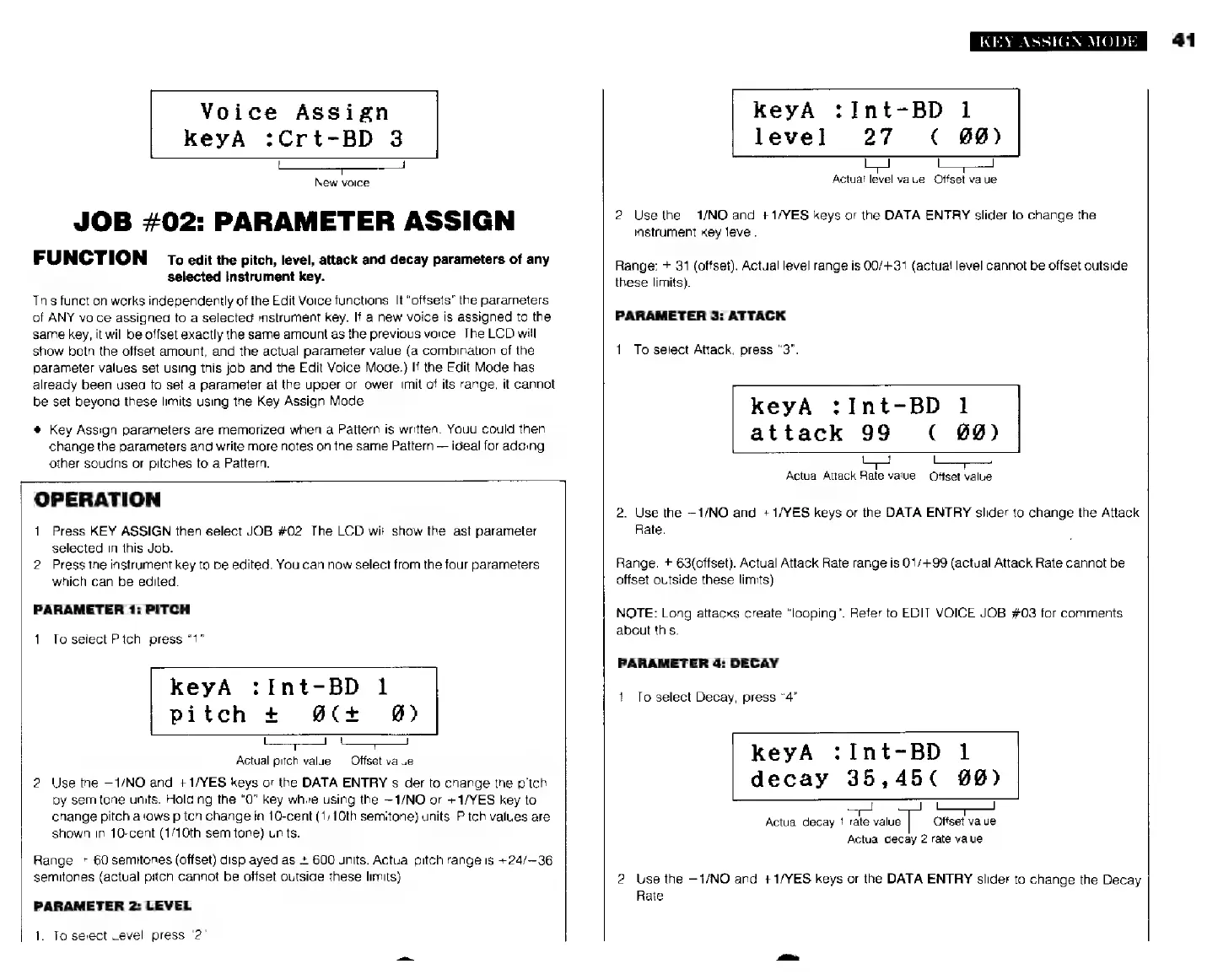
JOB
#02:
PARAMETER
ASSIGN
FUNCTION
то
edit
the
pitch,
level,
attack
and
decay
parameters
of
any
selected
Instrument
key.
This
function
works
independently
of
the
Edit
Voice
functions.
It
“offsets”
the
parameters
of
ANY
voice
assigned
to
a
selected
instrument
key.
If
a
new
voice
is
assigned
to
the
same
key,
it
will
be
offset
exactly
the
same
amount
as
the
previous
voice.
The
LCD
will
show
beth
the
offset
amount,
and
the
actual
parameter
value
(a
combination
of
the
parameter
values
set
using
this
job
and
the
Edit
Voice
Mode.)
If
the
Edit
Mode
has
already
been
used
to
set
a
parameter
at
the
upper
or
lower
limit
of
its
range,
it
cannot
be
set
beyond
these
limits
using
the
Key
Assign
Mode.
*
Key
Assign
parameters
are
memorized
when
a
Pattern
is
written.
Youu
could
then
change
the
parameters
and
write
more
notes
on
the
same
Pattern
ideal
for
adding
other
soudns
or
pitches
to
a
Pattern.
OPERATION
1.
Press
KEY
ASSIGN
then
select
JOB
#02.
The
LCD
мії!
show
the
last
parameter
selected
in
this
Job.
2.
Press
the
instrument
key
to
be
edited.
You
can
now
select
from
the
four
parameters
which
can
be
edited.
PARAMETER
1:
PITCH
1.
To
seiect
Pitch,
press
"1".
keyA
:Int-BD
1
pitch
+
#(+
@)
l
*—
Actual
pitch
value
Offset
value
2.
Use
the
—1/NO
and
+1/YES
keys
or
the
DATA
ENTRY
slider
to
change
the
pitch
by
semitone
units.
Holding
the
“О”
key
while
using
the
—1/NO
or
+1/YES
key
to
change
pitch
allows
pitch
change
in
10-cent
(1/10th
semitone)
units.
Pitch
values
are
shown
in
10-cent
(1/10th
semitone)
units.
Range;
+
60
semitones
(offset)
displayed
as
+
600
units.
Actual
pitch
range
is
+24/—36
semitones
{actual
pitch
cannot
be
offset
outside
these
limits)
PARAMETER
2:
LEVEL
1.
To
select
Level,
press
"2".
KEY
ASSIGN
MODE
KeyA
:Int-BD
1
level
27
<
00)
Actual
level
value
Offset
value
2.
Use
the
-1/МО
and
+1/YES
keys
or
the
DATA
ENTRY
slider
to
change
the
instrument
Key
level.
Range:
+
31
(offset).
Actual
level
range
is
00/+31
(actual
level
cannot
be
offset
outside
these
limits).
PARAMETER
3:
ATTACK
1.
To
select
Attack,
press
“3”.
keyA
:Int-BD
1
attack
99
(
#0)
Actual
Attack
Rate
value
Offset
value
2.
Use
the
—1/NO
and
+1/YES
keys
or
the
DATA
ENTRY
slider
to
change
the
Attack
Rate.
Range:
+
63(offset).
Actual
Attack
Rate
range
is
01/+99
(actual
Attack
Rate
cannot
be
offset
outside
these
limits).
NOTE:
Long
attacks
create
“looping”.
Reter
to
EDIT
VOICE
JOB
#03
for
comments
about
this.
PARAMETER
4:
DECAY
1.
To
select
Decay,
press
"4"
keyA
:Int-BD
1
decay
35,45
(
09)
Actual
decay
1
rate
value
Offset
value
Actual
decay
2
rate
value
2.
Use
the
—1/NO
and
+1/YES
keys
or
the
DATA
ENTRY
slider
to
change
the
Decay
Rate.
41