EasyManua.ls Logo

Yamaha RX5 - Page 46

Yamaha RX5
81 pages
Print Icon
To Next Page IconTo Next Page
To Previous Page IconTo Previous Page
Loading...
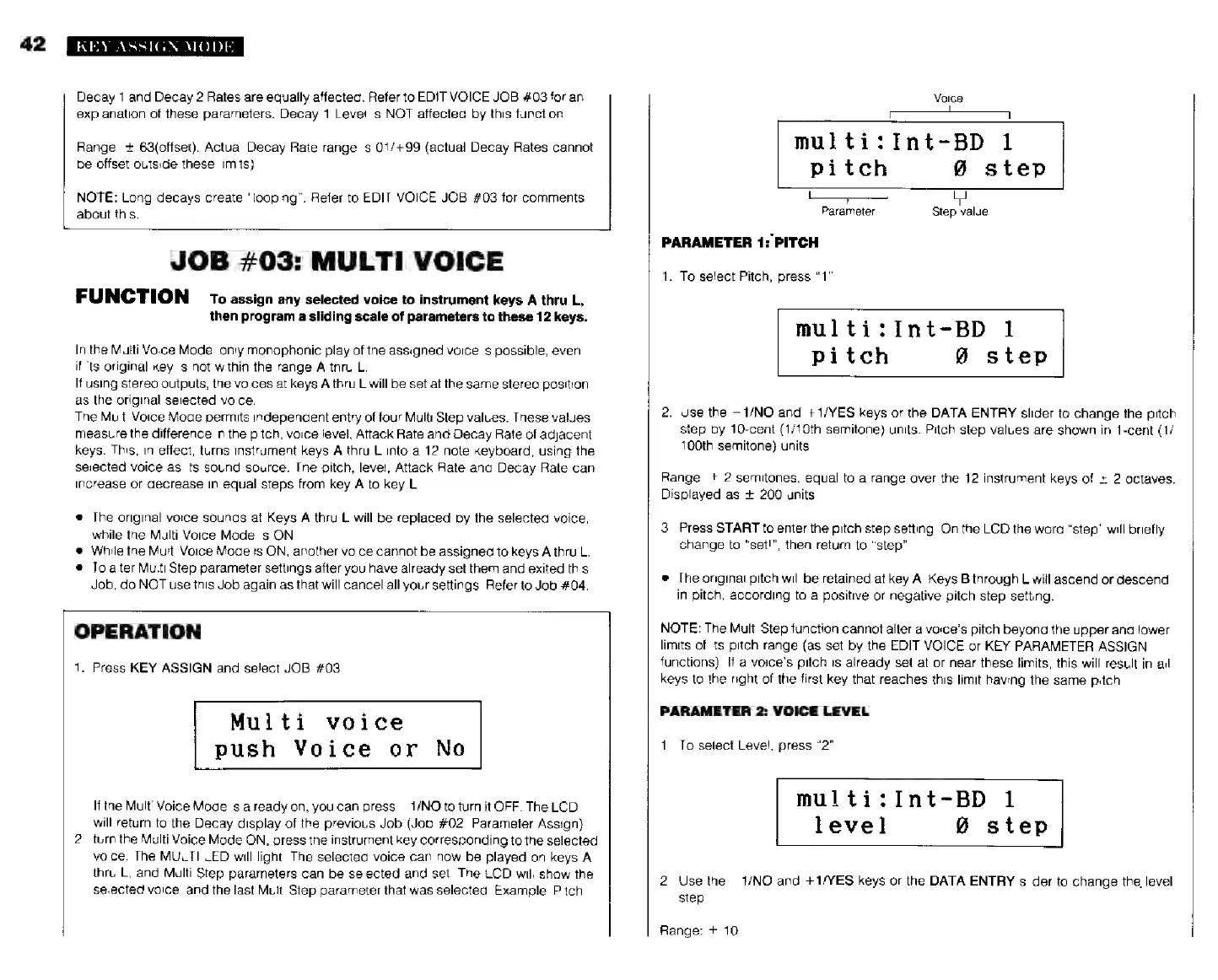
42
KEY
ASSIGN
MODE
Decay
1
and
Decay
2
Rates
are
equally
affected.
Refer
to
EDIT
VOICE
JOB
#03
for
an
explanation
of
these
parameters.
Decay
1
Level
is
NOT
affected
by
this
function.
Range:
+
63(offset).
Actual
Decay
Rate
range
is
01/+99
(actual
Decay
Rates
cannot
be
offset
outside
these
limits).
NOTE:
Long
decays
create
“looping”.
Refer
to
EDIT
VOICE
JOB
#03
for
comments
about
this.
JOB
#03:
MULTI
VOICE
FUNCTION
то
assign
any
selected
voice
to
instrument
keys
A
thru
L,
then
program
a
sliding
scale
of
parameters
to
these
12
keys.
In
the
Mutti
Voice
Mode,
only
monophonic
play
of
the
assigned
voice
is
possible,
even
if
its
original
key
is
not
within
the
range
A
thru
L.
If
using
stereo
outputs,
the
voices
at
keys
А
thru
L
will
be
set
at
the
same
stereo
position
as
the
original
selected
voice.
The
Multi
Voice
Mode
permits
independent
entry
of
four
Multi
Step
values.
These
values
measure
the
difference
in
the
pitch,
voice
level,
Attack
Rate
and
Decay
Rate
of
adjacent
keys.
This,
in
effect,
turns
instrument
keys
A
thru
L
into
a
12-note
keyboard,
using
the
selected
voice
as
its
sound
source.
The
pitch,
level,
Attack
Rate
and
Decay
Rate
can
increase
or
decrease
in
equal
steps
from
key
A
to
key
L.
Тһе
original
voice
sounds
at
Keys
A
thru
L
will
be
replaced
by
the
selected
voice,
while
the
Multi
Voice
Mode
is
ON.
*
While
the
Multi
Voice
Mode
is
ON,
another
voice
cannot
be
assigned
to
keys
À
thru
L.
*
To
alter
Multi
Step
parameter
settings
after
vou
hàve
already
set
them
and
exited
this
Job,
do
NOT
use
this
Job
again
as
that
will
cancel
all
your
settings.
Refer
to
Job
#04.
OPERATION
1.
Press
KEY
ASSIGN
and
select
JOB
#03.
Multi
voice
push
Voice
or
No
If
the
Multi
Voice
Mode
is
already
on,
you
can
press
—1/NO
to
turn
it
OFF.
The
LCD
will
return
to
the
Decay
display
of
the
previous
Job
(Job
#02:
Parameter
Assign).
2.
turn
the
Multi
Voice
Mode
ON,
press
the
instrument
key
corresponding
to
the
selected
voice.
Ihe
MULTI
LED
will
light.
The
selected
voice
can
now
be
played
on
keys
А
thru
L,
and
Multi
Step
parameters
can
be
selected
and
set.
The
LCD
will
show
the
Selected
voice,
and
the
last
Multi
Step
parameter
that
was
selected.
Example:
Pitch.
Voice
multi:Int-BD
1
pitch
@
step
Parameter
Step
value
PARAMETER
1:
PITCH
1.
To
select
Pitch,
press
“1”.
multi:Int-BD
1
pitch
8
step
2.
Use
the
-1/МО
and
+1/YES
keys
or
the
DATA
ENTRY
slider
to
change
the
pitch
step
by
10-cent
(1/10th
semitone)
units.
Pitch
step
values
are
shown
in
1-cent
(1/
100th
semitone)
units.
Range:
+
2
semitones,
equal
to
a
range
over
the
12
instrument
keys
of
+
2
octaves.
Displayed
as
+
200
units.
3.
Press
START
to
enter
the
pitch
step
setting.
On
the
LCD
the
word
"step"
will
briefly
change
to
"set!",
then
return
to
"step"
*
The
original
pitch
will
be
retained
at
key
A.
Keys
B
through
L
will
ascend
or
descend
in
pitch,
according
to
a
positive
or
negative
pitch
step
setting.
NOTE:
The
Multi
Step
function
cannot
alter
a
voice's
pitch
beyond
the
upper
and
lower
limits
of
its
pitch
range
(as
set
by
the
EDIT
VOICE
or
KEY
PARAMETER
ASSIGN
functions).
I!
a
voice's
pitch
is
already
set
at
or
near
these
limits,
this
will
result
in
all
keys
to
the
right
of
the
first
key
that
reaches
this
limit
having
the
same
pitch.
PARAMETER
2:
VOICE
LEVEL
1.
To
select
Level,
press
"2"
multi:Int-BD
1
level
P
step
2.
Use
the
—1/NO
and
+1/YES
keys
or
the
DATA
ENTRY
slider
to
change
the
level
step.
Range:
+
10.