EasyManua.ls Logo

Yamaha RX5 - Page 48

Yamaha RX5
81 pages
Print Icon
To Next Page IconTo Next Page
To Previous Page IconTo Previous Page
Loading...
44
KEY
ASSIGN
MODE
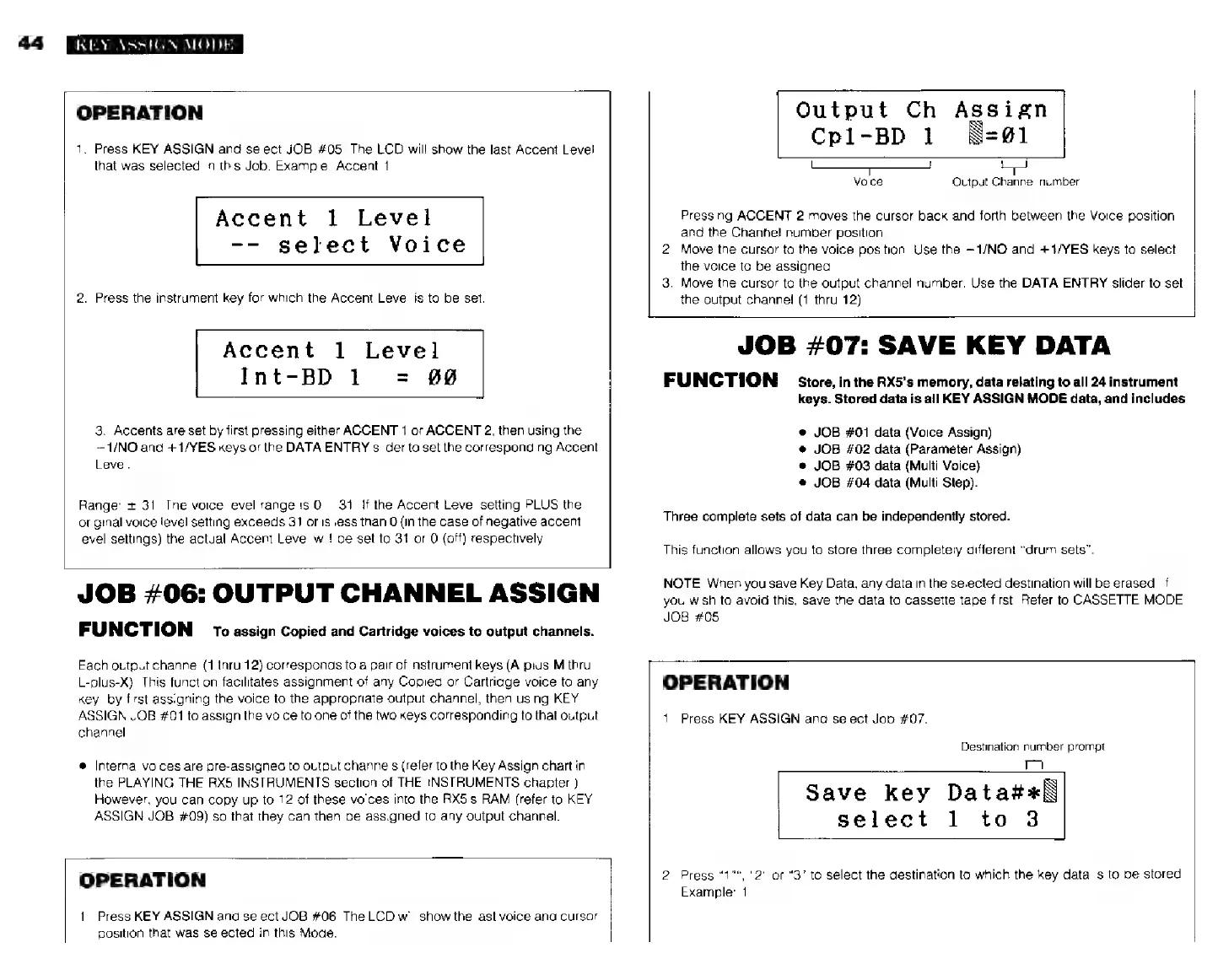
OPERATION
1.
Press
KEY
ASSIGN
and
select
JOB
#05.
The
LCD
will
show
the
last
Accent
Level
that
was
selected
in
this
Job.
Example:
Accent
1.
Accent
1
Level
--
select
Voice
2.
Press
the
instrument
key
for
which
the
Accent
Level
is
to
be
set.
Accent
1
Level
Int-BD
1
=
#0
3.
Accents
are
set
by
first
pressing
either
ACCENT
1
or
ACCENT
2,
then
using
the
—1/NO
and
+1/YES
keys
or
the
DATA
ENTRY
slider
to
set
the
corresponding
Accent
Level.
Range:
+
31.
The
voice
level
range
is
0
31.
If
the
Accent
Level
setting
PLUS
the
original
voice
level
setting
exceeds
31
oris
less
than
0
(in
the
case
of
negative
accent
level
settings)
the
actual
Accent
Level
will
be
set
to
31
or
0
(off)
respectively.
JOB
#06:
OUTPUT
CHANNEL
ASSIGN
FUNCTION
то
assign
Copied
and
Cartridge
voices
to
output
channels.
Each
output
channel
(1
thru
12)
corresponds
to
a
pair
of
instrument
keys
(A-plus-M
thru
L-plus-X).
This
function
facilitates
assignment
of
any
Copied
or
Cartridge
voice
to
any
key,
by
first
assigning
the
voice
to
the
appropriate
output
channel,
then
using
KEY
ASSIGN
JOB
#01
to
assign
the
voice
to
one
of
the
two
keys
corresponding
to
that
output
channel.
*
Internal
voices
are
pre-assigned
to
output
channels
(refer
to
the
Key
Assign
chart
in
the
PLAYING
THE
RX5
INSTRUMENTS
section
of
THE
INSTRUMENTS
chapter.)
However,
you
can
copy
up
to
12
of
these
voices
into
the
RX5's
RAM
(refer
to
KEY
ASSIGN
JOB
#09)
so
that
they
can
then
be
assigned
to
any
output
channel.
OPERATION
1.
Press
KEY
ASSIGN
and
select
JOB
#06.
The
LCD
will
show
the
last
voice
and
cursor
position
that
was
selected
in
this
Mode.
Output
Ch
Assign
Cpl-BD
1
WN=@1
Voice
Output
Channel
number
Pressing
ACCENT
2
moves
the
cursor
back
and
forth
between
the
Voice
position
and
the
Chanhel
number
position.
2.
Move
the
cursor
to
the
voice
position.
Use
the
-1/МО
and
+1/YES
keys
to
select
the
voice
to
be
assigned
3.
Move
the
cursor
to
the
output
channel
number.
Use
the
DATA
ENTRY
slider
to
set
the
output
channel
(1
thru
12)
JOB
#07:
SAVE
KEY
DATA
FUNCTION
Store,
inthe
RX5's
memory,
data
relating
to
all
24
instrument
keys.
Stored
data
is
all
KEY
ASSIGN
MODE
data,
and
includes
JOB
#01
data
(Voice
Assign)
JOB
#02
data
(Parameter
Assign)
JOB
#03
data
(Multi
Voice}
JOB
#04
data
(Multi
Step).
Three
complete
sets
of
data
can
be
independently
stored.
This
function
allows
уси
to
store
three
completely
different
“drum
sets”.
NOTE:
When
you
save
Key
Data,
any
data
in
the
selected
destination
will
be
erased.
If
you
wish
to
avoid
this,
save
the
data
to
cassette
tape
first.
Refer
to
CASSETTE
MODE
JOB
#05
OPERATION
1.
Press
KEY
ASSIGN
and
select
Job
#07.
Destination
number
prompt
Save
key
Data#t«\
select
1
to
3
2.
Press
“1"*,
"2"
ог
“3°
to
select
the
destination
to
which
the
key
data
is
to
be
stored
Example:
1.