EasyManua.ls Logo

Yamaha V50 - Page 38

Yamaha V50
81 pages
Print Icon
To Next Page IconTo Next Page
To Previous Page IconTo Previous Page
Loading...
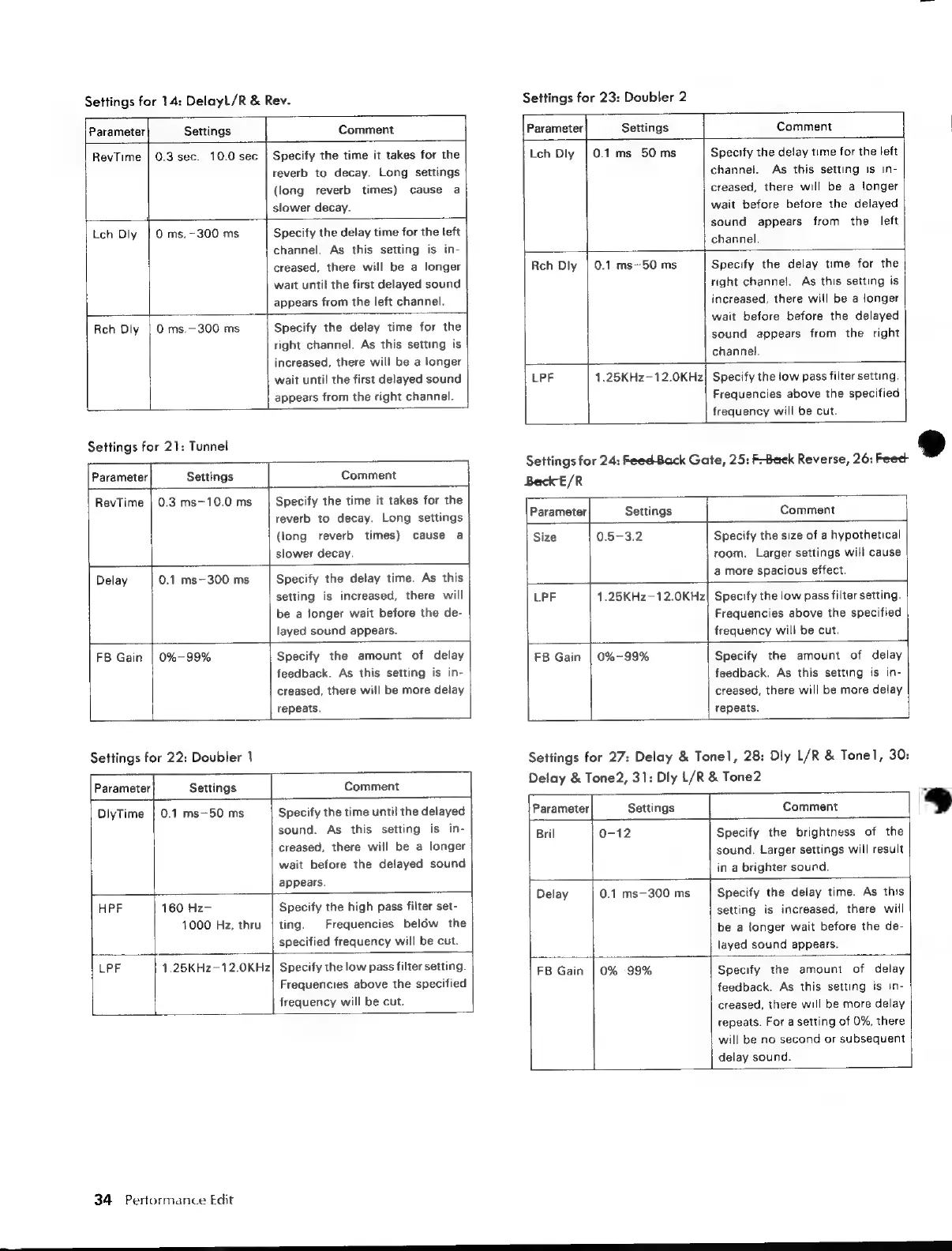
Settings
for
14:
Delayl/R
&
Rev.
Settings
for
23:
Doubler
2
Parameter
Settings
Comment
RevTime
|
0.3
sec.—10.0
sec
4
Specify
the
time
it
takes
for
the
reverb
to
decay.
Long
settings
(long
reverb
times)
cause
a
i
slower
decay.
Lch
Diy
|
0
ms.—300
ms
Specify
the
delay
time
for
the
teft
channel.
As
this
setting
is
in-
creased,
there
will
be
a
longer
wait
until
the
first
delayed
sound
appears
from
the
left
channel.
Rch
Dly
|
0
ms.—300
ms
Specify
the
delay
time
for
the
right
channel.
As
this
setting
is
increased,
there
will
be
a
longer
wait
until
the
first
delayed
sound
appears
from
the
right
channel.
Settings
for
21:
Tunnel
Parameter
Settings
Comment
|.
RevTime
|
0.3
ms—10.0
ms
Specify
the
time
it
takes
for
the
reverb
to
decay.
Long
settings
(long
reverb
times)
cause
a
slower
decay.
Settings
for
22:
Doubler
1
eS
Delay
0.1
ms-300
ms
Specify
the
delay
time.
As
this
setting
is
increased,
there
will
be
a
longer
wait
before
the
de-
layed
sound
appears.
ee
FB
Gain
|
0%-99%
feedback.
As.
this
setting
is
in-
creased,
there
will
be
more
delay
repeats.
Specify
the
amount
of
delay
Parameter
Settings
Comment
H
|
DlyTime
|
0.1
ms—50
ms
Specify
the
time
until
the
delayed
sound.
As
this
setting
is
in-
creased,
there
will
be
a
longer
wait
before
the
delayed
sound
appears.
HPF
160
Hz-
Specify
the
high
pass
filter
set-
1000
Hz,
thru
|
ting.
Frequencies
below
the
|
Specified
frequency
will
be
cut.
LPF
1.25KHz--12.0KHz|
Specify
the
low
pass
filter
setting.
Frequencies
above
the
specified
frequency
will
be
cut.
34
Performance
Edit
Comment
Specify
the
delay
time
for
the
left
channel.
As
this
setting
is
in-
creased,
there
will
be
a
longer
wait
before
before
the
delayed
sound
appears
from
the
left
channel.
Specify
the
delay
time
for
the
right
channel.
As
this
setting
is
increased,
there
will
be
a
longer
wait
before
before
the
delayed
sound
appears
from
the
right
channel.
Parameter
Settings
Lch
Dly
|
0.1
ms—50
ms
Rch
Dly
|
0.1
ms—50
ms
=
LPF
1.25KHz-12.0KHz
Specify
the
iow
pass
filter
setting.
Frequencies
above
the
specified
frequency
will
be
cut.
Settings
for
24:
Feed
Back
Gate,
25:
F-Beek
Reverse,
26:
Feed
Beck
E/R
Parameter
Settings
Comment
Size
0.5-3.2
Specify
the
size
of
a
hypothetical
room.
Larger
settings
will
cause
a
more
spacious
effect.
LPF
1.25KHz—12.0KHz|
Specify
the
low
pass
filter
setting.
Frequencies
above
the
specified
frequency
will
be
cut.
m
FB
Gain
|
0%-99%
Specify
the
amount
of
delay
feedback.
As
this
setting
is
in-
creased,
there
will
be
more
delay
repeats.
Settings
for
27:
Delay
&
Tonel,
28:
Dly
L/R
&
Tonel,
30:
Delay
&
Tone2,
31:
Dly
L/R
&
Tone2
Parameter
Settings
Comment
Bril
0-12
Specify
the
brightness
of
the
sound.
Larger
settings
will
result
i
in
a
brighter
sound.
Delay
0.1
ms—300
ms
Specify
the
delay
time.
As
this
setting
is
increased,
there
will
be
a
longer
wait
before
the
de-
layed
sound
appears.
FB
Gain
|
0%-99%
Specify
the
amount
feedback.
As
this
setting
is
in-
creased,
there
will
be
more
delay
repeats.
For
a
setting
of
0%,
there
will
be
no
second
or
subsequent
delay
sound.
of
delay
3
a

Table of Contents

Other manuals for Yamaha V50

Related product manuals