Acceleration and Deceleration Characteristics
6-17
Switching Acceleration and Deceleration Time Automatically
Use this setting when you want to switch acceleration/deceleration time automatically using the output fre-
quency.
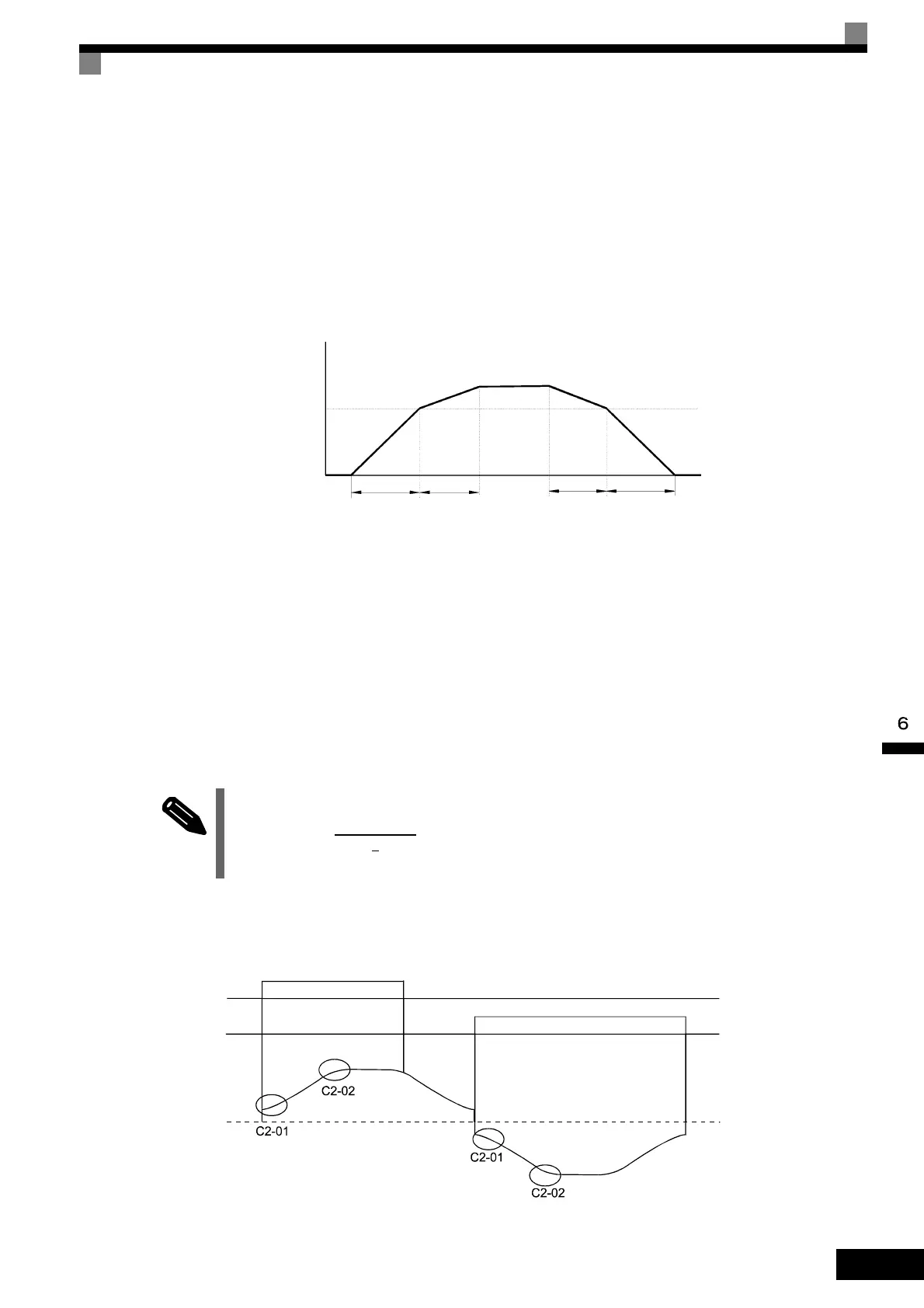
When the output frequency reaches the set value in C1-11, the Inverter switches the acceleration/deceleration
time automatically as shown in the following diagram.
Set C1-11 to a value other than 0.0 Hz. If C1-11 is set to 0.0 Hz, the function will be disabled.
Fig 6.16 Acceleration/deceleration Time Switching Frequency
Entering S-curve Characteristics in the Acceleration and Deceleration Time
By performing acceleration and deceleration using an S-curve pattern, you can reduce shock when starting and
stopping the machine.
Two S-curve characteristic times can be set: At acceleration start and at acceleration end. For deceleration
start and end the S-curve times are fixed to 0.2 sec.
Setting Example
The S-curve characteristic when switching operation (forward/reverse) is shown in the following diagram.
Fig 6.17 S-curve Characteristic during Operation Switching
When S-curve is set, calculate acceleration/deceleration time as follows:
Accel. time = + C1-01/03
Decel. time = 0.2 s + C1-02/04
Output frequency
Acceleration/deceler
ation time switching
frequency (C1-11)
C1-03 C1-01 C1-02 C1-04
When output frequency ≥ C1-11, acceleration and deceleration are performed using
Acceleration/deceleration Time 1 (C1-01, C1-02).
When output frequency < C1-11, acceleration and deceleration are performed using
Acceleration/deceleration Time 2 (C1-03, C1-04).
INFO
Forward
Reverse
Output frequency
C2-01 + C2-02
2
Artisan Technology Group - Quality Instrumentation ... Guaranteed | (888) 88-SOURCE | www.artisantg.com




 To Next Page