6-82
Using the Timer Function
The multi-function digital input terminals S3 to S7 can be used as timer function input terminals, and
multi-function output terminals M1-M2 and M3-M4 can be used as timer function output terminals. By setting
the delay time, you can prevent chattering of the sensors and switches.
• Set one of the constants H1-01 to H1-05 (multi-function contact input terminal S3 to S7) to 18 (timer func-
tion input).
• Set H2-01 or H2-02 (multi-function output terminals M1-M2 and M3-M4 function selection) to 12 (timer
function output).
Related Constants
Setting Example
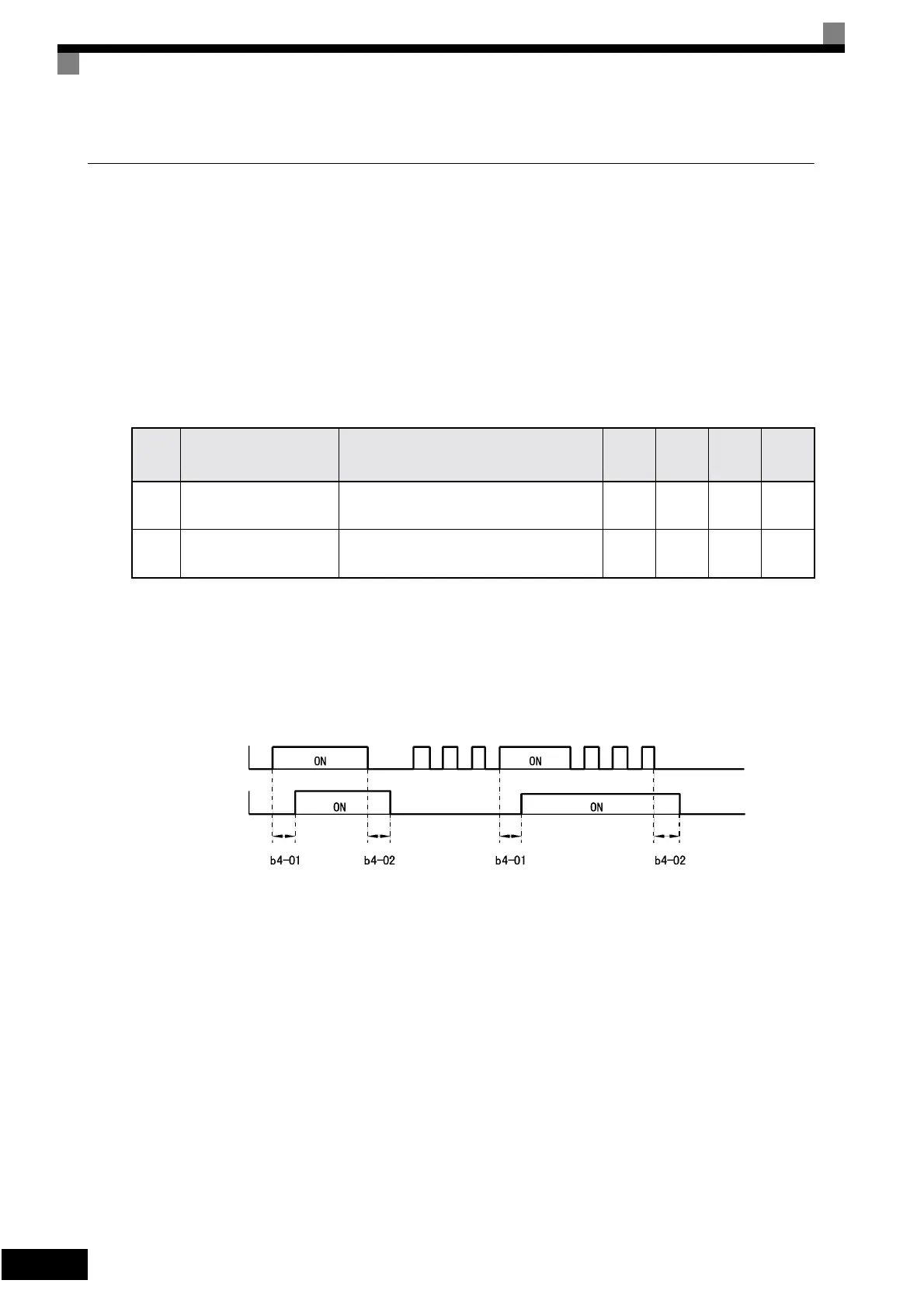
When the timer function input ON time is longer than the value set in b4-01, the timer output function is
turned ON. When the timer function input OFF time is longer than the value set in b4-02, the timer output
function is turned OFF. An example of timer function operation is given in the following diagram.
Fig 6.47 Timer Function Operation Example
Con-
stant
Number
Name Description
Setting
Range
Factory
Setting
Change
during
Opera-
tion
Access
Level
b4-01 Timer function ON-delay time
Set the timer function output ON delay time (dead time)
for the timer function input in 1-second units. Enabled
when a timer function is set in H1- and H2-.
0.0 to
300.0
0.0 s No A
b4-02 Timer function OFF-delay time
Set the timer function output OFF delay time (dead time)
for the timer function input in 1-second units. Enabled
when the timer function is set in H1- and H2-.
0.0 to
300.0
0.0 s No A
Timer function input
Timer function output
Artisan Technology Group - Quality Instrumentation ... Guaranteed | (888) 88-SOURCE | www.artisantg.com




 To Next Page