3-10
Verify Mode
Verify mode is used to display any constants that have been changed from their default settings in a program-
ming mode or by autotuning. “None” will be displayed if no settings have been changed.
Even in verify mode, the same procedures can be used to change settings as they are used in the programming
modes. Use the Increment, Decrement, and Shift/RESET keys to change the settings. The user constant will be
written and the monitor display will be returned to when the DATA/ENTER key is pressed.
Example Operations
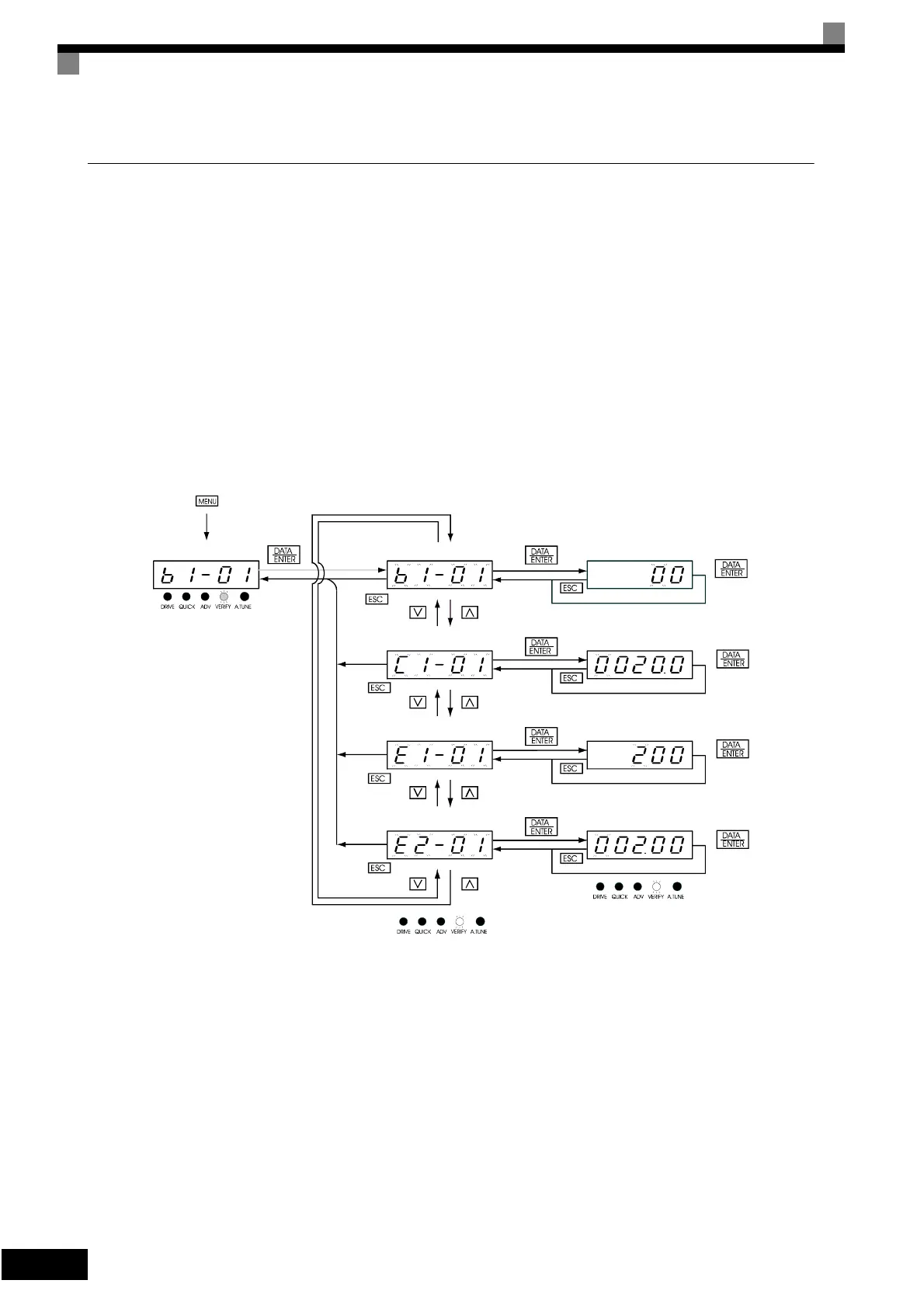
An example of key operations is given below for when the following settings have been changed from their
default settings: b1-01 (Reference Selection), C1-01 (Acceleration Time 1), E1-01 (Input Voltage Setting),
and E2-01 (Motor Rated Current).
Fig 3.7 Operations in Verify Mode
Mode Selection Display Monitor Display
Setting Display
Verify Mode
Frequency reference
selection
Acceleration time 1
Input voltage setting
Motor rated current
Frequency reference
selection
Acceleration time 1
Input voltage setting
Motor rated current
Artisan Technology Group - Quality Instrumentation ... Guaranteed | (888) 88-SOURCE | www.artisantg.com




 To Next Page