136
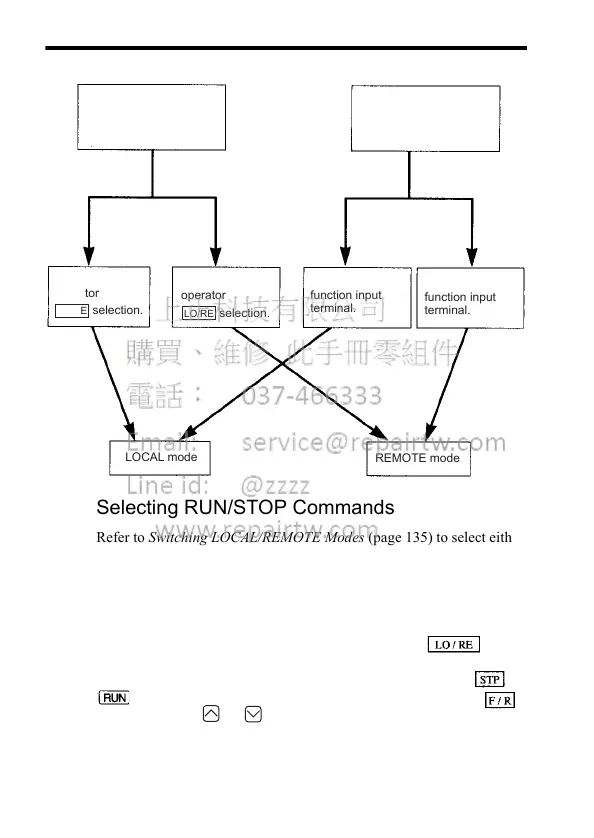
How to Select LOCAL/REMOTE Mode
Selecting RUN/STOP Commands
Refer to Switching LOCAL/REMOTE Modes (page 135) to select either
the LOCAL mode or REMOTE mode.
The operation method (RUN/STOP commands, FWD/REV RUN com-
mands) can be selected using the following method.
LOCAL Mode
When Lo (local mode) is selected for Digital Operator ON
mode, or when the LOCAL/REMOTE switching function is set and the
input terminals are turned ON, run operation is enabled by the or
on the Digital Operator, and FWD/REV is enabled by the
ON mode (using or key).
When LOCAL/REMOTE
switching function is not
set for multi-function
input selection
(When 17 is not set
for any of constants
n050 to n056)
Select Lo for
operator
LO/RE
selection.
Select rE for
operator
LO/RE
selection.
When LOCAL/REMOTE
switching function is set
for multi-function input
selection
(When 17 is set for
any of constants
n050 to n056)
Turn ON multi-
function input
terminal.
Turn OFF multi-
function input
terminal.
REMOTE mode
LOCAL mode













 To Next Page