7. Programming Features
143
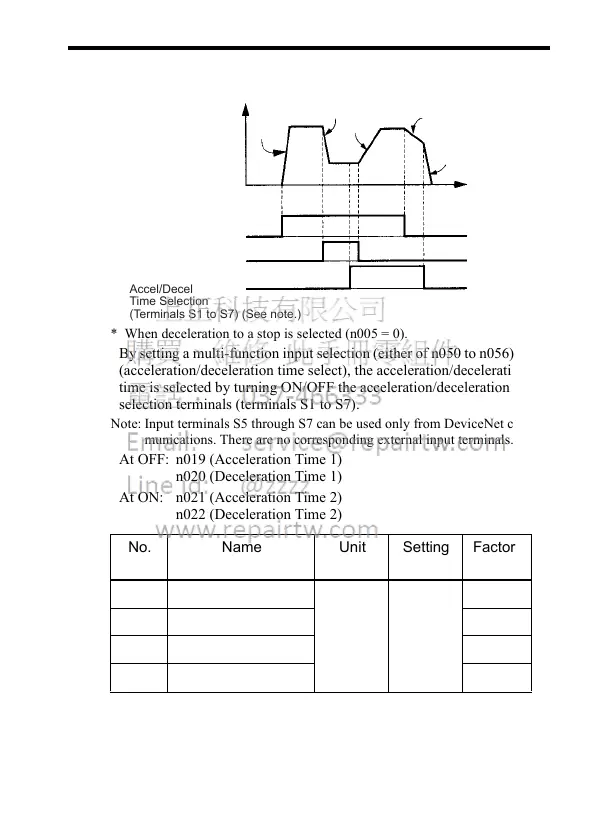
Using Two Acceleration/Deceleration Times
* When deceleration to a stop is selected (n005 = 0).
By setting a multi-function input selection (either of n050 to n056) to 11
(acceleration/deceleration time select), the acceleration/deceleration
time is selected by turning ON/OFF the acceleration/deceleration time
selection terminals (terminals S1 to S7).
Note: Input terminals S5 through S7 can be used only from DeviceNet com-
munications. There are no corresponding external input terminals.
At OFF: n019 (Acceleration Time 1)
n020 (Deceleration Time 1)
At ON: n021 (Acceleration Time 2)
n022 (Deceleration Time 2)
No. Name Unit Setting
Range
Factory
Setting
n019 Acceleration Time 1 Refer to
n018
setting
Refer to
n018
setting
10.0 s
n020 Deceleration Time 1 10.0 s
n021 Acceleration Time 2 10.0 s
n022 Deceleration Time 2 10.0 s
Accel
Time 1
(n019)
Decel
Time 1
(n020)
Accel
Time 2
(n021)
Decel
Time 2*
(n022)
Decel
Time 1*
(n020)
Time
ON
ON
ON
FORWARD (REVERSE)
FUN command
Multi-Step
Speed Reference
Accel/Decel
Time Selection
(Terminals S1 to S7) (See note.)













 To Next Page