26
• The dimensions shown for the distances on the left/right
and top/bottom of the Inverter apply to both mounting
within a panel (IP00 and IP20) and enclosed models
(NEMA1).
• When operating a 5.5-kW or 7.5-kW Inverter (200 V or
400 V Class) within a panel, always remove the top and
bottom covers.
Mounting/Removing Components
Removing and Mounting the Digital Operator and Covers
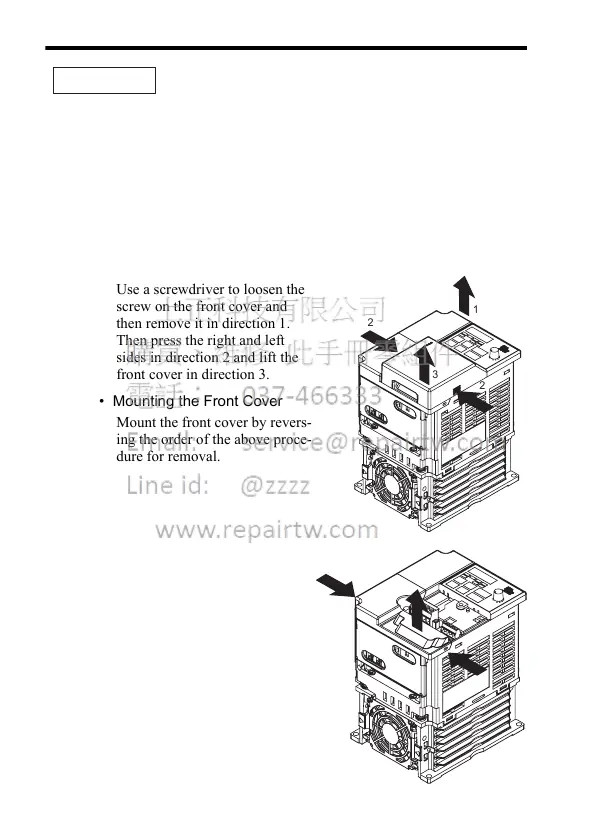
• Removing the Front Cover
Use a screwdriver to loosen the
screw on the front cover and
then remove it in direction 1.
Then press the right and left
sides in direction 2 and lift the
front cover in direction 3.
• Mounting the Front Cover
Mount the front cover by revers-
ing the order of the above proce-
dure for removal.
• Removing the Terminal Cover
After removing the front cover,
press the right and left sides of
the terminal cover in direction 1
and lift the terminal cover in
direction 2.
• Mounting the Terminal Cover
Mount the terminal cover by
reversing the order of the above
procedure for removal.
IMPORTANT
2
2
1
3
1
2
1













 To Next Page