192
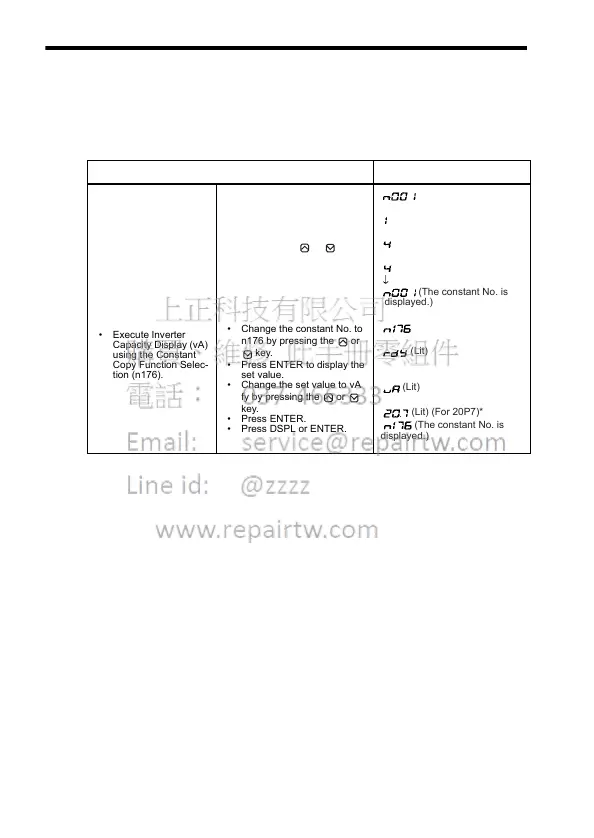
Inverter Capacity Display
The voltage class and maximum applicable motor capacity for which
constants are stored in the Digital Operator are displayed.
Example: Displaying Voltage Class and Maximum Applicable Motor
Capacity for Inverter whose Constants are in EEPROM in Operator
Explanation Operator Display
• Enable the setting for
constants n001 to
n179.
• Execute Inverter
Capacity Display (vA)
using the Constant
Copy Function Selec-
tion (n176).
• Press DSPL to light
[PRGM].
• Press ENTER to display the
set value.
• Change the set value to 4 by
pressing the or key.
• Press ENTER.
• Change the constant No. to
n176 by pressing the or
key.
• Press ENTER to display the
set value.
• Change the set value to vA
fy by pressing the or
key.
• Press ENTER.
• Press DSPL or ENTER.
(May be a different constant No.)
(Lit)
(Flashes)
(May be a different constant No.)
(Lit for one second.)
(The constant No. is
displayed.)
(Lit)
(Lit) (For 20P7)*
(Lit)
(The constant No. is
displayed.)













 To Next Page