7. Programming Features
139
Setting Operation Conditions
Reverse Run Prohibit (n006)
The Reverse Run Prohibit setting disables accepting a reverse RUN
command from the control circuit terminal or Digital Operator. This set-
ting is used for applications where a reverse RUN command can cause
problems.
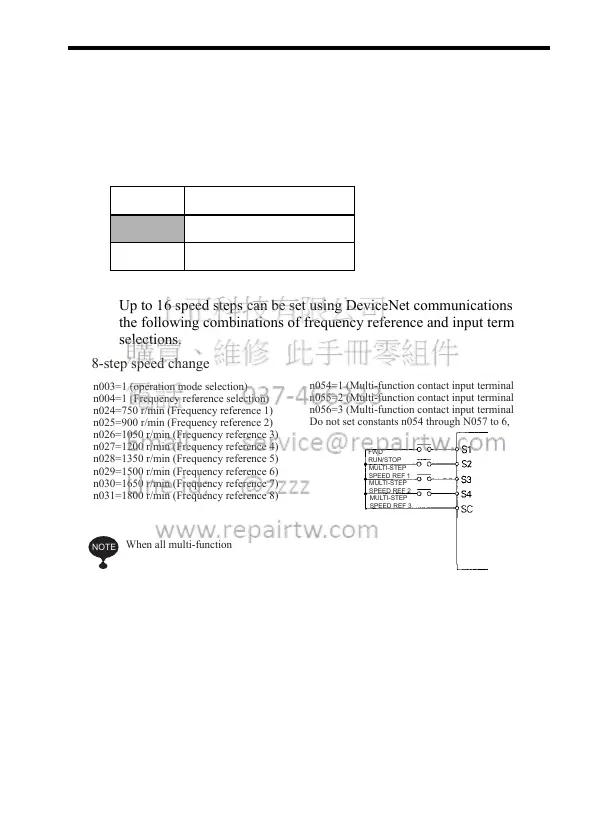
Multi-step Speed Selection
Up to 16 speed steps can be set using DeviceNet communications and
the following combinations of frequency reference and input terminal
selections.
Setting Description
0 Reverse run enabled.
1 Reverse run disabled.
8-step speed change
n003=1 (operation mode selection)
n004=1 (Frequency reference selection)
n024=750 r/min (Frequency reference 1)
n025=900 r/min (Frequency reference 2)
n026=1050 r/min (Frequency reference 3)
n027=1200 r/min (Frequency reference 4)
n028=1350 r/min (Frequency reference 5)
n029=1500 r/min (Frequency reference 6)
n030=1650 r/min (Frequency reference 7)
n031=1800 r/min (Frequency reference 8)
n054=1 (Multi-function contact input terminal 2)
n055=2 (Multi-function contact input terminal 3)
n056=3 (Multi-function contact input terminal 4)
Do not set constants n054 through N057 to 6, 7, or 8.
When all multi-function
reference inputs are OFF, the
frequency reference selected
by constant n004 (frequency
reference selection) becomes
effective.
FWD
RUN/STOP
MULTI-STEP
SPEED REF 1
MULTI-STEP
SPEED REF 2
MULTI-STEP
SPEED REF 3
NOTE













 To Next Page