140
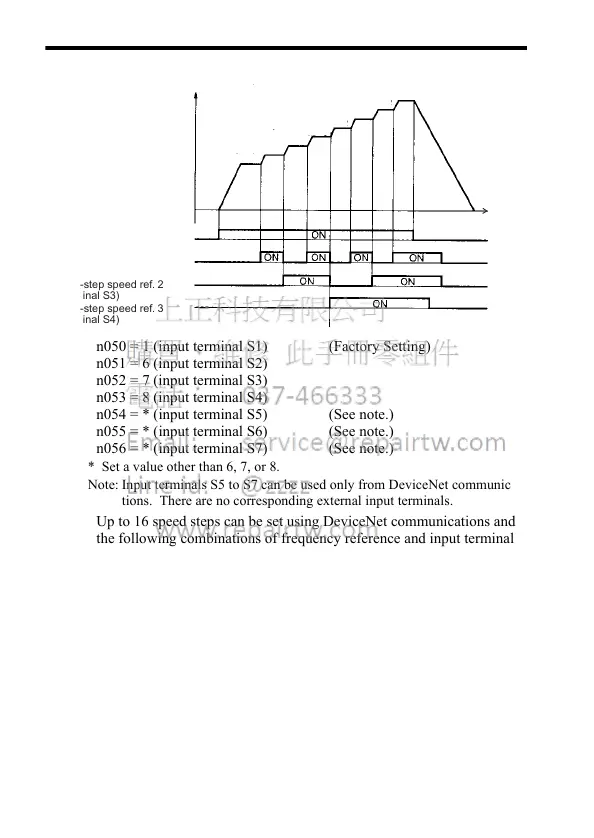
n050 = 1 (input terminal S1) (Factory Setting)
n051 = 6 (input terminal S2)
n052 = 7 (input terminal S3)
n053 = 8 (input terminal S4)
n054 = * (input terminal S5) (See note.)
n055 = * (input terminal S6) (See note.)
n056 = * (input terminal S7) (See note.)
* Set a value other than 6, 7, or 8.
Note: Input terminals S5 to S7 can be used only from DeviceNet communica-
tions. There are no corresponding external input terminals.
Up to 16 speed steps can be set using DeviceNet communications and
the following combinations of frequency reference and input terminal
selections.
Set frequency references 9-16 for n120 to n127.
Set the input terminal for a multi-step speed reference using the multi-
function input selection.
Frequency
reference
FWD RUN/STOP
Multi-step speed ref. 1
(terminal S2)
Multi-step speed ref. 2
(terminal S3)
Multi-step speed ref. 3
(terminal S4)
Time
(n024) 750 r/min
(n025) 900 r/min
(n026) 1050 r/min
(n027) 1200 r/min
(n028) 1350 r/min
(n029) 1500 r/min
(n030) 1650 r/min
(n031) 1800 r/min













 To Next Page