EasyManua.ls Logo

YASKAWA Varispeed V7 - Page 220

YASKAWA Varispeed V7
256 pages
Print Icon
To Next Page IconTo Next Page
To Previous Page IconTo Previous Page
Loading...
9. Fault Diagnosis
219
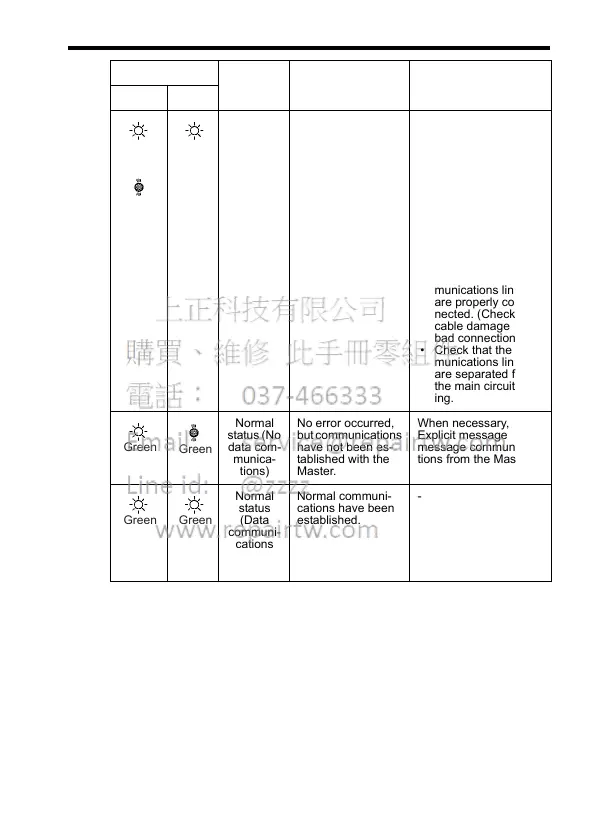
Communi-
cations
error
An error occurred
that disables com-
munications.
Check whether the
MAC ID is dupli-
cated in another
device in the
DeviceNet network.
Check that the Mas-
ter is operating prop-
erly.
Check that the termi-
nators are properly
connected to the
communications
line.
Check that the com-
munications lines
are properly con-
nected. (Check for
cable damage and
bad connections.)
Check that the com-
munications lines
are separated from
the main circuit wir-
ing.
Normal
status (No
data com-
munica-
tions)
No error occurred,
but communications
have not been es-
tablished with the
Master.
When necessary, send
Explicit message or I/O
message communica-
tions from the Master.
Normal
status
(Data
communi-
cations
estab-
lished)
Normal communi-
cations have been
established.
-
Indicator Status Meaning Cause Corrective Action
MS NS
Green
or
Red
Red
Green
Green
Green Green

Table of Contents