USING THE REMOTE CONTROL (CONTINUED)
Remote
Control
VCR
Functions
(pre-1989
Zenith
Models
With
On-Screen Programming)
Remote Control is programmed
to
use VCR code 29.
See "Programming the Remote Control" for details.
NOTE:
All
of
the remote control buttons function as
described in the text above.
The
following controls are
used when programming
the
timer.
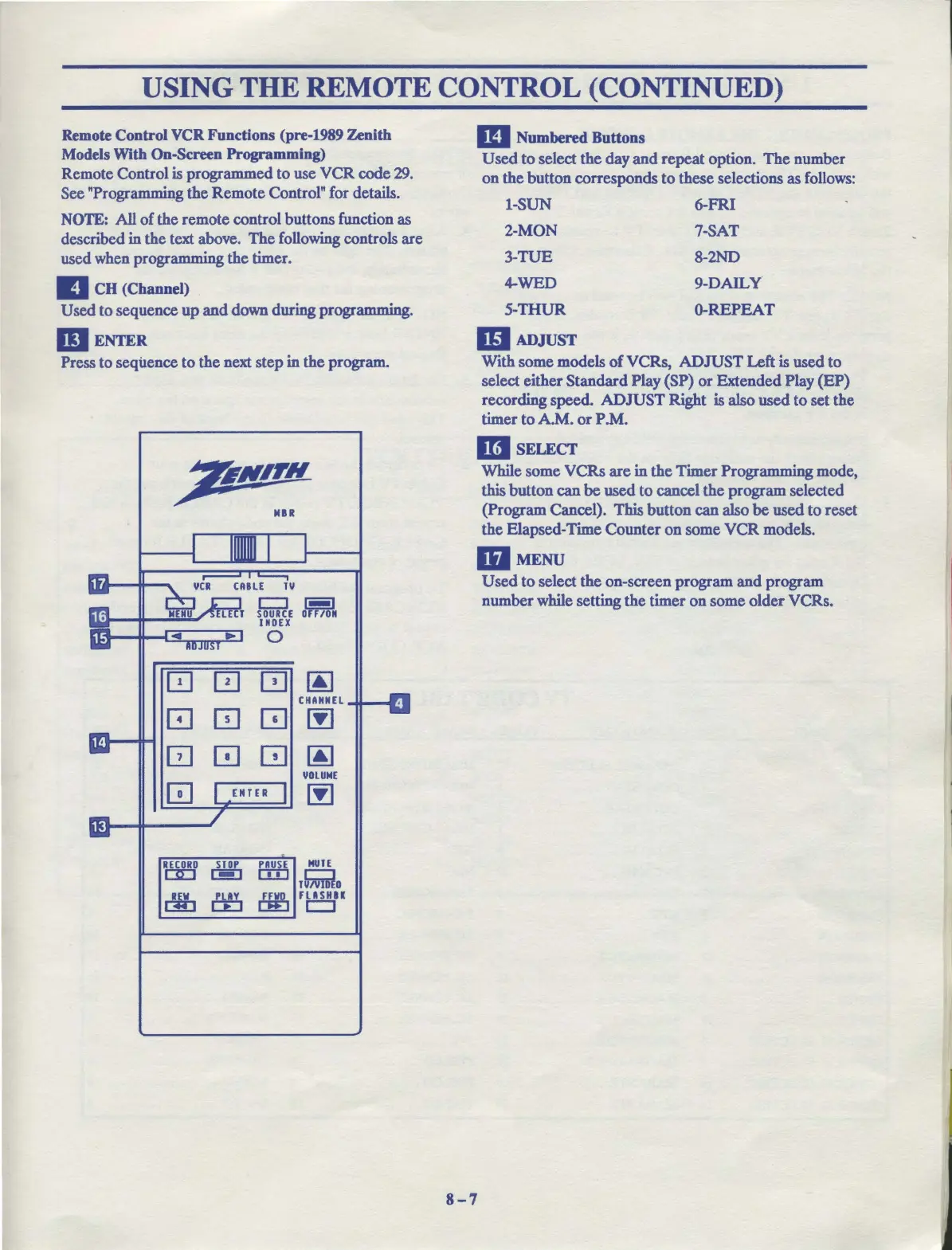
Ill
CH
(Channel)
Used to sequence
up
and
down during programming.
DI
ENTER
Press to sequence
to
the next step in the program.
Tl/
Cl~
SOURCE
D F/ON
INDEX
0
0 0
QJ
~
CHANNEL
0 0
~
~
0 0
GJ
~
1/DLUME
0
~
RECORD
STOP
PAUSE
MUTE
OD
I - I
CID
C":l
TuivllilO
r:Yl:i
ffi
~
FOi
m Numbered Buttons
Used
to
select
the
day
and
repeat option.
The
number
on
the button corresponds
to
these selections
as
follows:
1-SUN
6-FR.I
2-MON
7-SAT
3-TUE
8-2ND
4-WED 9-DAILY
5-THUR
0-REPEAT
ID
ADJUST
With some models
of
VCRs,
ADJUST
Left is used
to
select either Standard Play (SP)
or
Extended Play
(EP)
recording
speed
ADJUST
Right is also used
to
set the
timer to A.M.
or
P
.M.
l1il
SELECT
While some VCRs
are
in
the
Timer Programming mode,
this button can
be
used
to
cancel the program selected
(Program Cancel). This button can also
be
used to reset
the Elapsed-Time Counter
on
some
VCR
models.
mMENU
8-7
Used
to
select the on-screen program
and
program
number while setting
the
timer
on
some older VCRs.



 To Next Page