CONNECTIONS
FOR
YOUR
TV
(CONTINUED)
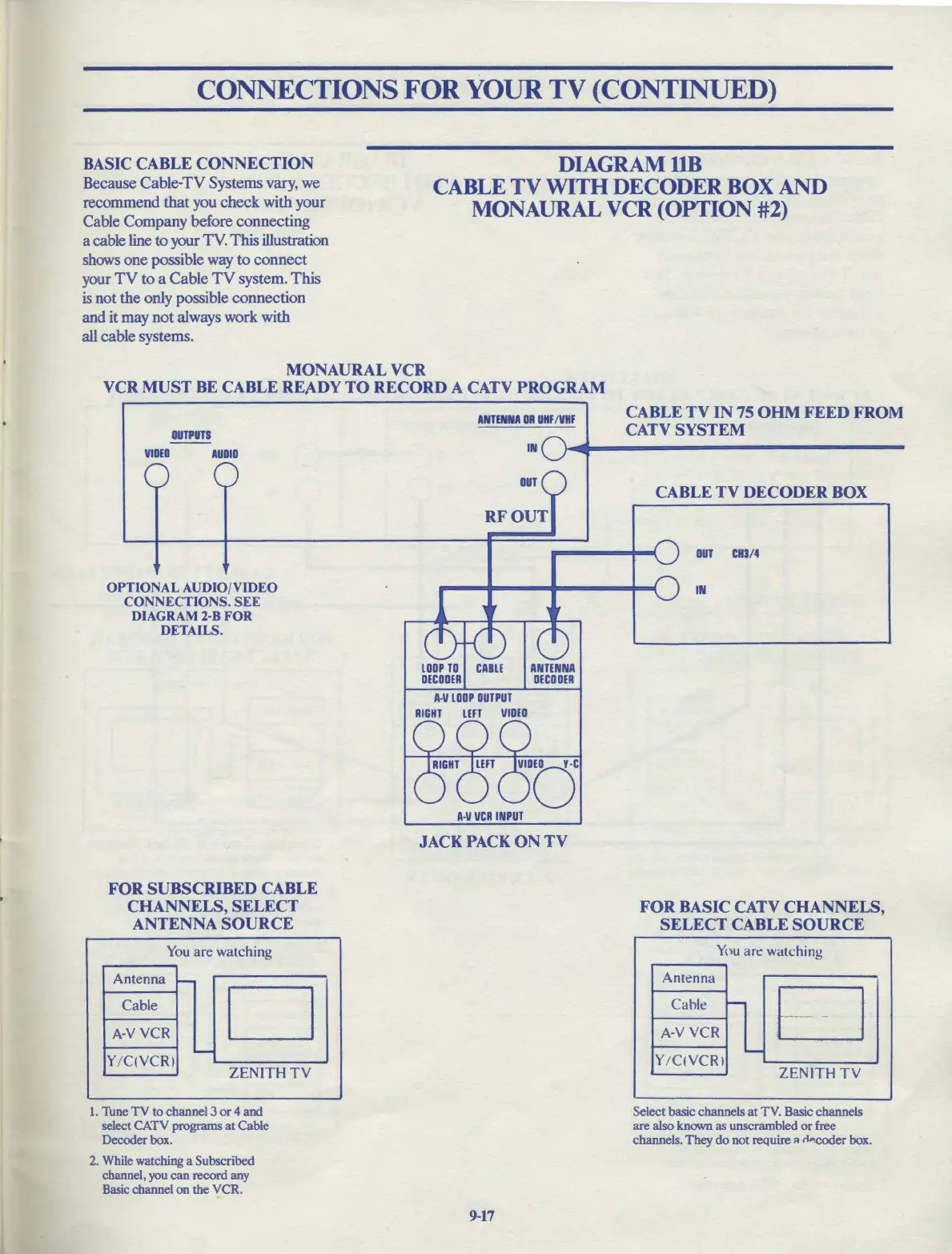
BASIC CABLE CONNECTION
Because Cable-TV Systems vary, we
recommend
that
you
check
with your
Cable Company before connecting
a cable line to your TV. This illustration
shows
one
possible way
to
connect
your
TV
to
a Cable
TV
system.
This
is
not the only possible connection
and it may
not
always work with
all cable systems.
DIAGRAMllB
CABLE
TV
WITH
DECODER
BOX
AND
MONAURAL
VCR
(OPTION #2)
MONAURAL VCR
VCR
MUST
BE CABLE REA.DY
TO
RECORD A CATV PROGRAM
OUTPUTS
VIDEO
AUDIO
OPTIONAL AUDIO/VIDEO
CONNECTIONS.
SEE
DIAGRAM 2-8 FOR
DETAILS.
FOR
SUBSCRIBED CABLE
CHANNELS, SELECT
ANTENNA
SOURCE
You
are watching
Antenna
-
Cable
D
A-VYCR
-
Y
/C
(YCR)
ZENITH
TV
1.
Tune
TV
to
channel 3
or
4
and
select CATV programs
at
Cable
Decoder box.
2.
While watching a Subscribed
channel, you
can
record any
Basic channel on the VCR.
ANTENNA
DR
UHF
/VHF
IN
OUT
A-V
LOOP
OUTPUT
RIGHT
LEFT
VIDEO
A•V
VCR
INPUT
JACK PACK
ON
TV
9-17
CABLE
TV
IN
75
OHM
FEED
FROM
CATV SYSTEM
CABLE
TV
DECODER BOX
OUT
CH3/4
IN
FOR BASIC CATV
CHANNELS,
SELECT CABLE
SOURCE
You
are watching
Antenna
Cable
..._
EJ
A·V VCR
-
Y
/CIVCRl
ZENITH
TV
Select basic channels
at
TV. Basic channels
are also known as unscrambled
or
free
channels. They
do
not
require " n,,,cocier box.



 To Next Page