10
2.4 I Installing the control box
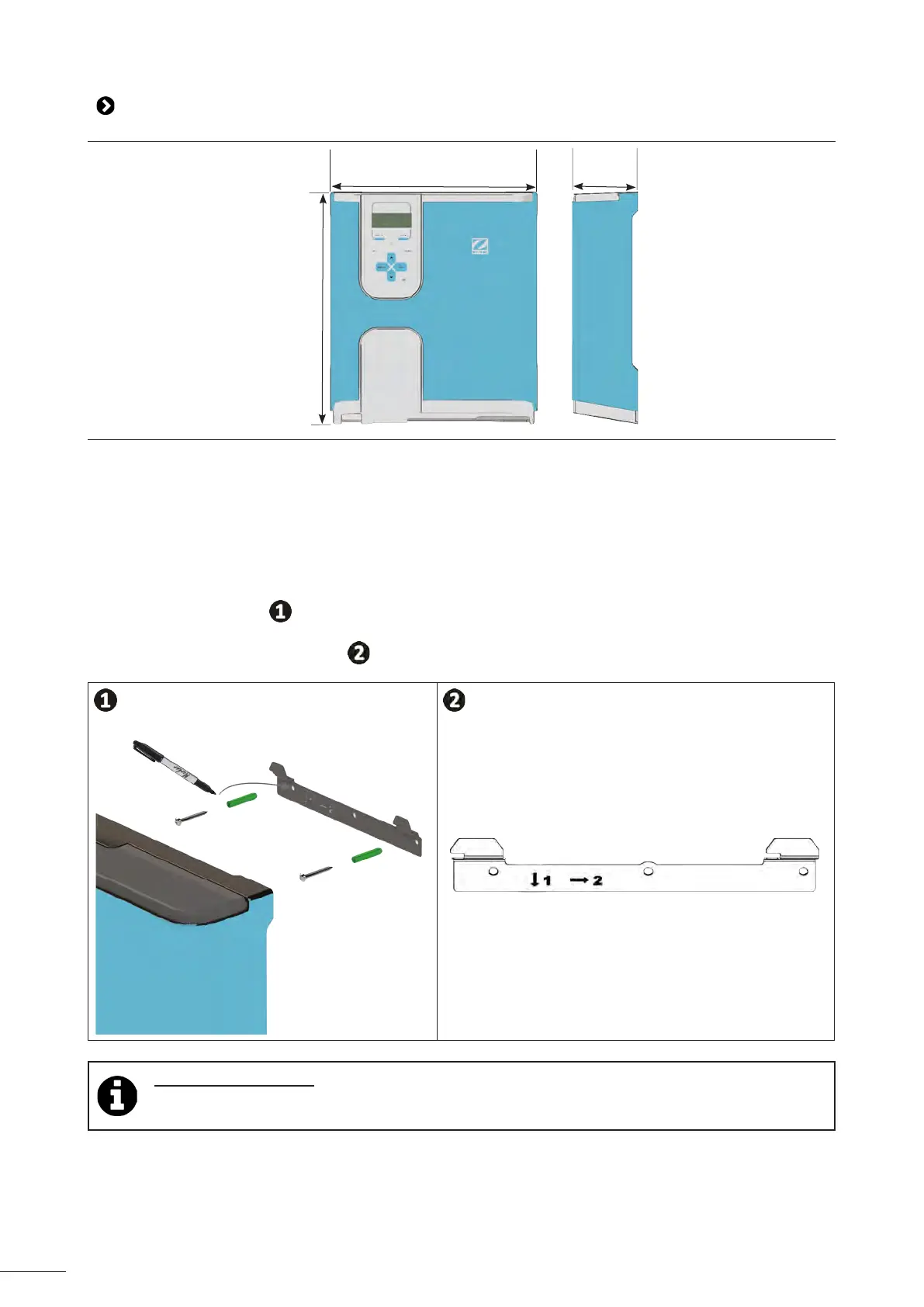
31.5 cm
9.6 cm
36.4 cm
• The control box must be installed in a dry venlated technical room protected against frost, with no pool
maintenance products or similar products stored nearby.
• The control box must be installed at a distance of at least 3.5 m from the outside edge of the pool. Always
comply with the installaon codes and/or laws applicable at the place of installaon.
• It must not be installed more than 1.8 metres from the cell (maximum cable length).
• If the box is xed to a post, a waterght panel must be xed behind the control box (350x400 mm minimum):
- Aach the metal mounng below to the wall or to the waterght panel using the screws and wall plugs
provided, (see gure
).
- Fix the control box to the metal support by moving 1 (downwards) and 2 (rightwards) in order to lock the
box onto its support, (see gure
).
Using Wi-Fi Direct mode: Use a smartphone (Sengs/Wi-Fi menu) to check that the home Wi-Fi
network can be detected when choosing the best locaon for the control box. A Wi-Fi extender or
powerline adapters with Wi-Fi hotspot (not supplied) may be required in some cases.














 To Next Page