48
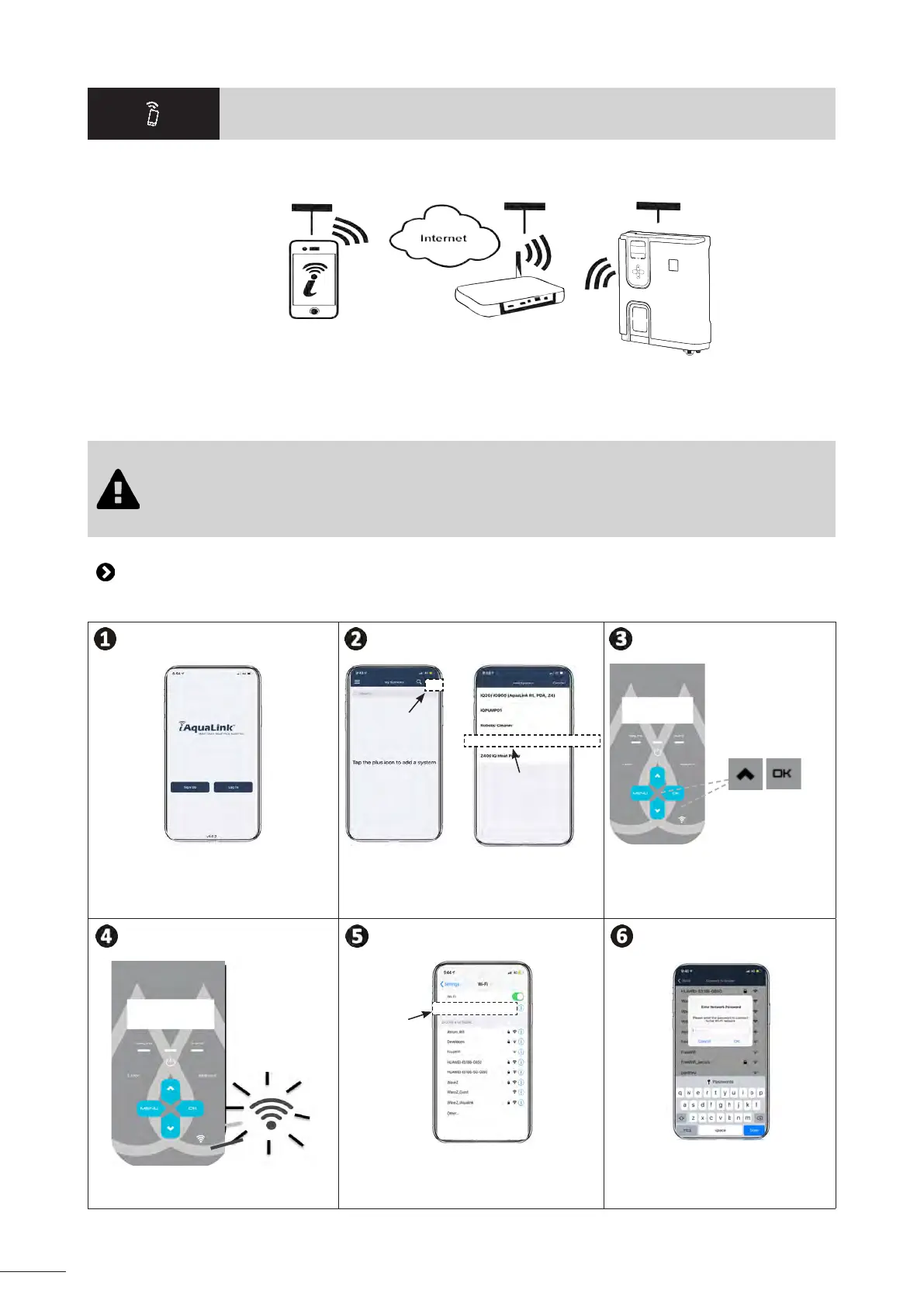
❻❻ Control using the iAquaLink™ app
Mobile device
(smartphone or tablet)
Home Wi-Fi
network
Chlorinator
The iAquaLink™ app is available for iOS and Android systems.
With the iAquaLink™ app you can control the chlorinator from any locaon at any me and have the benet of advanced funcons
such as addional programming opons and troubleshoong assistance.
Before you install the app, you must:
• Use a Wi-Fi-enabled smartphone or tablet,
• Use a smartphone or tablet with iOS 11.0 or later or Android 5.0 or later.
• Use a Wi-Fi network with a reasonably strong signal when connecng to the chlorinator.
• Have your home Wi-Fi network password at the ready.
6.1 I Conguring the appliance before rst use
• Download the iAquaLink™ app from the App Store or Google Play Store.
eXO iQ/Hydroxinator iQ
+
v
Connect to your iAquaLink account or
register to create an account (rst-me
use).
Add an appliance, select the product and
log in.
Press both buons unl the Wi-Fi LED
starts to ash.
Chlorinator
The Wi-Fi LED is ashing (pairing in
progress).
Select the "Chlorinator" network (modem/
LAN).
Choose the home Wi-Fi network and
enter the Wi-Fi password.














 To Next Page