53
❽ Troubleshoong
• Before you contact your retailer, please carry out these few simple checks using the following
tables if a problem occurs.
• If the problem persists, contact your retailer.
• : Acons to be performed by a qualied technician only
8.1 I Appliance behaviour
Informaon messages can be deleted by pressing for 4 seconds.
Some messages require human intervenon and cannot be deleted.
8.1.1 Appliance WITHOUT pH Link module or Dual Link module
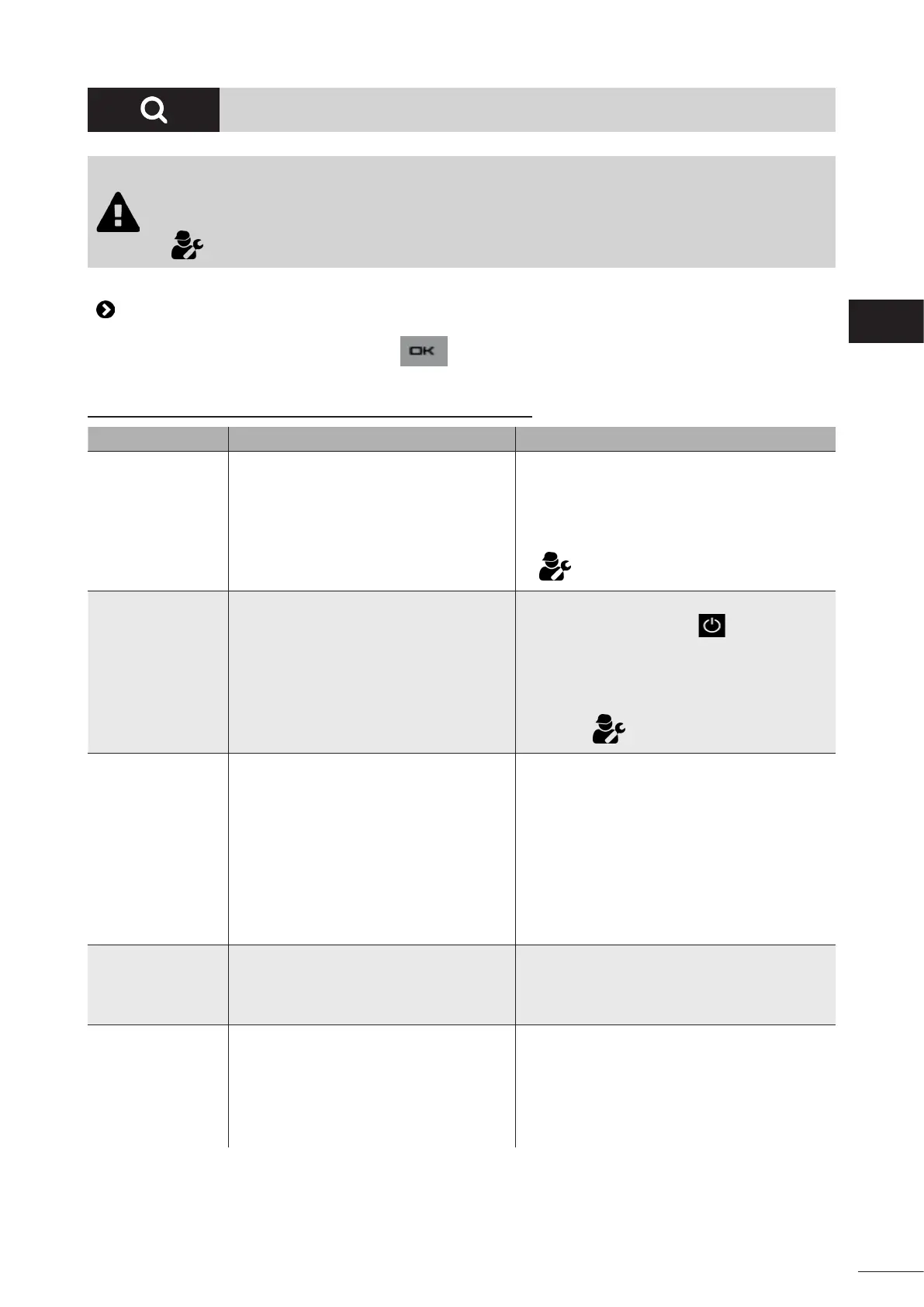
Message Possible cause Soluon
"NO FLOW"
"CHECK PUMP"
(“INFO” indicator
lit during the
producon mers)
• Filter pump failure.
• The lter and/or skimmer(s) are dirty.
• By-pass valve(s) closed.
• Disconnecon or failure of the ow
switch.
• Check the pump, the lter, the skimmer(s) and
the by-pass valve(s). Clean them if necessary.
• Check the wire connecons (ow switch).
• Check that the ow switch is working correctly
(replace it if necessary: contact the retailer)
.
"PROD. ERROR"
(“INFO” indicator
ashing)
• Poor connecon of the power supply
cord from the cell to the cell or inside the
appliance.
• The cell plates are worn, scaled up or
broken.
• Internal electronic problem in the
control box following an external electric
incident.
• Switch o the appliance ( buon) and
switch o the power supply to the control
box, then check the connecons for all cables
(mains power supply, cell, etc.).
• Replace the cell.
• Check the power supply board: contact your
retailer) .
"CONDUCTIVITY"
(“SALTS” indicator
lit)
• For models with a temperature sensor,
this error can be caused by low water
conducvity (low minerals). If no
temperature sensor is present: this
error may be caused by a low water
temperature or a low minerals level.
• Low minerals due to water loss or
diluon (lter backwash, water renewal,
rain, leaks, etc.).
• Can vary depending on the temperature
and age of the cell. The voltage across
the cell terminals varies in me.
• The cell is worn, scaled up or broken.
• Check the water temperature.
• Check the condion of the cell plates.
• Measure the minerals concentraon in the
pool water using a salinity tester or a test strip,
then add minerals to the pool to keep the level
at 4 g/L. If you do not know the minerals level
or how to test it, contact your retailer.
"OVERHEATING"
(“INFO” indicator
lit)
• The temperature inside the control box is
too high, chlorinaon slows (>85 °C) then
stops (> 90 °C) if the temperature does
not fall back down in order to protect the
electric circuits.
• If the box is installed outdoors, protect it from
direct sunlight.
• Chlorinaon resumes automacally once the
temperature has fallen back down.
• Problem on the appliance.
"LOW WATER
TEMP."
("INFO" indicator
lit, the temperature
displayed on
the screen ashes).
• The water temperature measured by the
appliance's temperature sensor is less
than or equal to 10°C; producon stops
in order to protect the cell.
• Chlorinaon will automacally resume at the
Low mode chlorinaon rate between 10 and
15°C.
• Chlorinaon will automacally resume
at the normal chlorinaon rate when the
temperature exceeds 15°C.
EN














 To Next Page