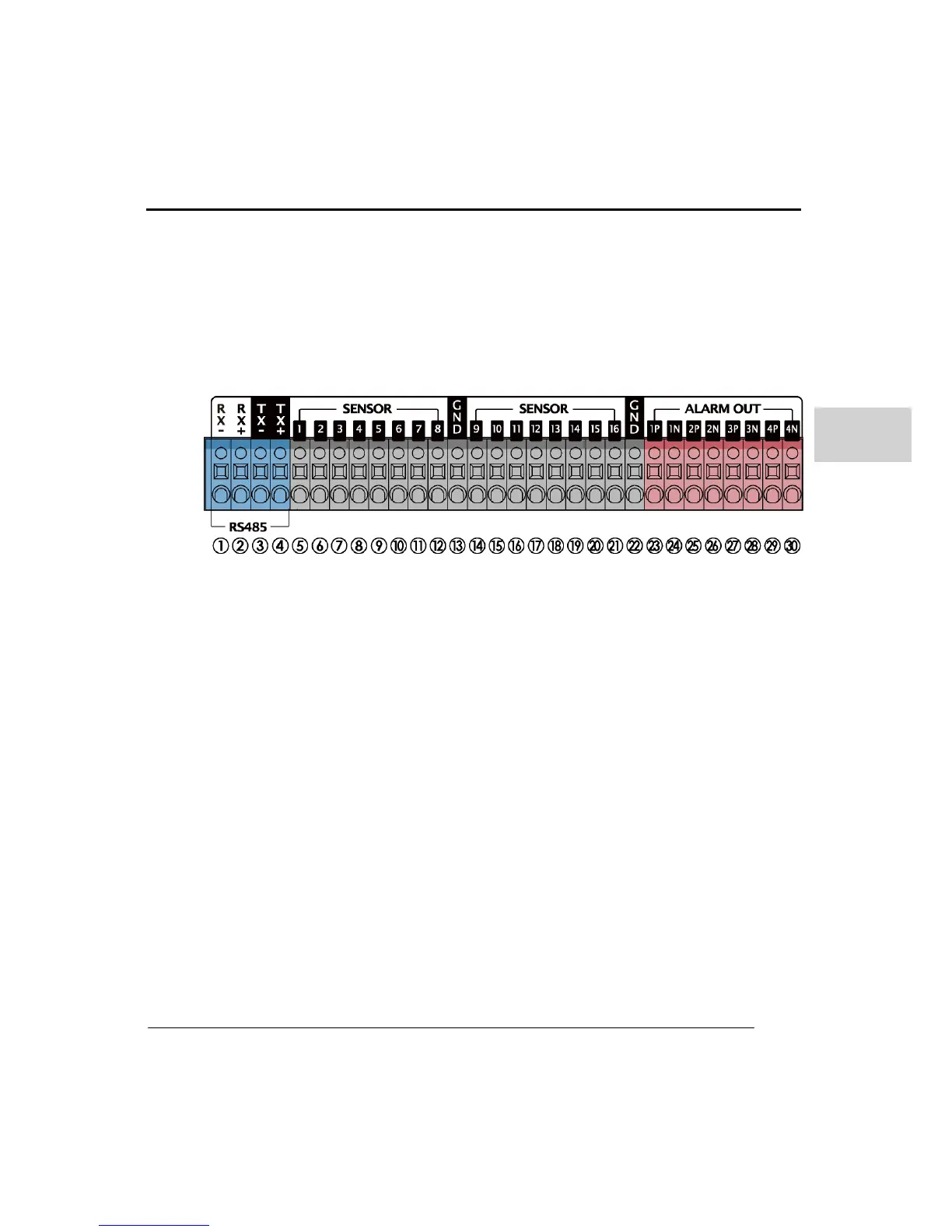
- Sensor and Alarm connection
a. Connection to the RS-485 Port
RS485 port is used for PTZ camera connection. Check your PTZ camera and if it has
RS422 option, use the TX+,- and RX+,-. In case of RS485 option, just use TX+,- port.
(Connection may differ by each camera manufacturer, please check the PTZ manual
before connection)
b. Sensor IN connection
For each sensor port used you must connect to the GND port. To activate a sensor you
normally have to supply a separate power supply unit. To get more details, see sensor
connection diagram on the sensor manufacturer’s manual. Each sensor can have a
different connection according to its connection type.
c. Alarm OUT connection (relay output)
The P is for signal connection and N is for COM connection. Connect 1P & 1N for one
relay device and 2P to 2N and so on. To get more details, see connection diagram on
Alarm manufacturers manual.



 To Next Page